Theater Seating Distance Calculator: Technical Guide
Calculating your ideal home theater viewing distance ensures cinematic immersion without eye strain. Use optical standards to match your projector screen size.
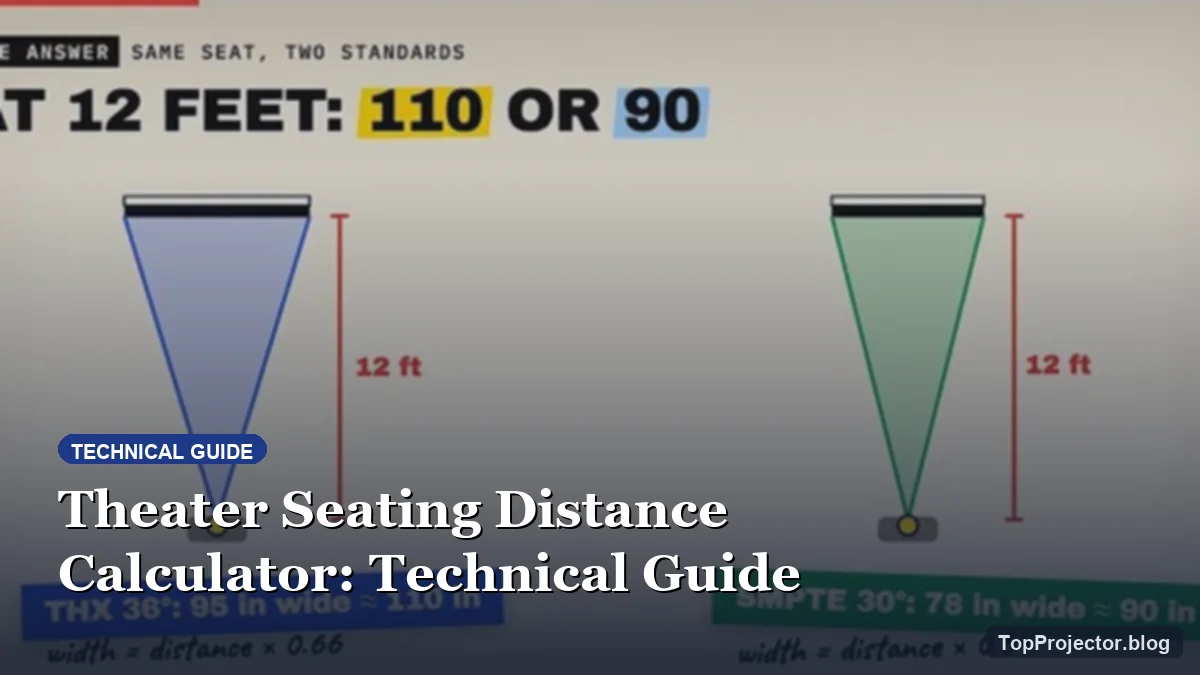
Apply the THX 40-degree field of view standard for a commercial cinema experience, or use the SMPTE 30-degree guideline for longer, multi-row family viewing sessions.
Ready to compare verified models? Start with our Best Theater Projector: Top Picks for Movie Nights (2026).
Practical Quick-Reference Table
| Scenario / Metric | Recommended Target | Why It Matters |
|---|---|---|
| THX Standard | 40-Degree Field of View | Delivers maximum theatrical immersion. |
| SMPTE Standard | 30-Degree Field of View | Reduces fatigue for general mixed content. |
| 4K UHD Multiplier | 1.2x to 1.5x Screen Width | Prevents visible pixel structure at close ranges. |
| 1080p Multiplier | 1.6x to 2.0x Screen Width | Avoids scaling artifacts and compression noise. |
| Screen Height | Bottom third at eye level | Prevents uncomfortable neck strain during films. |
| Riser Elevation | 6 to 12 inches per tier | Maintains clear sightlines for back rows. |
Understanding Cinematic Viewing Standards
Determining where to place your seats requires balancing field of view and visual clarity. Professional integrators rely on standardized viewing angles to replicate authentic commercial theater geometry right inside your living room.
When you sit too far back, your eyes lose the subtle details rendered in high-definition digital transfers. Conversely, sitting too close forces your head to swivel uncomfortably across massive projection surfaces.
- Maintain a 30 to 40 degree horizontal viewing angle for optimal immersion.
- Measure from the primary eye position to the exact center of the projection screen.
- Account for reclining angles when setting back-row platform heights.
- Test temporary chair positions before locking down permanent floor bolts.
The Role of Human Visual Acuity
Human eyes can resolve roughly one arcminute of detail under ideal lighting conditions. This biological limit dictates how close you can sit before individual pixels become discernible on screen.
Ultra-high-definition content allows much closer seating geometries because pixel density is quadrupled. Traditional 1080p content requires greater distances to avoid exposing compression artifacts or scaling noise.
- Calculate distance using display resolution as a primary multiplier.
- Higher pixel counts permit tighter viewing triangles without grid door effects.
Mathematical Foundations of Screen Size and Distance
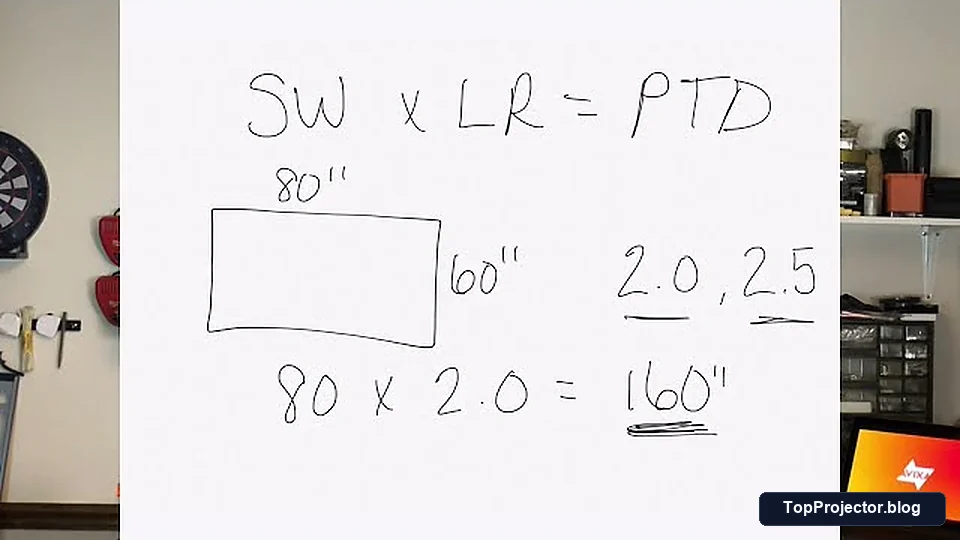
Calculating the ideal placement involves a straightforward geometric ratio between distance and screen width. Standardized formulas multiply your physical screen width by specific constants derived from optical engineering research.
For example, multiplying a 120-inch diagonal 16:9 screen width by a factor of 1.6 yields the baseline viewing distance. This mathematical approach eliminates guesswork during initial architectural room planning phases.
- Convert diagonal screen measurements into exact horizontal widths before computing.
- Use a 1.2 to 1.6 multiplier range for standard widescreen cinematic content.
- Verify throw ratios match the physical depth of your projection enclosure.
Applying Aspect Ratio Multipliers
Different media formats change how wide your projected image appears across your field of view. Cinemascope 2.39:1 content utilizes a wider canvas than standard 16:9 television broadcasts or streaming shows.
Dedicated home theaters often employ masking systems or anamorphic lenses to preserve constant image heights. Your calculator must adjust distance expectations based on your primary viewing material preferences.
- Factor in 2.39:1 aspect ratios for true widescreen cinematic immersion.
- Adjust row placement based on whether you watch sports or films.
Video Walkthrough: Projector model search bar
Evaluating SMPTE Versus THX Recommendations

The Society of Motion Picture and Television Engineers established foundational guidelines for commercial screening rooms. Their standard focuses on a comfortable 30-degree field of view for general audience safety and comfort.
In contrast, THX pushes the envelope by demanding a 40-degree field of view for maximum dramatic impact. Choosing between these two bodies depends entirely on your personal tolerance for peripheral motion.
- Choose SMPTE standards for relaxed, extended family viewing sessions.
- Adopt THX guidelines for dedicated, high-impact immersive movie rooms.
- Test both angles using temporary seating before final construction begins.
Comparing Industry Recommendation Profiles
SMPTE recommendations prevent eye fatigue during lengthy viewing marathons in mixed-use spaces. Reading our Anker Nebula Capsule 3 review shows how portable units manage ambient light rejection and compact room setups.
Neither standard is inherently superior; rather, they serve different architectural goals and room types. Reviewing your specific room layout helps determine which guideline fits your lifestyle best.
- Evaluate room acoustics alongside visual field recommendations.
- Consider viewer age and comfort preferences when selecting standards.
Accounting for Resolution and Pixel Density Limits
Native resolution heavily influences how close you can sit without noticing pixel structures. Exploring options like our best budget projectors helps you find 4K UHD projection performance without overspending on retail costs.
When pixel density increases, the screen door effect virtually disappears at normal viewing distances. This technological leap lets enthusiasts enjoy massive cinematic screens in remarkably compact dedicated home theater spaces.
- Match seating distance directly to your projector's native pixel grid.
- Avoid oversized screens with 1080p sources to prevent visible pixelation.
- Leverage pixel-shift 4K technology for improved clarity at close ranges.
Evaluating Upscaling and Compression Artifacts
Streaming compression introduces digital artifacts that become glaringly obvious at close seating ranges. If you sit too near a massive screen, background macro-blocking and banding will distract your eyes.
High-bitrate physical media like 4K Ultra HD Blu-ray discs tolerate much closer seating positions. Your calculator should account for source quality alongside raw display resolution capabilities.
- Prioritize physical media playback for ultra-close seating configurations.
- Factor compression limits into your final row distance calculations.
Video Walkthrough: What projector screen size?
Managing Room Constraints and Projection Geometry
Physical room dimensions often force compromises between ideal seating angles and available space. A long, narrow room restricts screen width, while a square room creates challenging acoustic and visual geometry.
Your projector's throw ratio limits will dictate where the optical engine must be mounted. Consulting our throw range calculator ensures a cohesive, professional AV layout for every room.
- Measure total usable room length excluding equipment rack clearances.
- Verify lens shift capabilities before finalizing your screen mounting height.
- Account for reclining furniture clearance in tight room layouts.
Overcoming Spatial Limitations
Small spaces benefit from ultra-short-throw projectors that eliminate long optical paths completely. These specialized units allow large image creation inches away from the screen surface, bypassing distance hurdles.
Always maintain safe walking paths around riser steps and heavy reclining theater seats. Safety and comfort must never be sacrificed purely to achieve an aggressive mathematical viewing angle.
- Use ultra-short-throw options for rooms under twelve feet long.
- Leave at least 36 inches of clear aisle space for movement.
Optimizing Seating Layouts for Multi-Row Theaters
Designing multi-row seating requires calculating precise riser heights to maintain unobstructed sightlines. Every viewer in the back row must see past the heads of patrons seated directly in front.
A proper riser calculation formula factors in eye-level heights, seat pitch, and screen bottom elevation. Ignoring this step results in blocked views and compromised home theater performance.
- Build tiered platforms ranging from 6 to 12 inches high.
- Stagger seat placement between rows to maximize visual clearance.
- Calculate eye-level geometry for both seated and reclining positions.
Calculating Riser Elevation and Sightlines
Accurate sightline diagrams prevent expensive construction errors during custom home theater builds. Ensure your back row distance compensates for the elevated viewing angle introduced by the riser platform.
Ergonomic seating with adjustable headrests helps viewers maintain proper posture across multiple consecutive film viewings. Combine these physical comforts with rigorous optical math for optimal results.
- Draft detailed side-profile schematics before ordering custom platforms.
- Test sightlines using laser measures and temporary risers.
Balancing Ambient Light and Peak Luminance Output
Room lighting drastically impacts perceived contrast and your ideal viewing distance. High ambient light rejection screens allow viewers to sit closer without washing out deep blacks and dynamic highlights.
Projector brightness measured in authentic ANSI lumens must match your screen size and room darkness. Using our ANSI lumens room calculator helps determine correct output specifications for your space.
- Target at least 30 to 40 ANSI lumens per square foot for dark rooms.
- Use specialized ALR fabric when controlling ambient light is impossible.
- Calibrate white balance to maintain color accuracy at various distances.
Managing Peak White and Black Levels
Dynamic contrast ratios enhance visual depth, making projected images feel remarkably three-dimensional. When seating distances match luminance output, eye strain decreases during extended movie viewing sessions.
Always verify that your projector lamp or laser light source maintains stable output over time. Regular calibration keeps your viewing environment optimized for your chosen seating geometry.
- Measure foot-lamberts across different screen surface areas.
- Replace projector lamps promptly when brightness drops significantly.
Frequently Asked Questions
What is the best viewing angle for home projectors?
The THX 40-degree field of view is widely considered the gold standard for immersive movie watching. For a more relaxed family viewing experience, the SMPTE 30-degree standard provides excellent comfort without excessive eye movement.
How does 4K resolution change my seating distance?
Higher pixel density allows you to sit much closer to the screen without noticing individual pixel structures. True 4K projection systems support tighter viewing angles that would expose grid artifacts on older 1080p displays.
Can I sit too close to a home theater screen?
Sitting too close forces your eyes and neck to strain as you scan across massive projection areas. It also exposes digital compression artifacts and pixel grids that degrade overall visual fidelity.
How high should my projector screen be mounted?
The bottom third of your projection screen should align roughly with your seated eye level. This prevents neck fatigue during long viewing sessions by keeping your natural gaze directed slightly downward.
Do multi-row theaters require special distance calculations?
Multi-row setups require careful riser height planning to ensure clear sightlines for back-row viewers. You must also adjust individual row distances so that no single seat exceeds extreme viewing angle limits.