How Much Electricity Does a Projector Use?
Understanding projector energy use requires evaluating illumination tech, brightness modes, and daily operating hours. We break down exact wattage demands for lamp, LED, and laser engines.
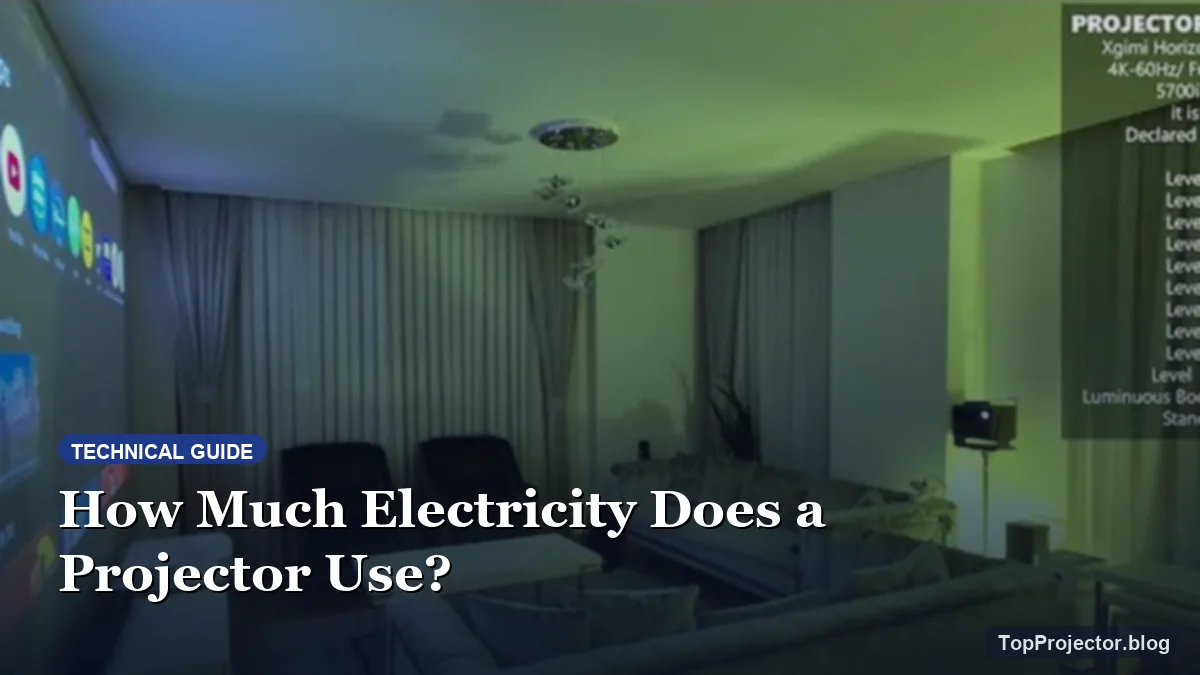
Standard home theater projectors consume 200 to 450 watts during active playback, making them directly comparable to mid-sized flat-panel displays when scaled by projected screen surface area.
Ready to compare verified models? Start with our Best Home Projectors Guide.
Projector Power Consumption Quick-Reference Table
| Projector Category | Typical Wattage Range | Primary Power Driver |
|---|---|---|
| Compact Portable LED | 30W - 65W | Low-output RGB LEDs and passive cooling |
| Standard Lamp Home Cinema | 250W - 350W | High-pressure UHP mercury discharge lamps |
| High-Lumen Laser 4K | 350W - 550W | Multi-laser diode banks and active cooling |
| Ultra Short Throw (UST) | 350W - 500W | Laser illumination paired with wide-angle glass optics |
| Commercial Venue Engine | 600W - 1200W+ | Massive dual-lamp or high-output laser arrays |
| Standard Standby Mode | 0.5W - 5W | Network control boards and quick-start triggers |
Decoding Projector Power Basics and Wattage Metrics
Modern projection systems convert electrical energy into optical lumens and thermal output. Evaluating real power consumption requires looking past manufacturer label maximums to understand active operating loads.
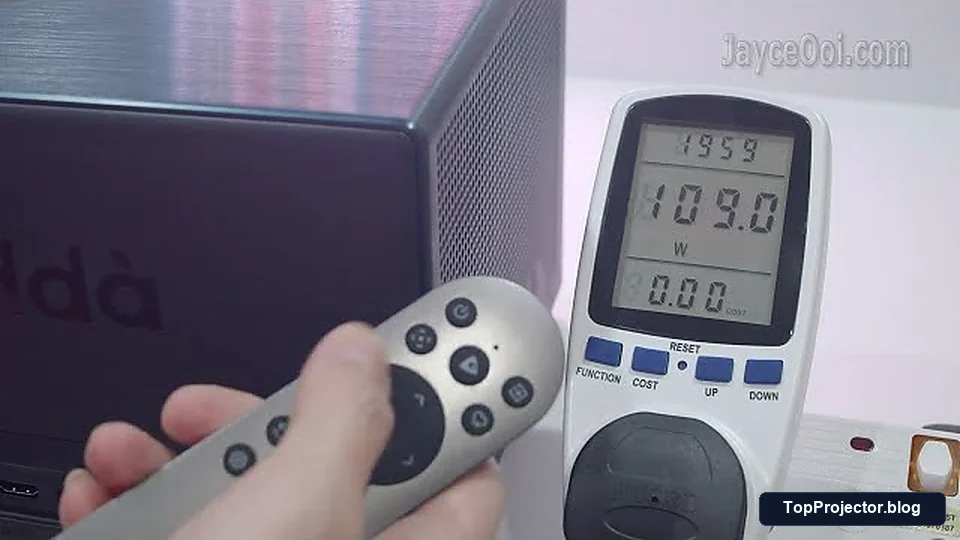
Electrical draw directly correlates with internal component demands. The optical engine, ballast, and cooling fans all draw continuous current during every standard movie viewing session.
Grasping these fundamental electrical metrics helps home theater enthusiasts estimate monthly utility impacts accurately. Proper calculation prevents unexpected spikes in household electricity bills over time.
Evaluating ANSI lumens versus wall draw requires measuring efficiency under heavy thermal loads. Choosing systems from our best short throw projector under 500 guide highlights excellent power management.
- Active draw fluctuates based on selected brightness settings.
- Manufacturer labels typically list maximum potential power capacity.
- Cooling fans add minor continuous wattage to total system draw.
- Ballast requirements for lamps generate significant thermal resistance.
- Always check the manufacturer specification sheet for peak wattage ratings during active operation.
- Measure real-world consumption using a dedicated Kill A Watt meter plugged directly into the wall outlet.
Understanding Watts Versus Lumen Output
Lumen output measures perceived brightness, not electrical consumption. A high-efficiency optical path can deliver exceptional ANSI lumens without requiring massive electrical wattage increases.
Older lamp-based units often demand high wattage to push light through dense LCD panels. Modern solid-state light engines achieve superior efficiency ratios for everyday use.
- Lumen efficiency varies drastically across display technologies.
- Higher ANSI ratings generally require heavier power supplies.
- Optical filters can reduce light throughput and waste energy.
Sub-Grid Voltage Fluctuations
Grid instability can cause power supplies to work harder, increasing internal thermal dissipation and driving up total AC power consumption during long cinematic sessions.
- Use a pure sine wave UPS to stabilize input voltage.
- Monitor thermal throttling warnings in your projector's service menu.
Comparing Lamp, LED, and Laser Illumination Engines
The internal light source dictates your baseline energy profile. Traditional UHP mercury lamps operate differently than solid-state lasers, especially when following our technical guide to casting a laptop to a projector.
Mercury lamps require high-voltage ignition spikes followed by steady continuous draw. This thermal generation demands aggressive fan cooling, raising overall power consumption significantly.
Solid-state alternatives alter this dynamic by eliminating fragile gas bulbs. Laser diodes and LEDs offer instant-on capabilities and precise dimming controls that optimize energy usage.
Traditional mercury lamps demand steady ballast voltage spikes during ignition, whereas modern solid-state laser diodes draw predictable current instantly without requiring lengthy high-temp warm-up phases.
- UHP lamps pull between 200W and 350W consistently.
- LED engines drop active draw below 65W for compact models.
- Laser diodes scale power dynamically based on picture content.
- Solid-state systems reduce thermal management overhead substantially.
- Solid-state laser engines reduce phantom drain by eliminating extended cooldown fan cycles.
- RGB LED projectors offer superior lumen-per-watt ratios for smaller screen sizes.
Evaluating Mercury Lamp Electrical Demands
UHP bulbs rely on electrical arcs sustained through pressurized mercury vapor. Maintaining this plasma arc requires robust lamp ballasts that consume steady baseline power.
As mercury lamps age, their internal resistance increases slightly. This degradation forces the ballast to work harder, subtly raising power consumption over thousands of hours.
- Ballast losses convert electrical energy directly into heat.
- Aging bulbs demand more voltage to maintain brightness levels.
- Startup ignition surges spike power temporarily during boot.
Assessing Laser and LED Efficiency Curves
Laser and LED projectors convert electrical current to light photons much more directly. This efficiency minimizes wasted heat and lowers total thermal management requirements.
Advanced laser engines can modulate diode intensity frame-by-frame. Dark cinematic scenes automatically reduce laser output, dropping instantaneous electrical draw below maximum limits.
- Solid-state diodes offer superior lumens-per-watt ratios.
- Frame-by-frame laser dimming conserves energy during dark scenes.
- Instantaneous startup eliminates lengthy warm-up power draws.
Laser Diode Efficiency Metrics
Laser phosphors convert blue laser excitation into wide color gamuts while maintaining low thermal loads, preserving power supplies over thousands of operating hours.
- Inspect laser module cooling fins for dust buildup annually.
- Keep ambient room temperatures below 75 degrees Fahrenheit for optimal efficiency.
Video Walkthrough: Projector Electric Power Usage Update - Values in the Top Projector Chart
Mathematical Framework for Calculating Real Operational Costs
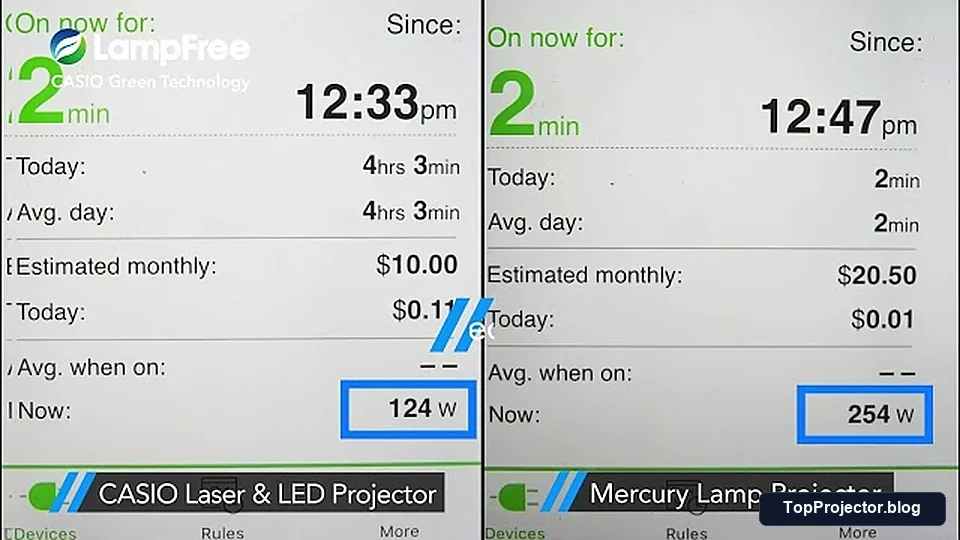
Calculating your projector electricity cost requires three simple variables: device wattage, daily operating hours, and local utility rates. Multiplying these factors reveals exact financial impacts.
Begin by checking the power rating on your projector rear chassis label or manual. Divide this wattage figure by one thousand to convert units into kilowatt-hours.
Multiply the resulting kilowatt value by your total operating hours per month. Finally, multiply that aggregate figure by your local utility cost per kilowatt-hour.
Calculating exact electricity expenses involves multiplying your daily usage hours by the rated kilowatt-hour draw, then applying your local utility provider's tiered flat-rate pricing.
- Kilowatt conversion divides total device wattage by one thousand.
- Daily usage habits heavily dictate cumulative monthly utility totals.
- Local energy tariffs determine exact financial operational costs.
- Real-world testing meters provide the most accurate baseline data.
- Multiply total operating watts by daily usage, then divide by 1000 to find daily kilowatt-hours.
- Factor in standby power draw which accumulates significantly over a full 365-day calendar year.
Step-by-Step Cost Estimation Example
Consider a standard lamp projector consuming 300 watts during active operation. Running this device for four hours daily accumulates twelve kilowatt-hours over a standard month.
At an average utility rate of twelve cents per kilowatt-hour, monthly operation remains remarkably low. Reading our detailed Epson 2350 review showcases how efficiently modern smart projectors handle daily viewing sessions.
- 300W consumption equals zero point three kilowatts hourly.
- Four daily hours yields roughly twelve monthly kilowatt-hours.
- Standard utility rates keep overall monthly expenses minimal.
Automating Consumption Tracking
Integrating smart plugs into your home automation dashboard allows continuous monitoring of parasitic draw and dynamic power reporting during movie playback.
- Set up automation routines to cut power during idle states.
- Export CSV usage logs to audit monthly electrical expenses accurately.
Projector Versus Flat-Panel TV Energy Efficiency
Consumers frequently debate whether giant projectors consume more electricity than massive flat-panel televisions. The answer depends heavily on diagonal screen size measurements.
Large LCD and OLED televisions scale power consumption exponentially as screen dimensions increase. A massive ninety-eight-inch television can draw significant continuous wattage during HDR playback.
Projectors beam light onto a passive reflective surface rather than illuminating pixels directly. You can evaluate required output via our ANSI lumens room calculator to optimize energy efficiency in your dedicated space.
While a massive 100-inch television demands continuous high-wattage backlighting across its entire panel, a projector scales power consumption purely based on optical throw and illumination engine type.
- Screen scale dictates whether projectors or TVs use less power.
- Massive flat panels draw high continuous current for bright panels.
- Reflective screens require no electrical power of their own.
- Per-square-inch energy efficiency favors dedicated home projectors.
- Large flat-panel displays often exceed 300 watts continuously during HDR content playback.
- Projectors use less energy per square inch of screen surface at ultra-large diagonal sizes.
Analyzing Watts-Per-Square-Inch Ratios
Calculating watts per square inch reveals true optical efficiency. Projectors spreading 350 watts across a massive one-hundred-fifty-inch diagonal image distribute energy remarkably well.
Large direct-view displays concentrate massive pixel arrays behind heavy glass substrates. This architecture often demands higher electrical draw for comparable giant screen sizes.
- Surface distribution makes projectors efficient at large scales.
- Direct-view displays concentrate high luminance across vast areas.
- Reflective projection reduces localized panel thermal stress.
Screen Gain and Power Interplay
Pairing a high-gain angular reflective screen with your projector allows you to drop laser output levels, dramatically reducing overall electrical draw.
- Calculate optimal screen gain to balance brightness and power usage.
- Avoid high-gain screens if viewing angles cause severe hot-spotting.
Optimizing Power Consumption via Eco Mode and Standby
Most modern home theater projectors feature dedicated energy-saving modes designed to reduce electrical draw. Engaging Eco Mode dims the lamp slightly while extending bulb lifespan.
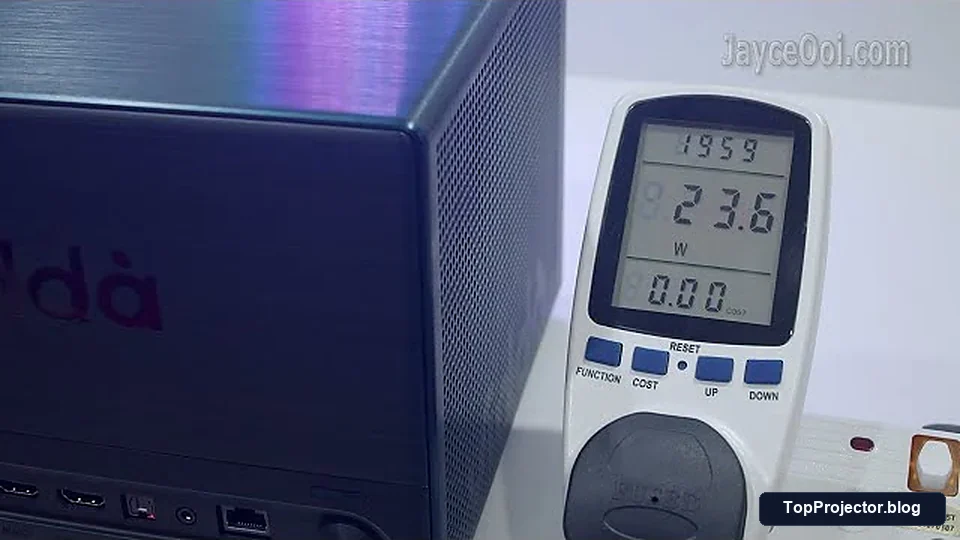
Eco settings typically drop active power consumption by twenty to thirty percent. For dark dedicated media rooms, this minor brightness reduction remains completely imperceptible to viewers.
Standby power management is another critical factor worth monitoring. Networked control features and quick-start triggers often maintain a small electrical trickle even when powered down.
Enabling factory Eco Mode reduces lamp driving current by up to thirty percent, significantly extending bulb lifespan while instantly slashing your active power footprint during movie sessions.
- Eco Mode reduces active wattage by up to thirty percent.
- Lamp lifespan increases significantly when running lower power profiles.
- Standby networking features consume minor continuous background power.
- Dedicated master power switches eliminate parasitic standby draw entirely.
- Disable fast-startup network standby modes to eliminate continuous network polling power draws.
- Configure auto-shutdown timers to power down the optical engine after 20 minutes of inactivity.
Managing Standby Parasitic Loads
Modern smart projectors feature wake-on-LAN and voice assistant integration. These convenience features require internal processors to remain partially active in standby mode.
Parasitic standby draw ranges from 0.5W to 5W continuously. While minor, utilizing a switched power strip can eliminate this unnecessary idle power consumption completely.
- Smart features keep system processors idling in standby.
- Parasitic loads accumulate wasted energy over idle weeks.
- Power strips provide complete physical disconnection from mains.
Network Standby Vulnerabilities
Leaving IP control or Ethernet management enabled can maintain active network card polling, increasing standby power draw from under 0.5 watts to over five watts.
- Switch to basic IR remote control commands to minimize standby wattage.
- Check your network settings menu for deep sleep profiles.
Portable and Off-Grid Projection Power Demands
Portable and outdoor projectors introduce unique electrical engineering challenges. Campers and tailgaters rely on compact power stations rather than traditional wall outlets.
Mini portable projectors utilize low-wattage LED arrays designed for battery efficiency. These units often consume between 30W and 65W during standard playback sessions.
Operating these devices requires matching projector input voltage with portable battery inverter outputs. USB-C Power Delivery standards have simplified outdoor mobile projection significantly.
Running compact LED projectors from portable lithium power stations requires calculating exact inverter efficiency losses alongside the raw wattage demands of the optical engine.
- Portable LED units draw minimal power for battery compatibility.
- Power stations require adequate watt-hour capacity for movie runtimes.
- USB-C Power Delivery standardizes mobile projector connections.
- Inverter efficiency losses impact total portable battery runtime.
- Choose power stations supporting pure sine wave output to protect sensitive internal ballasts.
- Account for a 15 percent conversion loss when stepping up DC battery power to AC.
Calculating Battery Runtimes for Portable Units
Estimating outdoor runtimes requires dividing battery watt-hours by projector wattage. A standard 500Wh power station can power a 50W portable projector for roughly eight hours.
Real-world efficiency losses in battery inverters typically reduce theoretical runtimes by ten to fifteen percent. Factoring this buffer ensures uninterrupted outdoor movie nights.
- Battery capacity is measured in total watt-hours.
- Inverter conversion losses reduce overall operational runtimes.
- Lower brightness settings extend outdoor battery playback duration.
Solar Panel Pairing Guidelines
Sizing solar arrays for off-grid projection nights demands calculating total runtime amp-hours carefully while compensating for intermittent cloud cover interruptions during long movie events.
- Use MPPT solar charge controllers for maximum energy harvest efficiency.
- Store backup batteries in temperature-controlled enclosures.
Troubleshooting Unexpected Power Surges and Thermal Management
Abnormal electrical behavior in projectors usually points toward cooling system failures or ballast degradation. Dust accumulation can obstruct airflow and force internal fans into overdrive.
When intake vents clog, thermal sensors detect rising internal temperatures. The projector may automatically ramp up fan speeds or trigger protective shutdown sequences to prevent hardware damage.
Regular maintenance preserves both optical clarity and electrical efficiency. Cleaning air filters quarterly ensures your projector operates within optimal thermal and electrical parameters.
Sudden projector shutdowns are frequently triggered by automated thermal protection circuits responding to blocked intake vents or failing cooling fans operating under high ambient temperatures.
- Dust blockages force cooling fans to draw extra power.
- Thermal sensors protect internal optics from overheating failures.
- Quarterly filter maintenance preserves baseline electrical efficiency.
- Abnormal buzzing sounds indicate potential ballast or fan wear.
- Clean washable intake air filters every 100 hours to prevent dangerous internal heat spikes.
- Inspect exhaust clearance gaps to ensure proper hot air dispersion away from walls.
Preventing Thermal Shutdowns and Overdraw
Improper mounting enclosures can trap hot exhaust air near intake vents. This thermal cycling forces internal electronics to work harder, increasing wear and energy consumption.
Ensuring adequate clearance around all chassis ventilation ports prevents heat buildup. Proper thermal management guarantees stable power draw throughout long viewing sessions.
- Ventilation clearance is vital for stable thermal regulation.
- Enclosed cabinetry traps hot air and degrades hardware.
- Unobstructed airflow prevents unnecessary cooling fan power spikes.
Diagnosing Ballast Failures
A failing ballast can draw erratic current spikes, tripping circuit breakers and causing catastrophic power delivery failures within the internal power supply unit.
- Listen for high-pitched electrical whining noises during startup sequences.
- Test wall outlets with a digital multimeter for ground faults.
Frequently Asked Questions
How many watts does an average home theater projector use?
Standard home theater projectors consume between 200 and 450 watts during active playback. This wattage varies depending on whether the unit utilizes a high-pressure lamp or solid-state laser engine.
Does running a projector in Eco Mode actually save electricity?
Yes, engaging Eco Mode reduces active power consumption by twenty to thirty percent. This setting dims the light source slightly while simultaneously extending the lifespan of your bulb.
Do projectors use more electricity than large flat-panel TVs?
Not necessarily when evaluated by watts-per-square-inch metrics. Giant direct-view flat panels often consume comparable or higher continuous power when scaling up to massive screen sizes.
What causes a projector to consume power while in standby mode?
Standby power handles background network connectivity, quick-start triggers, and smart operating systems. This parasitic idle load typically consumes 0.5W to 5W continuously until fully unplugged.
Can I power a standard home projector using a portable power station?
Standard lamp-based home units demand too much wattage for typical portable batteries. However, compact LED or laser models rated under 65 watts run efficiently on high-capacity power stations.