How Many Hours Does an Epson Projector Bulb Last?
Understanding Epson projection lamp lifespans helps you maximize optical performance and prevent unexpected blackouts. Real ANSI brightness decay dictates when a replacement becomes strictly necessary for your home setup.
Standard Epson projector lamps last between 3,000 and 12,000 hours depending on your Eco mode usage. Always track actual lamp hours rather than relying purely on calendar age.
Ready to compare verified models? Start with our Best Epson Best Projector: Top Picks (2026).
Practical Quick-Reference Table
| Scenario / Metric | Recommended Target | Why It Matters |
|---|---|---|
| Standard Lamp Mode | 3,000 to 4,000 Hours | Delivers maximum ANSI lumens output for high ambient light. |
| Eco Lamp Mode | 6,000 to 12,000 Hours | Reduces thermal stress and significantly extends bulb longevity. |
| Laser Light Source | 20,000 Hours+ | Provides nearly maintenance-free operation for casual daily viewing. |
| Brightness Decay Point | 50% Initial Output | Signals that the optical engine requires a new lamp module. |
| Filter Cleaning Cycle | Every 100 Hours | Prevents catastrophic thermal shutdowns from accumulated dust. |
| Daily Usage Baseline | 3 Hours Per Day | Translates to roughly three to ten years of total usage. |
Decoding Epson Lamp Lifespan Specifications and ANSI Brightness Decay
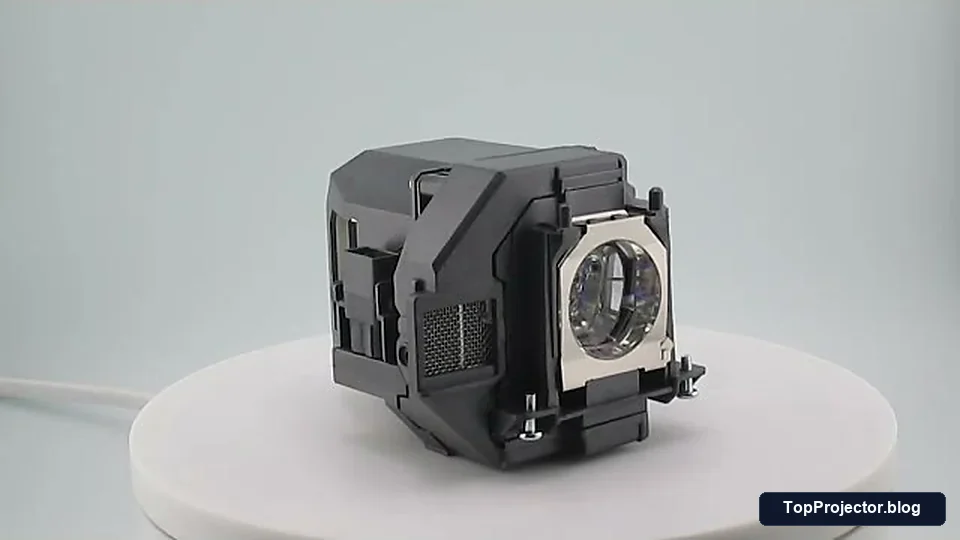
Consult our projector lamp lifespan guide to see how standard Epson lamps achieve 3,000 to 6,000 hours in normal mode, or up to 12,000 hours in Eco mode.
Manufacturer ratings measure the point at which light output drops by fifty percent. This gradual ANSI lumens degradation happens slowly over years of consistent home theater or gaming session usage.
Understanding this decline helps you plan replacements before absolute failure occurs. Operating your projector in cooler environments preserves the fragile mercury vapor arc tube and prevents premature cracking.
True optical longevity relies heavily on ambient room temperature management. Keeping your living room climate-controlled stops thermal shock from damaging the delicate quartz glass housing during rapid cooling cycles.
Epson rates traditional UHE lamps up to 10,000 hours in ECO mode, but raw ANSI lumen output naturally degrades by 50 percent over that lifespan due to physical arc-tube wearing and electrode gap widening.
- Normal lamp mode yields shorter lifespans with peak brightness.
- Eco mode lowers fan noise and doubles total operating hours.
- Brightness decay is linear rather than sudden for standard bulbs.
- Thermal management directly dictates actual bulb survival rates.
- Always source replacement modules directly from authorized distributors to guarantee correct arc gap geometry and reliable igniter performance.
The Science of Mercury Vapor Arc Degradation
Inside every traditional Epson lamp lies a high-pressure mercury vapor arc tube. Over thousands of hours, tungsten electrodes slowly erode and deposit dark material on the inner glass walls.
This internal darkening reduces light output long before the filament completely breaks. Recognizing this chemical process explains why your image looks noticeably dimmer after three years.
- Tungsten electrode erosion causes internal bulb darkening.
- Arc gap widening creates unstable flicker during long viewings.
Calculating Real-World Lumen Depreciation Curves
As your lamp passes 3,000 hours of operation, expect a noticeable drop in peak white and color brightness, requiring you to transition from Dynamic mode to Cinema mode for calibrated gamma tracking.
- Monitor ANSI lumen output using a calibrated lux meter placed one meter from the screen.
- Track total operational hours monthly to anticipate rapid phosphor and electrode degradation stages.
Lamp Versus Laser Technology Differences in Modern Epson Projectors
Solid-state laser light engines change traditional expectations by delivering 20,000 hours or more of maintenance-free operation, much like our findings in the Hisense PX3 Pro review highlighting advanced triple-laser UST power.
Epson laser models eliminate the recurring cost of replacement lamp modules entirely. This technological shift provides immense long-term value for dedicated home theater enthusiasts running extended daily viewing schedules.
Laser projectors also maintain superior color accuracy throughout their operational lifecycle. Traditional lamps shift toward warmer, greener spectrums as the gas mixture ages inside the sealed quartz capsule.
Transitioning from traditional mercury lamps to solid-state laser diodes extends your optical engine lifespan up to 20,000 hours while maintaining stable color performance and eliminating sudden catastrophic bulb blowouts.
- Laser diodes last up to five times longer than standard bulbs.
- Color reproduction remains stable across twenty thousand hours.
- Solid-state engines eliminate unexpected mid-movie lamp explosions.
- Upfront hardware costs are balanced by zero replacement expenses.
- Verify laser diode array status within the projector diagnostic menu after heavy multi-hour usage sessions.
Evaluating Solid-State Reliability for Dedicated Rooms
Laser illumination systems utilize multi-element diode banks to create brilliant primary colors. Even if a single diode fails, the projector continues operating with a minor imperceptible brightness reduction.
This structural redundancy prevents catastrophic hardware failures common in single-bulb architectures. Modern home theater owners benefit from unprecedented reliability during long movie marathons or weekend gaming.
- Multi-diode arrays prevent total sudden optical failure.
- Redundancy ensures steady performance in dedicated dark rooms.
Thermal Management and Diode Decay
Laser engines rely on complex liquid cooling blocks to maintain optimal operating temperatures, preventing premature diode degradation and ensuring consistent light output across wide ambient temperature ranges.
- Laser light engines maintain 80 percent original brightness far past standard lamp thresholds.
- Solid-state systems eliminate the costly maintenance cycles associated with routine UHE lamp swaps.
Video Walkthrough: How to Know the Lamp Hours on Your Epson Projector
Practical Daily Usage Calculations for Real-World Projector Longevity
Calculating your actual bulb lifespan requires analyzing viewing habits alongside optimal seating layouts derived from using our screen size and viewing distance calculator to ensure proper geometry.
At that steady moderate pace, a standard lamp rated for 4,000 hours lasts nearly four years. Switching that same exact hardware to Eco mode pushes usable lifespan past the seven-year milestone.
Heavy users operating cinematic displays for six hours daily will deplete standard bulbs much faster. Such intense usage demands strict adherence to filter cleaning routines to prevent premature thermal death.
Calculating your actual projector lifespan requires multiplying daily viewing habits by 365 days, revealing that a typical four-hour evening movie routine consumes roughly 1,460 hours of lamp life annually.
- Three daily hours yields approximately one thousand annual operating hours.
- Eco mode nearly doubles total calendar longevity for casual viewers.
- Heavy commercial usage patterns require annual bulb replacement budgeting.
- Viewing duration directly dictates your required maintenance schedule.
- Limit continuous daily sessions to under six hours to prevent excessive thermal stress on the quartz glass burner.
- Account for frequent power cycles which accelerate electrode erosion faster than prolonged single-session viewing.
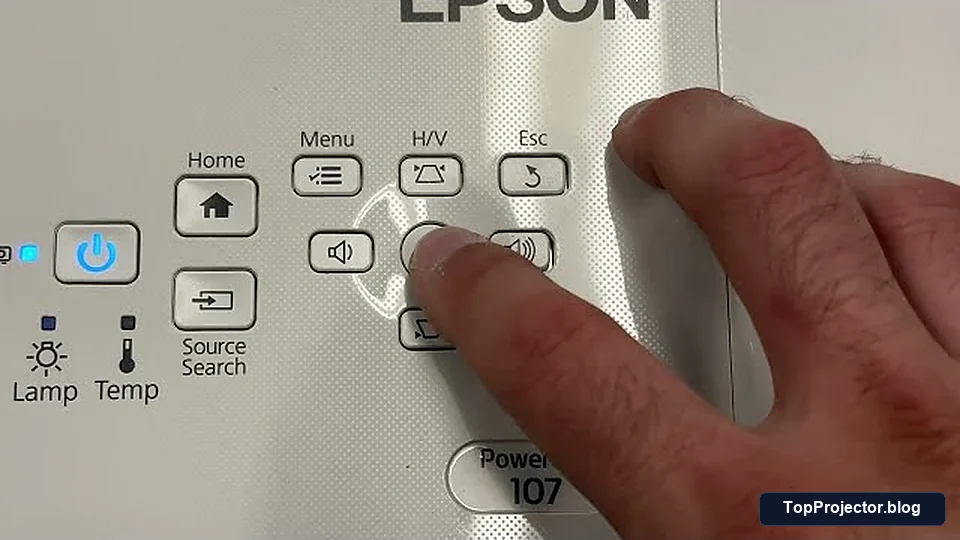
Checking Your Current Lamp Hours via the Epson On-Screen Menu
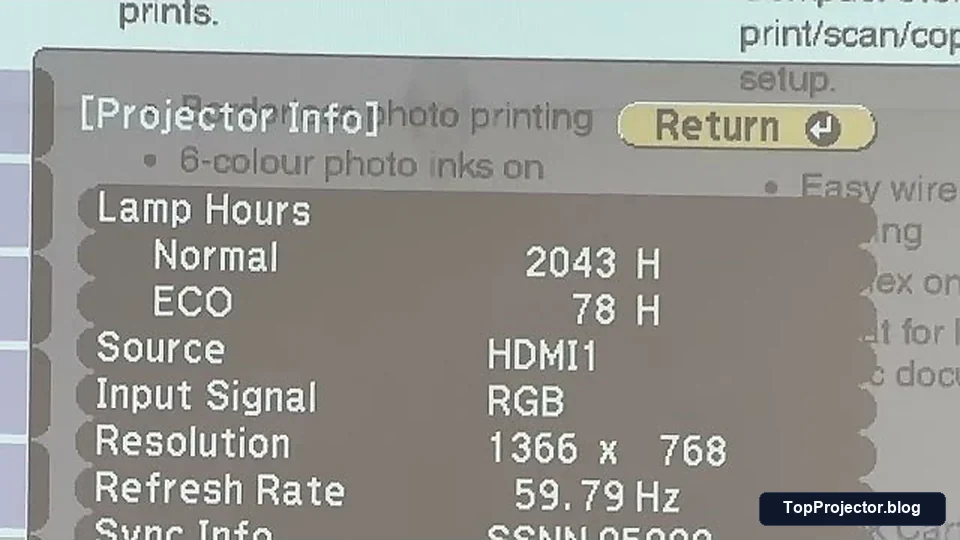
Monitoring your exact remaining lamp hours is remarkably straightforward on modern Epson hardware. Simply press the menu button on your remote and navigate directly to the Info or Status submenu.
The system diagnostics page displays precise operating hours alongside active input resolutions and firmware versions. Checking this metric monthly prevents you from being caught off guard by sudden bulb exhaustion.
Some advanced Epson projectors feature intuitive color-coded indicators right on the chassis. A flashing orange status light immediately alerts you when accumulated hours approach the factory replacement threshold.
Accessing your precise lamp usage metrics requires navigating the internal system firmware through your Epson remote, specifically targeting the Info menu tab to verify exact accumulated operating hours.
- Access system diagnostics through the standard remote control menu.
- Note the exact numerical hour reading for replacement planning.
- Monitor chassis indicator lights for sudden warning flashes.
- Record hour milestones in a log to track degradation rates.
- Note your current hour count before starting marathon viewing sessions to accurately project replacement timelines.
Navigating the Advanced Status Submenu
Open your projector settings and scroll down to the extended information tab. The lamp usage counter updates dynamically every time the optical engine completes a full shutdown cycle.
Keep in mind that resetting this timer without installing a new bulb is dangerous. Doing so removes your safety tracking and risks operating a degraded lamp past its structural limit.
- Scroll down to extended system information tabs.
- Never reset counters without physical bulb replacement.
Navigating Hidden Service Diagnostics
Pressing advanced remote control button combinations opens factory service menus where technicians inspect low-level diagnostic logs, error codes, and exact lamp timer resets following physical hardware replacements.
- Never reset your lamp timer unless you physically installed a brand-new OEM bulb assembly.
- Verify software counter accuracy by comparing menu readouts against your external usage logbooks.
Video Walkthrough: Epson EB-W49 Projector Lamp Bulb Replacement #epsonprojector #projectorlamps
Environmental Factors and Maintenance Habits That Accelerate Bulb Wear
Poor ventilation and blocked intake vents trap destructive heat around the lamp housing. Operating your Epson projector in cramped enclosures drastically reduces overall bulb lifespan through thermal stress accumulation.
Dust buildup acts as an effective thermal blanket over sensitive optical components. Cleaning or replacing air filters every one hundred hours ensures unimpeded airflow and protects your expensive hardware.
Cigarette smoke and kitchen grease also wreak absolute havoc on projector optics. Airborne residue bakes onto the hot quartz bulb surface, causing permanent discoloration and localized hot spots.
Ambient room temperatures exceeding 85 degrees Fahrenheit drastically shorten lamp life by forcing internal cooling fans to work harder while straining the fragile quartz glass combustion chamber.
- Blocked ventilation zones trap damaging heat inside the chassis.
- Dust accumulation accelerates thermal degradation of the arc tube.
- Airborne grease and smoke bake permanently onto hot glass.
- Maintaining clean intake filters prevents catastrophic hardware failures.
- Clean washable foam air filters every 100 hours to prevent catastrophic thermal buildup inside the optical path.
- Maintain a minimum clearance of two feet around all chassis exhaust vents for proper airflow.
Identifying Definitive Warning Signs of Impending Lamp Failure
A dying Epson lamp typically announces its imminent demise through unmistakable visual cues. You will notice a significantly dimmer picture, faded contrast ratios, and a noticeable shift toward yellow hues.
Audible warning signs include unusual flickering during bright scenes and louder cooling fan noises. The internal power supply works harder to ignite an eroding arc gap as the tungsten wears down.
When the projector abruptly shuts down mid-movie accompanied by flashing red status LEDs, stop immediately. Continuing to force ignition on a shattered bulb risks contaminating your entire optical light engine.
Watch for sudden flickering, noticeable color shifts toward a greenish hue, and an on-screen warning message indicating that your lamp has exceeded 9,000 hours of operational service.
- Severe picture dimming indicates advanced tungsten electrode erosion.
- Unstable flickering during bright sequences signals arc instability.
- Flashing red status indicator lights demand immediate power cutoff.
- Unusual burning smells require instant hardware inspection.
- Inspect the physical bulb housing immediately if you detect a faint burning smell during high-wattage projection.
- Heed blinking orange indicator lights which signal critical thermal overloads before total lamp shattering occurs.
Weighing OEM Lamp Replacement Versus Upgrading to a New Projector
Deciding between buying a replacement lamp or purchasing a new projector requires financial realism. If your aging Epson unit features outdated 1080p resolution, investing in a new 4K model makes sense.
However, if your projector chassis features modern native 4K PRO-UHD optics, a fresh lamp restores factory brightness instantly. Buying an authentic OEM replacement module ensures safe mechanical compatibility and optimal color purity.
Avoid cheap third-party knockoff bulbs sold online without manufacturer authorization. These unregulated alternatives frequently explode inside the housing, destroying expensive internal LCD panels and voiding your warranty.
Purchasing an authentic OEM lamp assembly makes sense when pairing your hardware with the best micro projector for iphone setups featuring robust 4K pixel-shifting capabilities and healthy optical alignment.
- Evaluate whether outdated resolution justifies buying a new projector.
- Authentic OEM lamps restore original brightness and color fidelity.
- Third-party knockoff bulbs carry severe risks of explosive failure.
- Factor total ownership costs before purchasing replacement modules.
- Calculate whether replacement bulb costs exceed fifty percent of current projector market valuation.
- Upgrade to newer solid-state models if your aging chassis lacks modern HDR tone-mapping features.
Frequently Asked Questions
Can I reset my lamp hours without changing the bulb?
Yes, you can manually reset the counter in the service menu. However, doing so is extremely dangerous because it removes your tracking safety net and risks operating a degraded lamp past its structural limit.
What happens if an Epson projector bulb explodes?
An exploding bulb scatters tiny glass shards and releases toxic mercury vapor inside the sealed optical chassis. Always unplug the unit immediately and contact professional technicians for safe internal cleanup and component decontamination.
Are third-party replacement lamps safe to use?
Unbranded knockoff lamps frequently lack proper thermal shielding and precise arc alignment. Sticking exclusively to certified original equipment manufacturer modules prevents catastrophic housing explosions and protects delicate internal LCD panels.
Does Eco mode really double my projector lamp lifespan?
Eco mode reduces lamp wattage output, which lowers operating temperatures and slows tungsten evaporation. This thermal relief typically doubles total operational hours compared to running peak normal brightness modes constantly.
How often should I clean my Epson projector air filters?
You should inspect and clean your air intake filters every one hundred hours of operation. Preventing dust accumulation ensures proper thermal management and stops premature bulb burnout in dusty residential living environments.