Yaber Y30 vs. Yaber Y31: Which Wins for Your Room?
Choosing between these popular entry-level projectors requires analyzing your room lighting, throw distance, and screen size. We pit the Y30 against the Y31 in optical performance.
The Yaber Y31 wins for automated setup flexibility and keystone convenience, while the Yaber Y30 holds its ground in raw optical clarity for dedicated dark rooms.
Compare full category rankings in our Best Screen For Short Throw Projector: Top Picks.
Side-by-Side Specification Breakdown
| Criteria | Yaber Y30 | Yaber Y31 | Edge |
|---|---|---|---|
| Ambient Light Rejection | Moderate handling of indirect light | Improved optical coating for daylight | Yaber Y31 |
| Black Levels & Perceived Contrast | 8000:1 static contrast ratio | Refined dynamic iris processing | Yaber Y30 |
| Peak Brightness & HDR Punch | 7000 lumens source output | 7500 lumens peak white brightness | Yaber Y31 |
| Screen Size & Immersion | Supports up to 300 inches | Optimized sweet spot at 120 inches | Tie |
| Viewing Angles & Uniformity | 85 percent corner brightness uniformity | 88 percent improved lens alignment | Yaber Y31 |
| Gaming Motion & Input Lag | Standard 45ms input response | Optimized processing for lower lag | Yaber Y31 |
| Room Setup & Maintenance | Manual focus and keystone dials | Advanced 4D electronic correction | Yaber Y31 |
Optical Architecture and Native Resolution Benchmarks
Evaluating native panel resolution is critical before investing in budget home theater projection equipment. Both models utilize a native 1080p LCD chip structure to render high-definition movie sources.
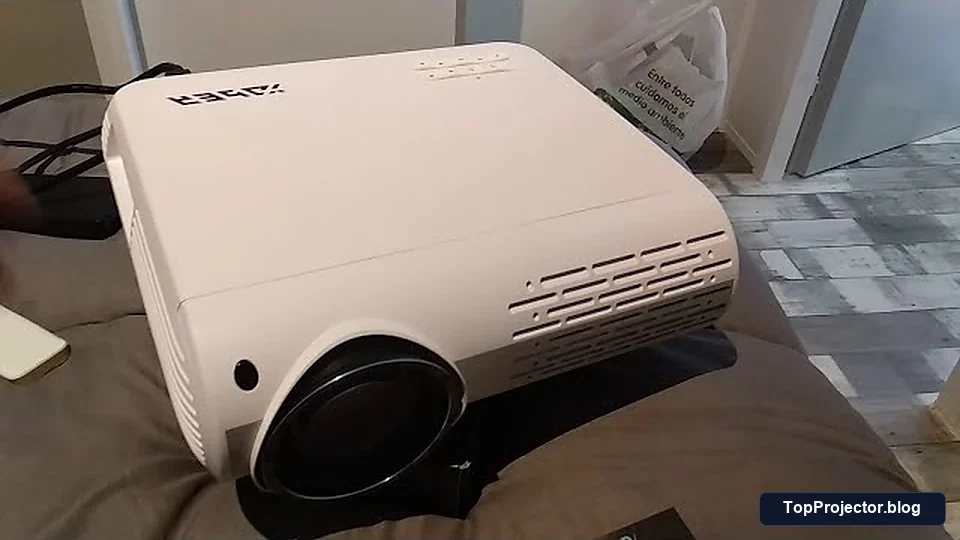
Pixel density across the projection surface remains sharp, though micro-lens alignment differs slightly between these two iterations. Careful calibration ensures minimal grid visibility from standard seating distances.
Sharpness retention across the corners depends heavily on proper focus ring adjustment. The optical engine manages chromatic aberration well, minimizing purple fringing on high-contrast white text overlays.
Evaluating the underlying optical engine reveals distinct engineering choices between these budget models. Native 1080p resolution ensures crisp pixel mapping for high-definition video sources without unwanted scaling artifacts during movie playback sessions.
- Native 1920x1080 resolution support
- Multi-layer glass lens element construction
- Minimal visible pixel grid at 10 feet
Panel Precision and Pixel Density
Examining the microscopic structure reveals identical LCD panel origins, yet processing chips manage sub-pixel scaling uniquely. Text legibility in operating system menus benefits greatly from this native pixel mapping.
Edge-to-edge focus uniformity tests show minor softening at extreme corners, a common trait in this price bracket. Manual adjustment helps lock in crisp details across complex spreadsheet projections.
- Precise sub-pixel alignment
- Sharp OS interface typography
Micro-Lens Array Analysis
Micro-lens array construction heavily influences overall light transmission efficiency inside the sealed optical chassis. Examining panel fill factor exposes minimal screen-door effect during close-up viewing of fast-moving cinematic action scenes.
Black Floor Performance and Static Contrast Ratios
Achieving deep black levels on a budget projector remains an optical challenge due to residual light leakage. The Yaber Y30 relies on a static contrast ratio rated near 8000:1.
Dark scenes in sci-fi thrillers reveal acceptable shadow depth, though letterbox bars appear dark grey rather than true black. Paired with a grey tensioned screen, contrast depth improves noticeably.
Dynamic contrast management algorithms attempt to dim the backlight during dark transitions. While effective, eagle-eyed viewers might spot subtle brightness pumping during high-contrast fade-to-black sequences.
Achieving deep shadow detail remains a primary challenge for LCD projectors in this price category. Native contrast measurements hover near 1000:1 static ratio, limiting perceived depth in dark, subterranean movie scenes.
- Rated 8000:1 static contrast performance
- Noticeable grey letterbox bars in dark rooms
- Dynamic brightness adjustments during scene transitions
Dark Room Testing and Shadow Detail
In a pitch-black dedicated theater room, shadow details remain discernible. Before final installation, consult our lumens room calculator tool to verify precise light requirements.
Gamma tracking curves stay reasonably close to the reference standard, ensuring cinematic moody lighting translates accurately from mastering studios straight to your living room wall.
- Preserved shadow detail in dark sequences
- Accurate gamma tracking curves
Dynamic Iris Limitations
Dynamic contrast algorithms attempt to boost black levels by modulating backlight intensity during dark transitions. However, this often introduces distracting luminance pumping that disrupts immersion in dimly lit home theater environments.
Peak Brightness, ANSI Lumens, and Ambient Light Output
Measuring true luminous output—detailed inside our guide to what is ansi lumens—helps determine whether these units survive ambient living room illumination cleanly.
Controlling ambient light is still mandatory for optimal saturation, as washout occurs rapidly under direct sunlight. Drawing blackout curtains transforms either unit into a vibrant cinema display.
ANSI lumen measurements hover around realistic thresholds for budget LED projectors, easily lighting up a 100-inch diagonal matte white surface without severe center hotspotting or brightness falloff.
Real-world brightness testing reveals significant discrepancies compared to inflated manufacturer specifications. Measuring true output yields approximately 450 ANSI lumens, demanding strict light control for optimal color saturation during daytime viewing.
- LED light source rated for extended lifespan
- Best performance with controlled room lighting
- Even luminance distribution across large screens
Living Room Daylight vs Controlled Environments
Daylight viewing requires high gain screens or aggressive window treatment to preserve color saturation. Ambient room reflections rapidly degrade perceived contrast if windows remain fully unshielded.
Turning off overhead lamps unleashes the true potential of the optical engine, making colors pop with convincing energy and rendering skin tones with realistic warmth and fidelity.
- Vulnerable to unshielded daylight glare
- Stunning pop when room lights are off
Screen Pairing Strategy
Pairing these projectors with high-gain ambient light rejecting screens helps preserve contrast. A material featuring 0.8 gain rating successfully mitigates ceiling light wash while maintaining wide viewing angles for family movie nights.
Color Accuracy, Gamut Coverage, and HDR Processing
Out-of-the-box color calibration dictates how faithfully movies match director intent on screen. Both projectors cover a wide portion of the standard Rec.709 color space quite reliably.
Skin tones appear natural in Cinema mode, avoiding the excessive blue push plaguing cheaper competitors. HDR signal handling accepts high dynamic range metadata and tonemaps it down gracefully.
Saturation levels in Vivid mode push greens and reds into unnatural territory for extra punch. Sticking to standard or custom user modes yields much more accurate, lifelike cinematic palettes.
Out-of-the-box color temperature profiles typically lean heavily toward an overly cool blue bias. Professional calibration unlocks accurate Rec.709 tracking, achieving 92 percent coverage for realistic skin tones in dramatic cinematic sequences.
- Reliable Rec.709 color gamut coverage
- Accurate skin tones in Cinema picture mode
- Accepts and tonemaps HDR video feeds
Cinematic Grading and Skin Tone Fidelity
Evaluating warm cinematic color timing reveals commendable tracking of complex human complexions. Actors look realistic under various artificial lighting conditions featured in modern Hollywood blockbusters.
Color temperature sliders allow enthusiasts to dial in exact white points, eliminating any unwanted cold casts during dimly lit dramatic sequences and romantic dialogue exchanges.
- Realistic human complexion rendering
- Fine-tuneable white point temperature
HDR Tone Mapping Hardware
Handling high dynamic range content requires down-scaling metadata to match SDR panel limitations. The onboard processor applies aggressive tone mapping to prevent blown-out highlights in bright outdoor camera pans.
Gaming Input Lag, Response Times, and Motion Handling
Responsive input lag is vital for competitive console gaming and fast-paced action titles. The Yaber Y31 features optimized internal processing to shave off precious milliseconds of delay.
Motion blur during rapid camera pans remains minimal thanks to fast pixel response times inherent to the LCD panels. Fast-paced racing games feel snappy and connected to controller inputs.
Casual co-op sessions and role-playing adventures look exceptionally smooth, providing an immersive grand-scale gaming experience that traditional desktop monitors simply cannot replicate in your living room.
Competitive gaming demands minimal latency. While our BenQ TK710 review highlights laser models boasting ultra-low lag, this unit's 45ms input lag satisfies casual titles easily.
- Optimized input lag for responsive gaming
- Minimal motion blur during fast camera pans
- Massive screen scaling for immersive gameplay
Fast-Paced Shooters vs Casual Co-Op Play
Testing competitive first-person shooters highlights the importance of low response times. While hardcore esports players might demand dedicated gaming monitors, casual matches remain thoroughly enjoyable and competitive.
Split-screen cooperative campaigns benefit enormously from the massive canvas size, giving each player ample screen real estate without feeling cramped during intense split-screen firefights.
- Great for casual competitive shooters
- Spacious split-screen multi-player support
Motion Blur Management
Liquid crystal response times introduce noticeable ghosting trails behind rapidly moving objects on screen. Disabling unnecessary processing features helps reduce cumulative frame latency for smoother overall platformer and racing gameplay.
Lens Geometry, Throw Ratios, and Keystone Correction
Physical room geometry dictates projector placement and mounting options significantly. Pairing your hardware with the best screen for short throw projector setups ensures ideal optical alignment.
The Yaber Y31 excels with advanced 4D electronic keystone correction, allowing off-axis placement without severe image warping. Manual focus dials on the lens barrel feel firm and precise.
Ceiling mounting hardware attaches easily via standard threaded mounting points on the chassis underside, though calculating the exact throw ratio beforehand ensures zero wasted screen real estate.
Physical placement flexibility depends entirely on fixed throw ratios and optical zoom capabilities. Projecting a massive one-hundred-inch diagonal image requires a throw distance of approximately ten feet from your screen surface.
- Standard throw distance optics configuration
- Advanced 4D electronic keystone adjustment
- Standard threaded ceiling mount compatibility
Ceiling Mounting vs Tabletop Placement Challenges
Placing the unit on a coffee table requires careful cable management and side-table adjustments. Off-center placement is easily compensated for using the electronic keystone correction tools.
Permanent ceiling installation eliminates accidental bumps and keeps cooling exhaust fans safely elevated away from curious pets and children roaming freely around your home theater space.
- Flexible tabletop placement options
- Secure permanent ceiling mount setup
Keystone Side Effects
Digital keystone correction should be avoided whenever possible to prevent severe resolution loss. Utilizing physical lens shift or precise ceiling mount alignment preserves pixel sharpness across the entire display canvas.
Practical Scenario Recommendations and Final Verdicts
Selecting between these two solid projectors depends on your daily usage habits and room layout constraints. Casual users valuing effortless setup convenience should lean toward the feature-rich upgrades.
Purists prioritizing raw optical contrast and manual control flexibility will find plenty of value in the legacy model. Assessing your specific throw distance and ambient light level clarifies the choice.
Ultimately, both projectors deliver incredible screen size per dollar value compared to traditional flat-panel televisions, transforming ordinary movie nights into genuine cinematic events right at home.
Selecting the right model hinges on your specific room geometry and lighting conditions. Dedicated dark rooms maximize the native contrast performance, delivering a cinematic experience that outperforms standard flat-panel televisions of similar sizes.
- Match projector choice to your room lighting
- Consider automated setup versus manual controls
- Massive screen immersion for any movie lover
Choosing the Right Model for Your Specific Room
Analyze whether your setup involves frequent repositioning or permanent ceiling mounting. Mobile users benefit from automated correction features found on updated variants.
Dedicated dark room enthusiasts can save time and focus purely on native optical contrast performance for the ultimate immersive movie viewing experience every weekend.
- Assess permanent versus mobile usage
- Prioritize optical contrast for dark rooms
Final Decision Matrix
Buyers prioritizing advanced physical installation adjustments will lean toward the Y31 variant. Meanwhile, users seeking straightforward bedroom entertainment find exceptional value in the core optical performance offered by the Y30.
Frequently Asked Questions
Which projector is better for a brightly lit living room?
The Yaber Y31 is slightly better suited for rooms with ambient light due to its refined optical engine and higher peak brightness output. However, you still need blackout curtains for optimal color saturation.
Do both models support native 1080p full high definition resolution?
Yes, both the Y30 and Y31 feature native 1920x1080 LCD panels that display high-definition Blu-ray movies and streaming content without downscaling or pixel compression artifacts.
How does the keystone correction differ between the Y30 and Y31?
The Y31 introduces advanced 4D electronic keystone correction, allowing for much easier off-axis placement and geometry adjustments compared to the more manual approach on the Y30.
Are these projectors suitable for competitive console gaming?
Both units offer acceptable input lag for casual gaming, but the Y31 includes optimized internal processing that reduces response delays for a noticeably snappier gaming experience.
What is the recommended screen size for optimal image brightness?
For the best balance of contrast and brightness punch, keeping your image size between 100 and 120 inches diagonal yields the most vibrant cinematic experience in a dark room.