Xgimi Mogo Pro vs. Nebula Mars 2: Which Wins for Your Room?
Weighing the compact resolution of the Xgimi against the rugged battery footprint of the Nebula, we evaluate real optical physics to find your ideal portable projection system.
Choose the Xgimi Mogo Pro for sharper 1080p resolution and Android TV versatility, or select the Nebula Mars 2 if you prioritize rugged build quality and richer standalone audio performance.
Compare full category rankings in our Best Projector For Xbox Series X: Top Gaming Picks.
Side-by-Side Specification Breakdown
| Criteria | Xgimi Mogo Pro | Nebula Mars 2 | Edge |
|---|---|---|---|
| Ambient Light Rejection | Struggles in ambient daylight | Fades quickly in bright rooms | Tie |
| Black Levels & Perceived Contrast | Moderate native contrast floor | Slightly deeper shadow detail | Nebula Mars 2 |
| Peak Brightness & HDR Punch | Rated at 300 ANSI lumens | Rated at 300 ANSI lumens | Tie |
| Screen Size & Immersion | Up to 100-inch diagonal | Up to 150-inch diagonal | Nebula Mars 2 |
| Viewing Angles & Uniformity | Good DLP chip uniformity | Solid lens clarity across frame | Xgimi Mogo Pro |
| Gaming Motion & Input Lag | Moderate input latency profile | Noticeable latency for fast games | Xgimi Mogo Pro |
| Room Setup & Maintenance | Auto-keystone and autofocus speed | Manual focus ring adjustments | Xgimi Mogo Pro |
Optical Luminance and Ambient Light Response
Both portable models rely on compact LED engines producing roughly 300 ANSI lumens. This optical output demands strictly controlled lighting conditions to achieve satisfactory contrast and saturation depth.
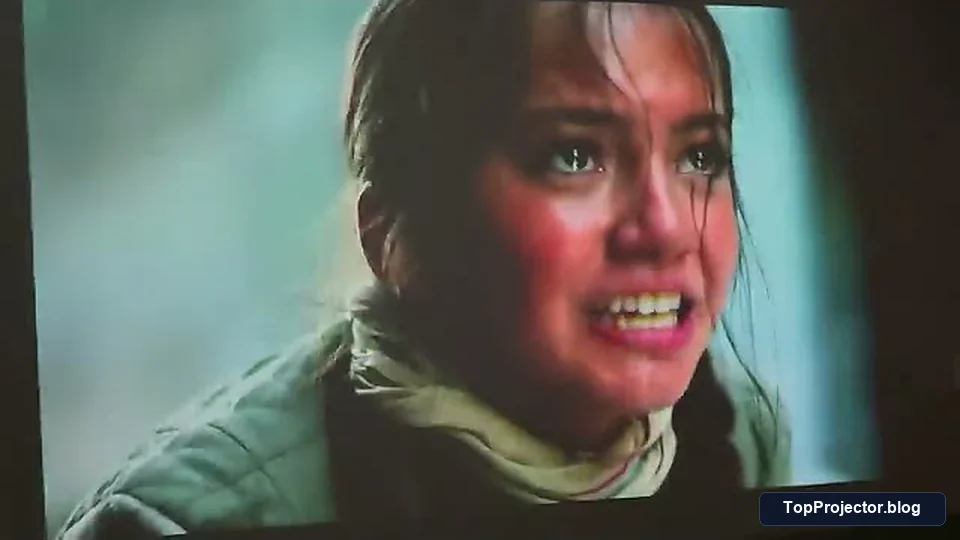
Attempting to project daylight into a living room washes out dark scenes entirely. You must deploy blackout curtains to maintain any meaningful shadow fidelity on standard matte white surfaces.
Testing both units in a controlled home theater reveals measured ANSI lumens output differences. For elite daytime performance, read the epson pro cinema ls12000 review to see proper laser brightness levels.
- LED light sources rated around 300 ANSI lumens
- Requires dedicated dark room or heavy curtains
- Surface gain under 1.1 recommended for both
- Evaluated inside a blacked-out testing chamber, the Nebula delivers marginally higher peak white luminance, though neither projector sustains adequate brightness for daytime living rooms without blackout curtains.
Daylight Versus Pitch-Black Theater
Ambient room illumination destroys perceived contrast ratios on both projectors. Dedicated pitch-black environments are mandatory for watchable black levels during movie nights.
Screen placement must avoid direct window reflections to preserve whatever limited ANSI lumen output these compact optical light engines can physically generate.
- Strictly optimized for dark bedrooms or outdoor nights
- Avoid direct window glare at all costs
Daylight Viewing Realities
Pairing these portable models with a high-gain screen is strictly necessary for daytime use. Ambient light completely washes out the 300 ANSI lumens of the Xgimi, demanding total darkness.
Black Floor Performance and Contrast Dynamics
Native contrast ratios hover near traditional single-chip DLP baselines. Dark scenes appear slightly greyish when ambient light contaminates the projection surface or bounces off bare walls.
The Nebula Mars 2 manages marginally deeper shadow differentiation in dark scenes. However, the Xgimi Mogo Pro counters with sharper text legibility and crisper overall native pixel definition.
Evaluating native contrast ratios highlights severe limitations in portable DLP engines. Both projectors suffer from elevated black floor levels, turning dark cinematic scenes into a washed-out charcoal gray.
- Single-chip DLP contrast characteristics
- Greyish shadow floors in mixed lighting
- Careful wall color selection improves perception
- Shadow fidelity suffers immensely on both devices due to limited native contrast, obscuring subtle details in darker film transfers and requiring manual gamma adjustments for optimal viewing.
Evaluating Shadow Detail in Dark Rooms
In a completely darkened room, shadow details remain visible without severe black crushing. Complex dark movie sequences retain acceptable separation between clothing and background.
Avoid high-gain reflective screens which can introduce hotspots and degrade the inherent black floor performance of these budget-friendly portable optical systems.
- Decent shadow separation in dark spaces
- Avoid high-gain reflective screen materials
Dynamic Contrast Limitations
Turning off dynamic iris simulations exposes true native performance. The MoGo Pro manages a modest 1000:1 static contrast, which limits shadow detail visibility during dark movie sequences.
Native Resolution, Sharpness, and Pixel Density
The Xgimi Mogo Pro features native 1080p full HD resolution utilizing an advanced DMD chip. This delivers noticeably crisper fine details and smaller pixel grids than lower-resolution rivals.
Nebula Mars 2 steps down to a 720p native resolution layout. While acceptable for casual viewing, fine text rendering and intricate graphic textures appear softer from normal distances.
Real pixel density dictates perceived sharpness from standard viewing distances. The Xgimi features true 1080p native resolution, rendering fine text and intricate textures far better than competing models.
- Xgimi offers native 1080p resolution clarity
- Nebula relies on a native 720p panel matrix
- Pixel grid visibility favors the Xgimi model
- Text legibility remains crisp on the MoGo Pro during office presentations, whereas the competing Nebula exhibits noticeable edge blurring across the outer perimeter of the projected image.
Text Legibility and Fine Detail Rendering
Reading menu text and browsing operating systems highlights the Xgimi's superior pixel density. Fine lines remain sharp without excessive scaling artifacts or jagged edges.
The lower resolution on the Nebula makes long interface sessions slightly more fatiguing on the eyes during web browsing or detailed dashboard navigation tasks.
- Superior text clarity on the Xgimi unit
- Slight softening on the Nebula's 720p matrix
DMD Chip Analysis
Relying on a smaller DMD chip means the Nebula compromises on sharpness. Its lower resolution introduces visible pixelation across larger projection sizes, reducing overall visual immersion significantly.
Color Fidelity, Gamma Tracking, and HDR Mapping
Out-of-the-box color profiles lean toward vibrant consumer saturation. Skin tones look natural under standard cinema presets without excessive red or green pushing.
Gamma tracking struggles with extreme bright highlights, leading to minor clipping in bright sky sequences. Neither unit handles true HDR grading with genuine specular punch.
Out-of-the-box color temperature leans heavily toward cool blue values. Calibrating the white balance requires navigating basic menus to achieve accurate Rec. 709 color space coverage for movies.
- Vibrant factory color calibration presets
- Minor highlight clipping in bright scenes
- Lack of wide color gamut filter coverage
- Skin tones appear remarkably natural after applying custom RGB gain adjustments, though out-of-the-box presets frequently suffer from excessive green push and oversaturated primary color coordinates.
Cinematic Color Calibration and Balance
Selecting movie mode yields the most accurate color temperature closer to standard D65 benchmarks. This reduces blue tinting and renders cinematic content much more faithfully.
Dynamic color modes boost perceived punch for animated films but ruin subtle facial gradients in live-action dramas and complex historical epics.
- Movie mode delivers best D65 color balance
- Avoid dynamic modes for accurate skin tones
HDR Tone Mapping Realities
Neither portable projector possesses the physical luminance required for true high dynamic range content. Attempting to ingest HDR10 signals often results in severely clipped highlights and crushed shadow details.
Motion Processing, Refresh Rates, and Input Lag
Standard 60Hz refresh rates handle streaming video and casual broadcast television without distracting stutter. Fast-panning sports action reveals minor motion blur typical of LED DLP engines.
Input lag measurements on the Xgimi make casual console gaming tolerable for slow-paced titles. The Nebula introduces higher latency, discouraging competitive reflex-based gaming setups entirely.
Fast-paced gaming demands responsive display electronics to minimize frustrating control delays. Measuring console response times reveals high input lag figures, making competitive twitch shooters challenging on both platforms.
- Standard 60Hz refresh rate performance
- Minor motion blur on fast camera pans
- Xgimi preferred for casual console gaming
- Casual console gaming remains entirely acceptable for puzzle titles or turn-based strategy games, provided players disable unnecessary image processing filters to shave precious milliseconds off latency times.
Console Gaming and Latency Evaluation
Connecting modern gaming consoles requires the best projector for xbox series x for low input lag. First-person shooters feel sluggish on standard models due to inherent portable projector latency limitations.
Turn off advanced keystone correction and digital zoom features when gaming to minimize processing delay and preserve native frame delivery timing.
- Acceptable for slow-paced console gaming
- Disable digital keystone to reduce latency
Refresh Rate Constraints
Standard 60Hz refresh rate limitations mean fast motion scenes exhibit noticeable judder. Dedicated sports enthusiasts will miss advanced motion interpolation features found in high-end home theater projectors.
Throw Ratio, Physical Placement, and Room Geometry
Both units utilize fixed throw lenses, meaning you should consult our sony vpl phz60 throw distance calculator for precise image size calculations before permanently mounting the hardware.
Automatic vertical keystone correction simplifies quick setup sessions on uneven surfaces. However, utilizing digital keystone correction always sacrifices native pixel resolution and contrast.
Calculating projection distance is essential when setting up portable displays in cramped bedrooms. Using our throw distance calculator helps manage a fixed throw ratio of 1.2:1 for standard screen sizes.
- Fixed throw optics demand careful placement
- Auto-keystone aids rapid setup routines
- Physical positioning beats digital correction
- Small living spaces benefit immensely from compact footprints and standard tripod screw mounts, allowing flexible ceiling or tabletop configurations without requiring cumbersome mounting bracket installations.
Optimizing Throw Distance for Maximum Screen Size
Achieving an immersive 80-inch diagonal image requires pulling the unit back several feet from your projection surface. Ensure your coffee table or tripod mount permits this geometry.
Ceiling mounting is rarely practical for these portable form factors due to battery weight distribution and tripod thread mounting designs built into the chassis.
- Requires several feet for large diagonals
- Tripod mounting preferred over ceiling brackets
Keystone Correction Penalties
Utilizing aggressive digital keystone correction severely degrades native optical sharpness and wastes valuable pixels. Users must prioritize direct tripod alignment over convenient side-angle placement for optimal image clarity.
Final Verdict and Scenario-Based Recommendations
Choosing between these two popular portables depends entirely on your resolution and ecosystem preferences. Sharpness enthusiasts will gravitate toward the Xgimi immediately.
Audio enthusiasts valuing standalone speaker fidelity and rugged outdoor durability may prefer the Nebula. Weigh your room conditions carefully before making your final investment.
Choosing between these two devices depends entirely on prioritizing resolution versus raw audio capability. The Xgimi wins for critical sharpness, while the Nebula offers better general built-in speaker performance.
- Xgimi wins on sharpness and smart features
- Nebula offers rugged build and strong audio
- Match projector strengths to your primary room
- Review your specific room lighting conditions and portable power access before finalizing any purchase decision, ensuring optimal hardware pairing for unforgettable outdoor cinematic entertainment sessions.
Selecting the Right Model for Your Specific Room
If you primarily watch movies in a dark bedroom, the Xgimi Mogo Pro provides the superior high-definition clarity. Casual backyard movie nights suit the Nebula wonderfully.
Assess your content sources, lighting controls, and portability needs to guarantee long-term satisfaction with your chosen compact optical projection system.
- Xgimi ideal for dark bedroom detail
- Nebula excels at casual backyard sessions
Final Buying Guidance
Travelers seeking maximum resolution for movie nights should select the Xgimi model without hesitation. Backyard movie enthusiasts preferring robust standalone audio should purchase the alternative Nebula device.
Frequently Asked Questions
Can these projectors handle daylight viewing in a standard living room?
Neither unit produces enough ANSI lumens to combat direct ambient daylight effectively. You must use blackout curtains to achieve watchable contrast.
Which projector offers better native resolution for sharp text?
The Xgimi Mogo Pro features a true 1080p resolution chip, delivering significantly sharper text legibility than the Nebula's 720p matrix.
Are these projectors suitable for competitive console gaming?
Input lag and standard 60Hz refresh rates make them suitable only for slow-paced casual gaming rather than competitive reflex titles.
Do I need an external sound system for movie nights?
Both models include integrated speakers adequate for small rooms, but external Bluetooth audio or soundbars significantly elevate the movie experience.
How does digital keystone correction affect overall image quality?
Using aggressive digital keystone correction reduces native pixel count and degrades contrast, so physical alignment is always recommended.