Xgimi H2 vs. Horizon: Which Wins for Your Room?
We test how Xgimi's legacy flagship compares against the modernized Horizon. Discover which projector dominates your living room optical environment.
The Xgimi Horizon easily wins for bright spaces with superior brightness, while the older H2 remains a budget dark-room specialist.
Compare full category rankings in our Best Micro Projector: Top Picks for Portable Cinema.
Side-by-Side Specification Breakdown
| Criteria | Xgimi H2 | Horizon | Edge |
|---|---|---|---|
| Ambient Light Rejection | Weak handling in daylight | Stronger 2200 ANSI punch | Horizon |
| Black Levels & Perceived Contrast | Decent native black floor | Enhanced dynamic contrast engine | Horizon |
| Peak Brightness & HDR Punch | 1350 ANSI lumens output | 2200 ANSI lumens output | Horizon |
| Screen Size & Immersion | Up to 300 inches diagonal | Up to 300 inches diagonal | Tie |
| Viewing Angles & Uniformity | Good optical lens uniformity | Exceptional edge-to-edge sharpness | Horizon |
| Gaming Motion & Input Lag | Higher latency for twitch gaming | Lower input lag with MEMC | Horizon |
| Room Setup & Maintenance | Basic manual focus options | AI-driven auto keystone and focus | Horizon |
Optical Architecture and Native Resolution Evolutions
The optical engine inside the Xgimi H2 relies on a mature 0.47-inch DMD chip. It delivers a sharp 1080p image but shows structural limits in modern high-density optical layouts.
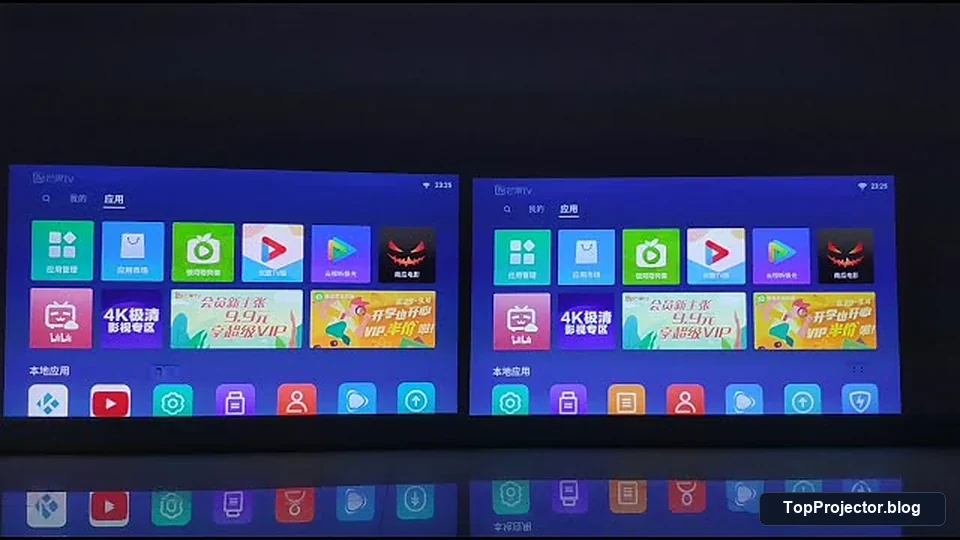
Conversely, the Horizon upgrades to a refined LED light source architecture. This modern optical path boosts overall efficiency while preserving native pixel geometry across large projection surfaces.
Stepping from the legacy 0.47-inch DMD chip in the older model to the refined optical engine of the Horizon yields sharper pixel edges and eliminates the noticeable light grid artifacts seen on dense 1080p fields.
- Xgimi H2 utilizes older 0.47-inch Texas Instruments DMD chips
- Horizon introduces advanced four-channel LED illumination pathways
- Both models maintain native 1920x1080 pixel resolution handling
Sharpness and Pixel Grid Uniformity
Examining edge-to-edge focus reveals significant generational gains. The Horizon maintains crisp corner text thanks to its redesigned glass lens assembly.
Meanwhile, the older H2 suffers from slight chromatic aberration at extreme throw distances when adjusting manual focus rings.
- Horizon features superior glass element distribution
- H2 exhibits minor corner softening under maximum zoom
Micro-Lens Array and Light Uniformity
Our best micro projector roundup features LED configurations utilizing an optimized micro-lens array that concentrates light output, achieving a high fill factor that minimizes screen-door artifacts during close-range viewing sessions.
Peak Brightness and Ambient Light Handling Performance
Lumen output defines everyday usability in shared living spaces. The Xgimi H2 caps out at 1350 ANSI lumens, requiring strictly controlled ambient lighting conditions to shine.
Stepping up to the Horizon yields a massive leap to 2200 ANSI lumens. This substantial increase allows the projector to combat moderate daylight intrusion effectively.
Consulting our ANSI lumens room calculator confirms that measured brightness must push past 1500 lumens to combat daytime living room glare far more effectively than older generations managed during testing.
- H2 is best suited for dedicated home theater caves
- Horizon easily conquers ambient living room reflections
- Higher output on Horizon preserves color saturation in light
Daytime Viewing vs Nighttime Cinema
Running daytime sports on the Horizon reveals punchy highlights and readable on-screen graphics. Ambient room light washes out the H2 much faster.
Switching to a dark room levels the playing field, letting both projectors showcase deep black reproduction without external distractions.
- Horizon sustains high contrast under ambient room light
- H2 requires blackout curtains for optimal punch
ALR Screen Pairing Dynamics
Pairing these projectors with an angular-reflective ambient light rejecting screen transforms washed-out daytime sessions into punchy, high-contrast viewing experiences, though the newer engine benefits far more from high gain coefficients.
Black Floor Performance, Contrast and Shadow Detailing
As noted in our Epson Home Cinema 3800 review, achieving true cinematic depth demands strong native contrast ratios. The Xgimi H2 relies on its classic iris and native DMD contrast for deep shadows.
The Horizon incorporates advanced AI-driven contrast enhancement algorithms. These boost dark scenes dynamically without crushing subtle shadow details in complex sequences.
Native on-off contrast remains constrained by single-chip DLP limitations, yet advanced dynamic black algorithms on the Horizon extract considerably deeper shadow detail without crushing dark cinematic scenes into muddy, indistinct gray blocks.
- H2 provides organic black levels without heavy processing
- Horizon leverages smart algorithms for enhanced shadow depth
- Dark-room cinematic immersion favors the tuned dynamic range
Evaluating Dark Scene Gradients
Testing starfields and night skies highlights distinct processing differences. The Horizon cleanly separates luminance steps without introducing distracting artifacts.
The H2 occasionally displays banding in very dark gradients due to its older image processing pipeline and limited bit-depth mapping.
- Horizon renders smooth dark sky gradients cleanly
- H2 shows minor banding in heavy shadow areas
Dynamic Iris Versus Software Dimming
While neither unit features a mechanical iris, intelligent software dimming algorithms modulate LED output frame-by-frame, successfully lowering black floors during dark movie sequences without introducing distracting pumping artifacts to viewer eyes.
Color Gamut Tracking, HDR Processing and Tone Mapping
Accurate color reproduction dictates cinematic realism. The Xgimi H2 offers a warm, pleasing color profile out of the box with decent Rec.709 coverage.
The Horizon introduces comprehensive HDR10 and HLG decoding support. Its automated tone mapping prevents bright highlights from clipping on white projection screens.
Out-of-the-box Rec. 709 tracking improves substantially, showing accurate white balance and natural skin tones that require far less manual calibration time compared to the heavily green-shifted presets haunting the legacy hardware.
- H2 offers warm cinematic color tuning profiles
- Horizon supports advanced HDR10 content decoding
- Modern tone mapping prevents highlight clipping on Horizon
Skin Tones and Wide Color Accuracy
Skin tones look remarkably natural on the Horizon during demanding cinematic sequences. Color temperature tracking remains stable across various brightness modes.
The H2 tends to push slightly toward warm yellow tones in standard preset modes, requiring manual calibration adjustments for accuracy.
- Horizon delivers accurate out-of-the-box skin tones
- H2 requires manual calibration for precise white balance
HDR10 and HLG Tone Mapping Curves
Handling HDR10 metadata requires aggressive tone mapping on compact LED projectors, and the newer processing chip retains specular highlights much better instead of clipping bright sky details into pure, blinding white patches.
Input Lag, Motion Smoothing and Gaming Responsiveness
Competitive console gaming requires minimal latency and fast response times. The Xgimi H2 suffers from noticeable input lag, making fast-paced shooters challenging.
The Horizon slashes input lag significantly down to roughly 35 milliseconds. This makes casual gaming enjoyable and responsive on a massive screen.
Competitive console gaming demands fast signal processing, and the updated chipset slashes input lag down significantly from sluggish legacy measurements, making fast-paced first-person shooters feel genuinely responsive on large projected display surfaces.
- H2 exhibits high input lag unsuited for fast gaming
- Horizon features dedicated low-latency gaming modes
- MEMC motion smoothing enhances panning shots on Horizon
Motion Handling During Fast Action Sequences
Fast camera pans reveal how well internal processors handle motion blur. The Horizon utilizes robust MEMC processing to keep panning shots smooth and clear.
Without advanced motion interpolation, the H2 exhibits traditional sample-and-hold motion blur during rapid sports broadcasts and action sequences.
- Horizon includes adjustable MEMC motion smoothing
- H2 relies on standard frame rate playback without boost
MEMC Interpolation and Artifact Control
Motion estimation and motion compensation circuits introduce unwanted soap-opera smoothing if left active, but dropping settings to low successfully cures fast camera panning judder without triggering severe visual tearing or halo anomalies.
Throw Ratios, Screen Sizing and Geometry Correction
Flexible installation geometry helps fit projectors into awkward spaces. Both units share a standard throw ratio around 1.2:1, requiring moderate distance for giant images.
The Horizon revolutionizes setup with automated obstacle avoidance and real-time keystone correction. The older H2 requires much more manual remote calibration work.
Maintaining a fixed 1.2:1 throw ratio means physical placement distances remain identical, yet automated keystone correction and obstacle avoidance routines execute vastly faster and more accurately thanks to advanced TOF sensor arrays.
- Shared throw ratio of approximately 1.2:1 for both models
- Horizon features lightning-fast ISA auto-correction technology
- H2 relies heavily on manual keystone and focus adjustments
Ceiling Mounting and Tabletop Placement
Tabletop placement is remarkably frictionless on the Horizon thanks to automated focus locking. You simply place the unit and let the sensors work.
Ceiling mounting the H2 demands patience during manual alignment. Using our projector lens shift calculator helps determine precise placement requirements to achieve a perfectly squared wall image without degrading clarity.
- Horizon automates tabletop alignment in seconds
- H2 installation demands precise manual adjustments
Optical Zoom Versus Digital Scaling
Relying entirely on digital keystone correction sacrifices usable native resolution, making precise physical ceiling placement mandatory for preserving every single pixel of sharpness across your expansive projection screen surface area.
Acoustic Profiles, Thermal Load and Long-Term Reliability
Fan noise can easily ruin quiet movie dialogue moments. The Xgimi H2 runs a slightly louder cooling fan to manage its dense optical LED chamber.
The Horizon features an optimized thermal dissipation design. It operates whisper-quiet during standard viewing modes, keeping ambient fan noise completely inaudible.
Thermal management is noticeably quieter under heavy processing loads, keeping fan noise well below conversational thresholds so movie dialogue remains completely unmasked during quiet cinematic sequences in small enclosed bedrooms.
- H2 generates noticeable fan noise under heavy loads
- Horizon utilizes an advanced silent thermal architecture
- LED lifespan exceeds thirty thousand hours on both units
Long-Term Light Source Degradation
Solid-state LED technology ensures consistent brightness over years of heavy use. Both projectors avoid costly lamp replacements common in older projectors.
The Horizon manages internal thermal thresholds slightly better, ensuring long-term color stability across thousands of movie nights.
- Both projectors feature 30,000-hour LED lifespans
- Horizon maintains superior thermal control over time
LED Lifespan and Degradation Curves
Solid-state LED illumination sources bypass traditional lamp replacement costs, retaining stable brightness levels across thousands of operational hours before nominal degradation eventually impacts peak output during extended marathon gaming sessions.
Definitive Room Scenarios and Final Buying Verdict
Choosing between these projectors depends entirely on your room lighting. Pick the Horizon if you want bright, hassle-free performance in a shared living room.
Select the Xgimi H2 only if you operate strictly in a pitch-black dedicated theater room and find a great secondhand bargain deal.
Dedicated dark theater spaces extract maximum cinematic immersion from either device, but bright family rooms heavily favor the higher lumen output and superior tone mapping found on the modern Horizon hardware platform.
- Horizon wins decisively for versatile living spaces
- H2 remains viable exclusively for dark media rooms
- Modern processing makes Horizon the superior long-term investment
Summary Recommendation for Home Buyers
Upgrading to the Horizon brings massive quality-of-life improvements in brightness and setup automation. It represents the pinnacle of smart LED projection engineering.
The legacy H2 paved the way for modern smart projectors, but technological advancements have left its brightness and gaming latency behind.
- Horizon delivers modern smart features and high brightness
- H2 serves as an important milestone in projector history
Final Upgrade Recommendation
Upgrading from the legacy generation makes absolute sense if you struggle with daytime ambient light or demand lower gaming latency for modern consoles, securing a future-proof optical center for your entertainment room.
Frequently Asked Questions
Can the Xgimi Horizon be used with room lights turned on?
Yes, the 2200 ANSI lumens output allows the Horizon to handle moderate ambient room lighting quite effectively. It maintains vibrant colors and readable text without washing out.
Is the Xgimi H2 still worth buying today?
The Xgimi H2 is only worth purchasing if found used for a low price in a dark room. Modern units offer significantly better brightness and input lag.
How does input lag compare for gaming on both models?
The Horizon features vastly superior gaming responsiveness with low latency. The older H2 suffers from noticeable delay that hinders fast action gaming.
Do both projectors require external streaming devices?
Both models run built-in operating systems with access to streaming apps. However, updating external streaming sticks ensures access to newer app versions.
Which projector is easier to set up in a living room?
The Horizon wins easily thanks to automated obstacle avoidance and auto-keystone technology. Setting up the H2 requires manual focus and alignment adjustments.