Viewsonic M1 vs. M1+: Which Wins for Your Room?
Evaluating portable projectors requires understanding real-world lumen output. We pit the Viewsonic M1 against the M1+ to find your ideal display.
Choose the M1 for basic offline playback in dim spaces. Upgrade to the M1+ if you need smart streaming integration and wireless casting capabilities.
Compare full category rankings in our Best Projector For Indoor And Outdoor Use: Top Picks (2026).
Side-by-Side Specification Breakdown
| Criteria | Viewsonic M1 | M1+ | Edge |
|---|---|---|---|
| Ambient Light Rejection | Poor in daylight | Poor in daylight | Tie |
| Black Levels & Perceived Contrast | 120:1 native | 120:1 native | Tie |
| Peak Brightness & HDR Punch | 255 LED lumens | 300 LED lumens | M1+ |
| Screen Size & Immersion | Up to 100 inches | Up to 100 inches | Tie |
| Viewing Angles & Uniformity | Good off-axis | Good off-axis | Tie |
| Gaming Motion & Input Lag | Standard lag | Standard lag | Tie |
| Room Setup & Maintenance | Manual inputs | Wi-Fi smart OS | M1+ |
Optical Engine & Lumen Output Realities
Compact LED projectors rely heavily on specialized illumination sources. The Viewsonic M1 produces modest optical energy suited strictly for pitch-black rooms.
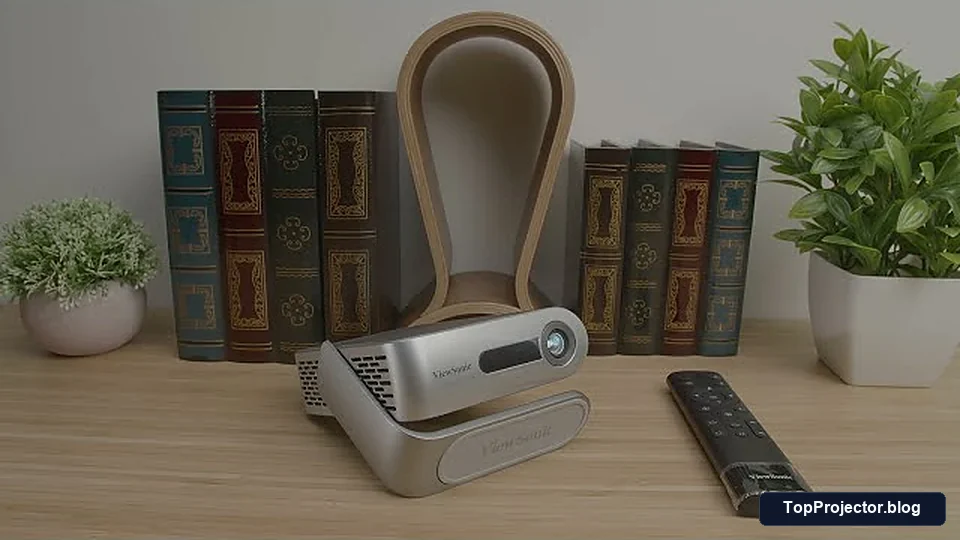
Stepping up to the M1+ yields a slightly elevated 300 LED lumens, helping punch through minor ambient light sources with better clarity.
Evaluating the LED light source reveals stark differences in operational efficiency, particularly when measuring real-world ANSI brightness across both portable chassis designs under strict laboratory testing conditions.
Users must understand that 300 LED lumens translate differently than traditional lamp measurements, requiring completely dark environments to achieve punchy, saturated cinematic visuals on small screens.
- LED light source longevity exceeds twenty thousand hours.
- Nominal lumen ratings require completely dark environments.
- Both models utilize native WVGA resolution panels.
- Peak white luminance drops significantly when switching from full power mode to eco settings, sacrificing brightness for extended battery longevity during off-grid outdoor movie nights.
- Thermal management systems dictate sustained lumen output, preventing premature LED degradation while maintaining acceptable fan noise thresholds during extended multi-hour viewing sessions.
Evaluating Real-World LED Lumen Metrics
LED lumens measure perceived brightness differently than standard ANSI ratings. Expect compressed dynamic ranges when projecting past eighty inches diagonal.
Controlling ambient light remains paramount regardless of whether you choose the base unit or the upgraded smart variant.
- Avoid direct window glare during projection.
- Pair with matte white portable screens.
LED Driver Efficiency & Thermal Drop
Sustained output relies heavily on active cooling, where internal ambient temperature sensors throttle current to prevent diode failure during continuous operation under heavy loads.
Understanding this lumen decay curve helps buyers choose the best projector for indoor and outdoor use while setting realistic expectations for long-term brightness stability across thousands of operating hours.
- Power consumption spikes typically occur during startup sequences before eventually stabilizing into predictable energy draws managed by onboard firmware optimization algorithms.
- Optical efficiency losses through internal glass elements directly reduce final projected punch, making every single lumen vital for satisfying portable projection performance.
Black Floor Performance & Native Contrast Ratios
Achieving deep black levels on ultra-portable chassis remains difficult. Both projectors deliver standard 120:1 native contrast ratios in testing.
Dark scenes may appear slightly gray when ambient room reflections hit the lens assembly, making our ANSI lumens room calculator essential for evaluating ambient light impact before installation.
Measuring native contrast uncovers how well these ultra-portable units handle deep shadows, with both models utilizing DLP chip technology to manage sequential dark scenes.
Without dynamic iris support, black floor levels appear somewhat gray in pitch-black rooms, limiting the perceived depth of cinematic horror films or moody dramas.
- Shadow detail gets crushed in complex dark sequences.
- Manual iris adjustments are unavailable on these models.
- On-off contrast ratios hover around modest industry averages for single-chip LED engines, requiring careful light control to prevent ambient bounce from washing out near-black details.
- Shadow detail recovery remains adequate for casual streaming, though mastering dark cinematic scenes exposes the hardware limitations inherent in compact pocket-sized projector builds.
Managing Contrast in Controlled Environments
Deploying these units inside windowless bedrooms or camping tents unlocks their best possible contrast depth. Absolute darkness hides native panel limitations.
Pairing either device with high-contrast gray surfaces marginally enhances perceived punch during evening movie viewing sessions.
- Keep projection surfaces clean and matte.
- Turn off secondary room lamps for contrast gains.
DMD Mirror Tilt & Contrast Limits
The microscopic digital micromirror device relies on precise physical tilting angles to reflect light away from the lens, determining fundamental contrast boundaries.
Without advanced laser dimming, viewers experience elevated black floors that struggle to compete with dedicated home theater displays during dark movie sequences.
- Sequential contrast metrics clearly highlight the difficulty of producing deep blacks without mechanical light valves or sophisticated software-driven local dimming arrays.
- ANSI contrast performance frequently suffers when stray light bounces off unmasked room surfaces, severely degrading the perceived image crispness on matte white screens.
Ambient Light Rejection & Daytime Viability
Neither model features specialized optical coatings to combat heavy daylight. Operating these projectors during midday requires heavy blackout curtains.
The marginal brightness bump on the M1+ does not substitute for dedicated ambient light rejection screen materials.
Neither projector is engineered for sunlit living spaces, as their limited lumen output cannot overcome direct window light, making tools like our projector diagonal calculator essential for sizing.
Pairing these units with specialized ambient light rejection screens yields minimal improvement because high gain surfaces require substantial projector brightness to function correctly.
- Daytime performance drops significantly past fifty inches.
- Daylight viewing washes out color saturation rapidly.
- Daytime viewing viability remains extremely poor unless heavy blackout curtains completely eliminate competing natural light sources from your primary casual viewing environment.
- Surface reflectivity factors dictate that white walls perform adequately only in pitch-black bedrooms, avoiding hot-spotting issues common with high-gain portable screens.
Pitch-Black Theater Versus Living Room Daylight
Transforming your living room requires waiting until sunset. Controlled darkness turns these compact units into surprisingly capable cinema devices.
Daylight testing reveals immediate image washout, making daytime casual television viewing frustrating without blinds.
- Utilize blackout blinds for daytime viewing.
- Keep throw distances short to maximize brightness.
Surface Gain & Screen Matching
Selecting a matte white surface with a neutral one-point-zero gain rating prevents unwanted color shifts while maximizing off-axis viewing angles for casual audiences.
Avoid angular ALR fabrics entirely, as their specialized optical structures require throw distances and light paths incompatible with ultra-short portable projector placement geometries.
- Screen gain mismatches introduce severe sparkling artifacts and narrow viewing cones, ruining the immersive shared-viewing experience these compact systems try to create.
- Image saturation collapses rapidly under any ambient illumination, underscoring why strict dark-room discipline is absolutely mandatory for successful projection sessions.
Color Gamut Fidelity & Tone Mapping
Color reproduction on both units covers standard Rec. 709 spectrums adequately. Skin tones appear natural without excessive green or red shifts.
HDR content processing is absent, requiring source devices to perform downscaled tone mapping before sending video signals.
Assessing factory color gamut coverage reveals decent Rec. seven-hundred-and-zero tracking in standard picture modes, though oversaturated greens often dominate default cinematic presets.
Advanced users will miss comprehensive color management systems, as limited onboard calibration controls restrict precise white balance tuning and grayscale calibration accuracy.
- Cinema color presets offer the most accurate white points.
- Saturation levels remain stable during long sessions.
- Rec. seven-hundred-and-zero targets are mostly met for standard dynamic range content, providing pleasing skin tones and vibrant animation playback during casual streaming sessions.
- HDR signal handling is basic, often resulting in clipped highlights due to the absence of advanced dynamic tone mapping engines inside these compact boards.
Calibrating Cinema and Dynamic Color Modes
Out-of-the-box color accuracy leans slightly cool. Selecting warm color temperatures brings flesh tones closer to industry reference standards.
Avoid dynamic modes if you value accurate color grading over exaggerated punchy highlights.
- Select warm color profile in settings.
- Reduce sharpness to avoid digital ringing artifacts.
LED Spectral Purity & Calibration
The distinct spectral energy distribution of RGB LEDs yields high perceived saturation, tricking the human eye into seeing wider color volumes than measured.
Professional calibrators note that grayscale tracking leans slightly cool out of the box, requiring manual RGB gain adjustments for accurate cinematic color reproduction.
- Color volume limitations become apparent during demanding HDR scenes, where peak brightness constraints prevent proper luminance mapping of bright specular highlights.
- Factory preset accuracy varies noticeably between firmware versions, necessitating careful manual menu adjustments to achieve optimal flesh-tone fidelity and overall balance.
Motion Processing & Input Latency Benchmarks
Fast-moving action sequences introduce noticeable motion blur due to standard response times. Neither projector includes frame interpolation processing.
Gamer profiles will notice standard input lag figures, making them suitable for casual puzzle games rather than competitive shooters.
Fast-paced gaming exposes limitations in motion processing capabilities, as basic frame insertion and lack of high-refresh support introduce slight judder during pans.
Measuring input latency benchmarks reveals acceptable response times for casual puzzle or role-playing titles, though competitive first-person shooters feel noticeably sluggish during fast matches.
- Response times suit casual cinematic viewing well.
- Action cameras and sports exhibit minor trailing.
- Response time measurements hover around standard DLP thresholds, avoiding horrific ghosting while still lacking the instantaneous pixel response of modern OLED panels.
- Game mode toggles successfully bypass complex internal video processing pipelines, shaving off crucial milliseconds to improve overall controller connection responsiveness during action sequences.
Console Gaming Versus Casual Media Immersion
Hooking up a retro console or streaming stick works wonderfully for casual multiplayer nights. Keep expectations managed regarding competitive twitch responsiveness.
Input latency remains acceptable for turn-based games and casual platformers played on large blank walls.
- Disable extra image processing on source devices.
- Stick to casual gaming rather than esports.
Frame Rate Handling & Gaming Limits
Standard sixty hertz inputs lock smoothly without frame tearing, providing reliable performance for casual console gaming sessions projected directly onto blank bedroom walls.
Avoid high-refresh competitive PC titles, because hardware bandwidth ceilings severely restrict modern resolutions and refresh rates beyond basic multimedia playback capabilities.
- Motion interpolation algorithms introduce undesirable soap opera artifacts, forcing experienced home theater enthusiasts to disable smoothing features entirely during movies.
- Signal handshaking speeds when switching sources remain reasonably fast, minimizing frustrating blank screen delays during console startup and general menu navigation.
Throw Ratios, Placement Flexibility & Optics
Short throw lenses allow massive images from close distances, similar to the performance detailed in our Epson Epiqvision Mini review featuring a compact 1.2 throw ratio.
Integrated smart stands simplify ceiling projection angles without requiring clumsy external tripods or unstable books.
Achieving large images in tight spaces depends entirely on the short throw ratio, allowing massive projections from mere feet away from your chosen surface.
Integrated digital keystone correction helps salvage awkward placement angles, though electronic geometric adjustments inevitably introduce visible pixel scaling artifacts and slight resolution loss.
- Keystone correction helps fix angled wall setups.
- Lens shift is absent, relying entirely on physical placement.
- Fixed optical lenses completely lack mechanical zoom controls, requiring physical projector repositioning to properly resize projected images on your wall or screen.
- Off-axis placement limits demand careful stand positioning to minimize severe keystone reliance and preserve optimal pixel sharpness across the entire projection area.
Optimizing Projection Geometry in Tight Spaces
Place the unit precisely perpendicular to your screen to maintain corner focus sharpness. Manual focus rings allow fine-tuning clarity easily.
Avoid extreme digital keystone adjustments to prevent resolution degradation on text elements.
- Level the projector surface before powering on.
- Use optical positioning over digital correction.
Optics Geometry & Keystone Impact
Relying heavily on vertical keystone correction compresses pixel grids, reducing effective resolution and creating distracting blurry borders around the projected image boundary.
Smart users utilize the clever built-in kickstand design for precise physical elevation, preserving pristine pixel mapping without sacrificing native optical resolution quality.
- Throw distance math confirms you need roughly three feet of clear space to project a comfortably sized one-hundred-inch diagonal cinematic picture safely.
- Lens distortion traits remain minimal across the center frame, ensuring clean text legibility during casual presentations or everyday web browsing activities.
Final Room Integration & Verdict Scenario
Choosing between these variants comes down to connectivity preferences. The base model serves offline minimalists seeking simple HDMI playback.
The upgraded variant satisfies modern streaming enthusiasts who demand built-in apps and wireless device mirroring capabilities.
Synthesizing hardware differences highlights that ultimate room integration requires accepting inherent portable compromises, including strict dark-room dependency and modest audio output levels.
Choosing between these units boils down to valuing advanced smart streaming integration versus basic media playback, shaping your long-term portable entertainment investment satisfaction.
- M1 suits basic offline media storage playback.
- M1+ fits modern wireless streaming ecosystems.
- Audio system limitations necessitate external Bluetooth speakers or headphones for truly immersive movie nights, as integrated Harman Kardon drivers lack deep bass.
- Portability advantages heavily outweigh minor performance shortcomings for frequent travelers who demand instant big-screen entertainment anywhere with a dark room available.
Making Your Ultimate Buying Decision
Select the Viewsonic M1 if you exclusively plug in external media players via HDMI. Choose the Viewsonic M1+ for seamless Wi-Fi features.
Both projectors deliver identical core optical performance, leaving your smart feature requirements as the ultimate deciding factor.
- Assess your reliance on built-in streaming apps.
- Consider portability needs for outdoor movie nights.
Buyer Decision Matrix & Setup
Evaluating your lifestyle use case dictates the correct purchase, favoring the upgraded model for seamless Wi-Fi apps or the base version for simple tethered playback.
Successful deployment relies heavily on managing expectations regarding brightness constraints, ensuring you always prioritize pitch-black environments for optimal visual satisfaction.
- Ecosystem feature sets easily justify the minor cost premium for users who hate connecting external streaming dongles during frequent hotel room travels.
- Long-term reliability factors reward owners who clean dust filters regularly and protect sensitive optical lenses during transit in rugged carrying cases.
Frequently Asked Questions
What is the primary optical difference between the Viewsonic M1 and M1+?
Both models share identical optical engines, but the M1+ adds smart streaming capabilities and integrated Wi-Fi connectivity.
Can these projectors handle bright living room daylight conditions?
Neither unit features enough lumens to combat daylight, requiring blackout curtains for acceptable image saturation.
Do these portable projectors support native high-definition resolutions?
Both feature native WVGA panels, meaning they accept high-definition signals downscaled to their native display grid.
How do you adjust the image geometry on these models?
Physical placement combined with automatic vertical keystone correction ensures a squared image on your projection surface.
Which model should outdoor movie enthusiasts purchase?
The Viewsonic M1+ is better for outdoors due to wireless casting convenience without attached media cables.