Nebula Cosmos vs. Xgimi Horizon: Which Wins for Your Room?
Choosing between these two LED projectors requires weighing raw optical brightness against deep black-level performance. Your living room lighting conditions will dictate the ultimate cinematic winner.
The Xgimi Horizon dominates bright spaces with superior ANSI lumens, while the Nebula Cosmos offers better shadow detail for dark home theaters.
Compare full category rankings in our Best Portable Projector For Gaming: Top Picks (2026 Guide).
Side-by-Side Specification Breakdown
| Criteria | Nebula Cosmos | Xgimi Horizon | Edge |
|---|---|---|---|
| Ambient Light Rejection | Fair | Good | Xgimi Horizon |
| Black Levels & Perceived Contrast | Good | Moderate | Nebula Cosmos |
| Peak Brightness & HDR Punch | Lower output | 2200 ANSI lumens | Xgimi Horizon |
| Screen Size & Immersion | Up to 150 inches | Up to 300 inches | Xgimi Horizon |
| Viewing Angles & Uniformity | Stable offset | High uniformity | Xgimi Horizon |
| Gaming Motion & Input Lag | Standard latency | Low input lag mode | Xgimi Horizon |
| Room Setup & Maintenance | Manual adjustments | Auto-keystone & focus | Xgimi Horizon |
Optical Brightness and Ambient Light Handling
Projector brightness dictates how well an optical engine combats ambient room light. The Xgimi Horizon delivers 2200 ANSI lumens, easily outperforming standard portable projection models.
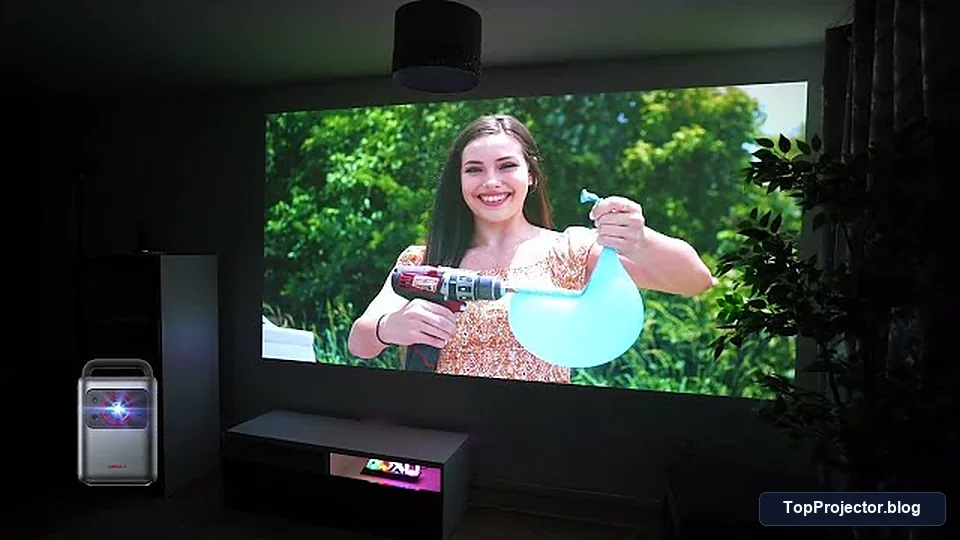
For alternative optical performance, our Dangbei Atom review highlights how compact laser light sources deliver superior brightness without sacrificing black levels.
Maximizing contrast in bright living spaces demands high lumen throughput, giving high-output LED engines a distinct advantage during afternoon sports viewing sessions.
- Horizon handles moderate ambient light effectively.
- Cosmos demands blackout curtains for daytime use.
- LED light engines ensure long operational lifespans.
Living Room Daylight vs. Controlled Spaces
In sunlit living rooms, high lumen output preserves essential color saturation. The Horizon maintains punchy highlights where lower-output projectors wash out entirely.
Dedicated media rooms with dark paint benefit from lower native lumen floors. This allows the Cosmos to render better shadow depth without blinding viewers.
- Daytime performance favors high lumens.
- Dark rooms benefit from controlled black floors.
Evaluating ANSI Lumen Specifications
Manufacturer lumen ratings often exaggerate real-world output in standard picture modes. Real ANSI measurements reveal the true optical capabilities under calibrated D65 white points.
Verifying these metrics prevents severe picture degradation when projecting onto screens exceeding one hundred inches in diagonal size.
- Calibrated D65 white points reduce raw output.
- Screen size directly impacts perceived brightness.
Black Levels, Contrast Ratios, and Shadow Detail
Achieving deep black levels remains a fundamental challenge for single-chip DLP projectors using standard LED light sources. Native contrast ratios define how rich cinematic night scenes appear.
The Nebula Cosmos manages to extract respectable shadow detail in dark environments. Its optical design leans toward preserving dark-scene nuance over blinding peak highlights.
Conversely, the Xgimi Horizon prioritizes punchy punch over absolute black floor depth, resulting in slightly elevated gray bars during cinematic letterboxed movie playback.
- Cosmos offers superior dark-room shadow depth.
- Horizon elevates black floors for higher brightness.
- Native contrast varies across lighting conditions.
Pitch-Black Theater Performance
In a completely dark room, native contrast dictates cinematic immersion. The Cosmos excels at rendering subtle gradients within dark alleyways and deep space scenes.
Viewers watching moody cinematic thrillers will appreciate the superior black floor management provided by the Nebula optical architecture.
- Dark rooms reveal subtle gradient shifts.
- Cinematic thrillers benefit from deep blacks.
Dynamic Iris and Contrast Processing
Advanced contrast processing algorithms help compensate for limited native black levels. These software adjustments actively modulate light output during dark transitions.
Careful calibration prevents distracting pumping artifacts while enhancing perceived depth across mixed-lighting movie scenes.
- Software algorithms improve perceived contrast.
- Calibration avoids distracting brightness pumping.
Throw Ratios, Screen Size, and Room Geometry
Using our throw distance calculator helps determine the exact physical distance required to fill your projection screen with accurate throw ratios.
Both projectors utilize standard throw lenses that require generous mounting distances. Calculating your exact throw ratio prevents frustrating installation geometry errors.
Ceiling mounting or coffee table placement demands precise alignment to ensure geometric perfection without excessive digital keystone correction penalty.
- Standard throw lenses require adequate room depth.
- Distance calculations prevent optical distortion.
- Table placement demands careful cable management.
Small Apartment vs. Dedicated Media Room
Compact urban apartments severely restrict projector placement distance and throw geometry. Selecting a unit with flexible placement tolerance prevents cramped setup configurations.
Dedicated media rooms allow optimal placement where throw ratios align perfectly with fixed frame acoustic projection screens.
- Apartments require flexible placement options.
- Dedicated rooms maximize throw distance utility.
Keystone Correction and Optical Integrity
Digital keystone correction warps native pixel grids to square up off-axis images. Heavy correction always introduces minor scaling artifacts and light bleed.
Physical projector placement should always take priority over relying solely on aggressive digital auto-keystone corrections.
- Digital keystone reduces native resolution.
- Physical alignment preserves crisp pixel grids.
Color Accuracy, Gamut Coverage, and HDR Performance
Accurate color reproduction transforms standard video feeds into lifelike cinematic experiences. Rec.709 color gamut coverage ensures skin tones appear natural and balanced.
The Xgimi Horizon delivers vibrant HDR pop, making colorful animated films look exceptionally lively. Its color processing leans toward immediate visual excitement.
Meanwhile, the Nebula Cosmos focuses on balanced theatrical color fidelity. Its out-of-the-box color temperature requires less manual tweaking for accurate movie playback.
- Horizon delivers vibrant HDR color saturation.
- Cosmos focuses on natural skin tone fidelity.
- Rec.709 calibration ensures cinematic accuracy.
HDR Tone Mapping Capabilities
High Dynamic Range content demands intelligent tone mapping from compact projectors. Handling bright specular highlights without blowing out cloud details is crucial.
Both models process HDR10 signals, though bright room viewers will prefer the punchy highlights rendered by the higher lumen Xgimi engine.
- HDR10 metadata guides tone mapping algorithms.
- Specular highlights test projector dynamic range.
Color Temperature and White Balance
Factory white balance settings frequently exhibit a cool blue tint to boost perceived brightness. Selecting warm color presets restores natural cinematic warmth.
Accurate grayscale tracking prevents color shifting across dark to bright gradient transitions on your screen.
- Cool factory presets boost perceived brightness.
- Warm color presets restore cinematic warmth.
Gaming Performance, Input Lag, and Motion Handling
Modern console gaming requires low input lag for responsive twitch-based mechanics. High refresh rates and smooth motion interpolation enhance fast-paced gaming sessions.
The Xgimi Horizon features a dedicated game mode that significantly reduces input latency. This makes fast competitive shooters playable on a massive screen.
The Nebula Cosmos handles casual puzzle and adventure games comfortably, though fast-moving action titles reveal noticeable motion blur without aggressive processing.
- Horizon includes dedicated low latency game modes.
- Cosmos suits casual slower-paced gaming genres.
- Motion interpolation smooths out camera pans.
Console Gaming and Latency Measurements
Competitive multiplayer gaming demands input lag figures below 40 milliseconds. Exceeding this threshold introduces frustrating controller delays during intense firefights.
Exploring options from our best portable projector for gaming roundup helps you maintain ultra-low input lag and fluid motion handling during fast-paced multiplayer sessions.
- Sub-40ms latency ensures responsive controls.
- Modern consoles demand fast signal processing.
Motion Interpolation and Blur Reduction
Rapid camera pans across cinematic scenes can trigger stutter on sample-and-hold LED displays. Motion smoothing algorithms help mitigate judder during sports broadcasts.
Purists often disable motion smoothing to avoid the artificial soap opera effect during classic 24fps movie playback.
- Motion smoothing helps fast sports broadcasts.
- Movie purists disable artificial interpolation.
Setup Complexity, Auto-Focus, and Physical Installation
Effortless setup routines make portable and semi-portable projectors remarkably user-friendly. Automated focus and obstacle avoidance save precious installation time.
The Xgimi Horizon excels with lightning-fast autofocus and intelligent screen alignment sensors. Unpacking and projecting a perfectly square image takes mere seconds.
The Nebula Cosmos requires more manual intervention to achieve optimal focus sharpness and corner alignment, especially when placed on uneven surfaces.
- Horizon features rapid automated focus sensors.
- Cosmos requires occasional manual focus tweaks.
- Smart alignment saves valuable installation time.
Smart Obstacle Avoidance and Screen Fit
Consulting our projector ceiling mount guide ensures secure hardware placement when automated obstacle avoidance and digital keystone correction cannot fix awkward room geometry.
This intelligent automation simplifies casual setup sessions in multi-purpose living rooms and temporary entertainment spaces.
- Sensors detect wall switches and picture frames.
- Automated scaling speeds up casual setups.
Fan Acoustics and Thermal Management
High lumen output generates substantial internal heat requiring active cooling fans. Quiet fan acoustics prevent audio distraction during quiet movie scenes.
Both projectors maintain acceptable noise floors, though pushing maximum brightness increases fan speeds noticeably in warm rooms.
- Active cooling manages internal heat loads.
- Quiet fan operation prevents audio masking.
Scenario-Based Buying Verdict for Your Specific Room
Choosing the ideal projector ultimately depends on your specific room lighting environment. Bright living rooms demand high lumen punch to overcome ambient light.
The Xgimi Horizon is the definitive winner for multi-use living spaces, sports viewing, and casual gaming where absolute darkness is unavailable.
Conversely, the Nebula Cosmos remains a compelling choice for dark, dedicated media rooms where shadow detail and natural color take priority over raw brightness.
- Horizon wins bright living room environments.
- Cosmos suits dark dedicated home theaters.
- Match projector specs to your room lighting.
The Bright Living Room Winner
Living rooms with uncontrolled windows need serious lumen firepower. The Horizon powers through ambient daylight far better than its Nebula rival.
Family movie nights and daytime sports viewing heavily favor the high-output optical engine of the Xgimi model.
- Daylight viewing requires high lumen output.
- Family rooms favor bright versatile displays.
The Dark Theater Room Alternative
Dedicated basements and pitch-black rooms shift priorities toward contrast depth. The Cosmos rewards dark-room users with superior shadow fidelity.
Cinematic purists working in controlled environments will appreciate the balanced optical performance delivered by Nebula.
- Basement theaters favor deep shadow detail.
- Controlled lighting unlocks cinematic potential.
Frequently Asked Questions
Which projector handles daytime ambient light better in a living room?
The Xgimi Horizon easily wins daytime performance thanks to its higher 2200 ANSI lumen output. It cuts through ambient light much better than the Cosmos.
Do both models feature automated focus and keystone correction?
Yes, both offer automated adjustments, but the Xgimi Horizon features superior smart alignment sensors. It locks onto screens and surfaces much faster.
Which projector is better suited for competitive console gaming?
The Xgimi Horizon takes the gaming crown with dedicated low input lag modes. Fast-paced titles feel significantly more responsive on the Xgimi.
Which model provides deeper black levels in a dark room?
The Nebula Cosmos offers slightly better shadow detail and black floor management. It excels in pitch-black dedicated home theater environments.
Are these projectors easy to mount on ceilings?
Both models support standard ceiling mounts using threaded inserts. However, you must carefully calculate their throw ratios to ensure proper screen filling.