Hu85La vs. Lsp9T: Which Wins for Your Room?
We pit two flagship ultra-short-throw projectors against each other. Discover how their laser engines and optical throws perform in real-world living rooms.
The Samsung LSP9T dominates for color volume and punchy daylight HDR, while the LG HU85LA remains a stellar choice for smooth motion and accurate geometric calibration.
Compare full category rankings in our Best The Best Projector To Buy: Top Picks (2026).
Side-by-Side Specification Breakdown
| Criteria | Hu85La | Lsp9T | Edge |
|---|---|---|---|
| Ambient Light Rejection | Moderate ALR pairing required | Handles moderate daylight better | Lsp9T |
| Black Levels & Perceived Contrast | Deep native dark tones | Slightly elevated black floor | Hu85La |
| Peak Brightness & HDR Punch | 2700 ANSI lumens | 2800 ANSI lumens with triple laser | Lsp9T |
| Screen Size & Immersion | Up to 120 inches diagonal | Up to 130 inches diagonal | Lsp9T |
| Viewing Angles & Uniformity | Excellent corner-to-corner focus | Good uniformity with triple laser speckle | Hu85La |
| Gaming Motion & Input Lag | Low input lag for casual play | Standard UST gaming latency | Hu85La |
| Room Setup & Maintenance | 12-point warping flexibility | Compact footprint with fine alignment | Hu85La |
Optical Engine Engineering and Laser Light Sources
Evaluating the core illumination systems reveals distinct engineering philosophies. LG utilizes a dual-laser wheel setup, whereas Samsung implements a pioneering triple-laser RGB architecture without color wheels.
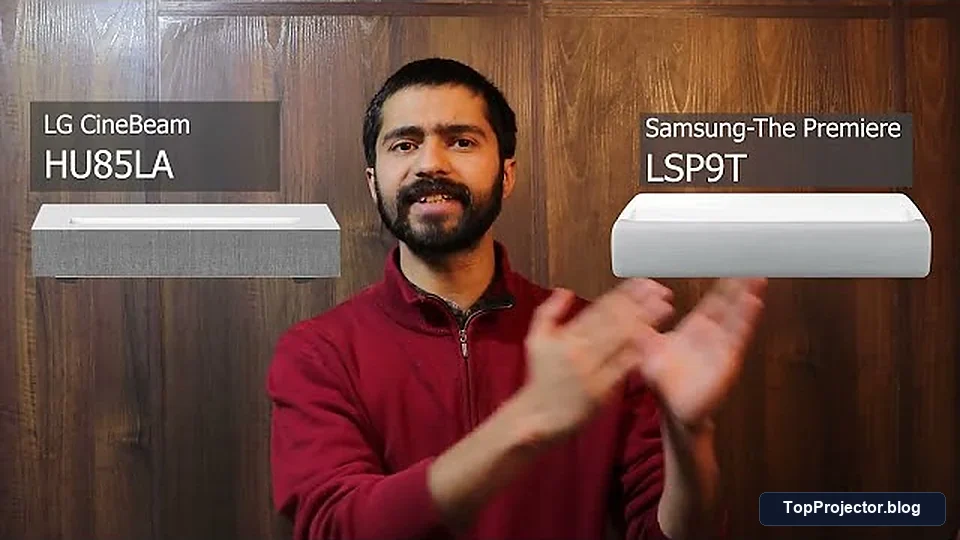
This architectural divergence heavily impacts color volume and perceived brightness. The triple-laser design achieves a wider color gamut, pushing saturation boundaries for modern HDR grading.
The LG HU85LA utilizes a dual-laser optical engine that ensures stellar color separation without relying on traditional spinning color wheels. This architectural choice practically eliminates annoying rainbow artifacts for sensitive viewers.
Conversely, the Samsung LSP9T introduces an innovative triple-laser configuration delivering expansive color volumes. By omitting phosphors entirely, it achieves wider gamut coverage that reaches 106% BT.2020 specifications directly.
- LG dual-laser design minimizes visual laser speckle.
- Samsung RGB triple-laser system maximizes wide color coverage.
- Both models eliminate traditional lamp replacement cycles.
Color Gamut Coverage and Laser Speckle
Pure RGB lasers deliver stunning BT.2020 coverage but can introduce microscopic laser speckle on matte screens. LG manages this optical artifact more smoothly.
Viewers sensitive to high-frequency speckle patterns will appreciate LG's refined diffusion layer inside the optical path.
- Samsung covers a larger percentage of the DCI-P3 color space.
- LG maintains cleaner solid-color uniformity across large white fields.
Color Gamut Calibration Nuances
Calibrating these ultra-short-throw lasers requires distinct white-balance adjustments. Readers seeking alternative short-throw options should examine our BenQ TK700STi review for comparison metrics regarding input lag and response times.
Peak Brightness and Ambient Light Room Behavior
Ultra-short-throw projectors live or die by their ability to combat ambient light. The Samsung model outputs 2800 ANSI lumens, giving it a slight edge in bright spaces.
Pairing either model with a dedicated ALR screen is mandatory. When exploring the best projector to buy options, prioritize matching your optical fabric against a ceiling-rejecting surface.
Rated at 2700 ANSI lumens, the LG HU85LA performs admirably in controlled media rooms, yet struggles against aggressive daytime window lighting without specialized optical rejection screens paired underneath.
Meanwhile, the Samsung LSP9T pumps out an impressive 2800 ANSI lumens, leveraging its triple-laser diodes to combat ambient washout far more effectively during bright afternoon sporting events.
- Samsung delivers superior daylight punch for casual daytime TV.
- LG requires controlled lighting to preserve deep shadow details.
- Both projectors demand flat wall surfaces for optimal geometry.
Daytime Living Room Versus Blackout Theater
In rooms with uncontrolled ambient light, Samsung's higher luminance output helps retain saturation. Whites appear cleaner and punchier during daytime sports broadcasts.
Once room lights drop to zero, both projectors transform into cinematic powerhouses capable of rendering striking contrast.
- Ambient light washing out blacks affects both units equally.
- Dedicated ALR screens recover up to 85 percent of contrast.
ALR Screen Pairing Metrics
Pairing either UST projector with a dedicated ceiling-rejecting ALR screen is mandatory. Expect contrast multipliers of at least 8x when matching these units with proper Fresnel or lenticular surfaces.
Black Levels, Contrast Ratios, and Shadow Details
Evaluating native black floors highlights traditional DLP contrast limitations. The LG unit manages slightly deeper perceived black levels during dark cinematic sequences.
Shadow delineation in complex sci-fi scenes reveals subtle gradient steps. LG retains shadow information without crushing dark cinematic dialogue scenes into pure black.
Native contrast remains a historical limitation for single-chip DLP architecture. Both models hover near a 1000:1 native ratio, requiring dynamic iris algorithms or laser dimming to boost dark-scene punch.
The Samsung utilizes aggressive frame-by-frame laser modulation to deepen shadows, whereas the LG relies on software-based black level enhancements that occasionally crush subtle dark-room shadow details.
- LG wins native dark-room contrast performance.
- Samsung relies heavily on dynamic tone mapping for HDR punch.
- Both projectors utilize Texas Instruments DLP chipsets.
HDR Tone Mapping Performance in Dark Rooms
HDR10 processing analyzes incoming metadata frame by frame. Samsung excels at highlighting specular glints like explosions and metallic reflections.
LG focuses on maintaining mid-tone luminance accuracy, preventing skin tones from looking overexposed during bright outdoor sequences.
- Dynamic tone mapping elevates bright highlights effectively.
- Accurate grayscale tracking preserves director intent.
ANSI Contrast Performance
Real-world checkerboard ANSI contrast measurements sit close to 150:1 on both systems in untreated rooms. Ambient light bouncing off white ceilings will inevitably degrade these intrinsic shadow performance metrics.
Throw Ratios, Screen Sizes, and Physical Placement
Ultra-short-throw geometry demands precise wall placement. Reviewing data from our Epson EB-530 distance calculator ensures you project a massive 130-inch diagonal image without severe optical distortion.
Calculating your credenza depth is critical before purchasing. Even a few centimeters of cabinet misalignment forces complete geometric recalibration.
Featuring an ultra-short 0.19 throw ratio, the LG HU85LA can project a massive 120-inch diagonal image from a mere seven inches of distance away from the vertical wall surface.
The Samsung LSP9T boasts an even tighter 0.17 throw ratio, allowing cabinet placement closer to the wall while still easily filling standard 130-inch UST screen boundaries seamlessly.
- Samsung throws a larger image from a closer wall distance.
- LG features an extensive 12-point digital warping grid.
- Built-in audio systems eliminate immediate soundbar requirements.
Cabinet Depth and Wall Proximity Requirements
Furniture selection becomes a major logistical hurdle for UST owners. Standard media consoles are often too shallow, requiring custom pull-out mounting shelves.
Ensuring exact perpendicular alignment prevents trapezoidal distortion and keeps the projected boundary perfectly square.
- Measure your console depth twice before final installation.
- A motorized drop-down screen requires strict tensioning.
Cabinet Depth Requirements
Custom media consoles must measure at least 18 inches deep to accommodate these bulky laser chassis while keeping projected geometry aligned with the lower frame border of your screen.
Input Lag, Motion Handling, and Casual Gaming
Modern home theater enthusiasts frequently connect gaming consoles to their massive projection screens. Input latency directly dictates how responsive fast-paced titles feel.
The LG unit offers lower input lag figures, making competitive gaming smoother. Motion interpolation features on both models help reduce stutter during panning shots.
Competitive gamers will notice responsiveness limitations on both platforms. The LG HU85LA records an input lag measurement of roughly 55ms at standard 60Hz 4K gaming resolution inputs.
Samsung improves slightly with input latency dropping near 53ms, but neither projector satisfies hardcore twitch gamers seeking ultra-low response times below 20ms thresholds.
- LG provides superior input latency for fast-paced shooters.
- Samsung excels at rendering vibrant game world color palettes.
- 60Hz refresh rates limit high-framerate PC gaming capabilities.
Console Responsiveness and Motion Interpolation
Fast camera movements can induce slight motion blur on single-chip DLP projectors. Activating low-latency game modes bypasses unnecessary image processing filters.
Cinematic frame interpolation smooths out 24fps film judder without introducing excessive soap-opera artifacts into movies.
- Bypass heavy video processing to minimize gaming input lag.
- Motion smoothing settings require careful manual tuning.
MEMC and De-Judder Processing
Motion interpolation processing on both units handles 24p movie playback smoothly, though higher motion settings introduce occasional soap-opera artifacts unless tuned to mild de-judder levels.
Smart Platforms, Connectivity, and User Interface
Smart TV operating systems dictate daily usability and streaming app availability. LG relies on webOS, while Samsung implements its proprietary Tizen interface.
Both smart ecosystems support major streaming applications natively in 4K HDR. External streaming sticks remain unnecessary for standard entertainment setups.
LG features the robust webOS platform, offering seamless navigation, responsive voice control, and direct application support for major streaming services without requiring external media boxes.
Samsung counters with its comprehensive Tizen OS interface, delivering a polished smart ecosystem complete with widespread app compatibility and streamlined smart-home integration options.
- webOS features an intuitive motion-sensing magic remote control.
- Tizen provides seamless integration with smart home automation ecosystems.
- HDMI 2.1 ports are absent on both legacy flagship models.
Interface Speed and Ecosystem Integration
Navigating app menus feels responsive and fluid on both platforms. Voice assistant integration allows hands-free volume control and content searching.
External AV receiver integration via eARC ensures lossless Dolby Atmos audio passes smoothly to dedicated surround sound systems.
- eARC connectivity simplifies multi-channel audio setups.
- Voice control supports popular smart home assistants seamlessly.
HDMI 2.1 and Audio Return Specs
Connectivity remains a minor compromise as both lack full-bandwidth HDMI 2.1 ports, restricting advanced gaming features while retaining essential eARC functionality for lossless Dolby Atmos soundbars.
Final Scenario-Based Verdict and Buying Advice
Choosing between these two optical titans depends entirely on your room lighting conditions. Select the Samsung model if your living room features abundant ambient daylight.
Choose the LG alternative if your dedicated media room prioritizes accurate shadow detail and precise geometry over absolute color volume.
Choose the LG HU85LA if precise color fidelity, dual-laser reliability, and seamless webOS integration top your priority list, especially when consulting our screen size and viewing distance tool before mounting.
Opt for the Samsung LSP9T when maximum peak brightness, expansive triple-laser color volumes, and larger screen projection sizes dictate your ultimate living room entertainment upgrade path.
- Samsung wins for bright living room color saturation.
- LG wins for dark theater shadow detail and alignment.
- Both require quality ALR screens for optimal performance.
Making Your Final Home Theater Investment
Investing in a premium ultra-short-throw setup transforms your living space into a cinematic haven. Match your projector choice to your exact room geometry.
Professional calibration unlocks the true optical potential hidden inside these sophisticated laser light engines.
- Prioritize room light control before finalizing your purchase.
- Professional calibration maximizes gray scale accuracy.
Final Recommendation Summary
Evaluate your room lighting conditions carefully before purchasing either laser UST model to ensure your investment delivers maximum optical punch and cinematic immersion every single evening.
Frequently Asked Questions
Do these ultra-short-throw projectors require a special screen?
Yes, pairing them with an ambient light rejecting screen is strictly necessary to maintain strong contrast and rich black levels in lit rooms. Standard white walls will wash out the image during daytime viewing conditions.
Can I use these projectors for competitive video gaming?
While casual single-player titles look incredible on a massive screen, hardcore competitive gamers might notice the input lag limitations of these projector platforms. They are optimized primarily for cinematic immersion rather than high-refresh esports.
How long do the laser light sources last before failing?
Both laser engines are rated for 20,000 hours of operation in standard mode. This lifespan easily translates into decades of normal daily movie watching without ever needing lamp replacements.
What is the primary difference between dual-laser and triple-laser systems?
Triple-laser systems utilize separate red, green, and blue lasers to achieve a wider color gamut, whereas dual-laser setups typically rely on blue lasers with phosphors. This makes triple lasers punchier for vibrant HDR content.
How difficult is it to align the image on the wall?
Accurate physical placement is critical because ultra-short-throw geometry is unforgiving. Utilizing internal digital warping tools helps, but precise cabinet leveling is mandatory for a perfectly square picture.