Home Cinema Projector vs. Tv: Which Wins for Your Room?
Choosing between a massive projection setup and a flat-panel display requires balancing room lighting with optical physics. We evaluate every performance metric to find your ideal display.
For dedicated dark rooms, projectors deliver unmatched cinematic immersion, while TVs dominate bright living spaces with superior contrast and punchy peak highlights.
Compare full category rankings in our Best Projector For Outdoor Movies: Top Backyard Picks.
Side-by-Side Specification Breakdown
| Criteria | Home Cinema Projector | Tv | Edge |
|---|---|---|---|
| Ambient Light Rejection | Relies on specialized ALR screens to combat washing out. | Employs high-nit panels and matte anti-glare coatings. | Tv |
| Black Levels & Perceived Contrast | Vulnerable to ambient light bounce and native panel limits. | Achieves near-infinite contrast via self-emissive OLED pixels. | Tv |
| Peak Brightness & HDR Punch | Ranges from 1,500 to 3,000 ANSI lumens on premium models. | Exceeds 2,000 to 4,000 nits for searing specular highlights. | Tv |
| Screen Size & Immersion | Easily scales from 100 to 150 inches for true IMAX scale. | Practical limits cap mass-market sizes at 85 to 98 inches. | Home Cinema Projector |
| Viewing Angles & Uniformity | Prone to hot-spotting or gain drop-off at wide off-axis seating. | Maintains perfect color and brightness across wide viewing angles. | Tv |
| Gaming Motion & Input Lag | Modern lasers achieve 15ms to 20ms lag at 4K/60Hz. | Delivers sub-10ms lag with 144Hz variable refresh rates. | Tv |
| Room Setup & Maintenance | Requires precise throw calculations, ceiling mounting, and calibration. | Simple stand placement or wall mounting with zero bulb upkeep. | Tv |
Optical Contrast and Black Floor Physics
Achieving deep black levels remains the ultimate optical benchmark for serious home theater enthusiasts. Native contrast ratios dictate how convincingly shadow details emerge in darkened viewing environments.
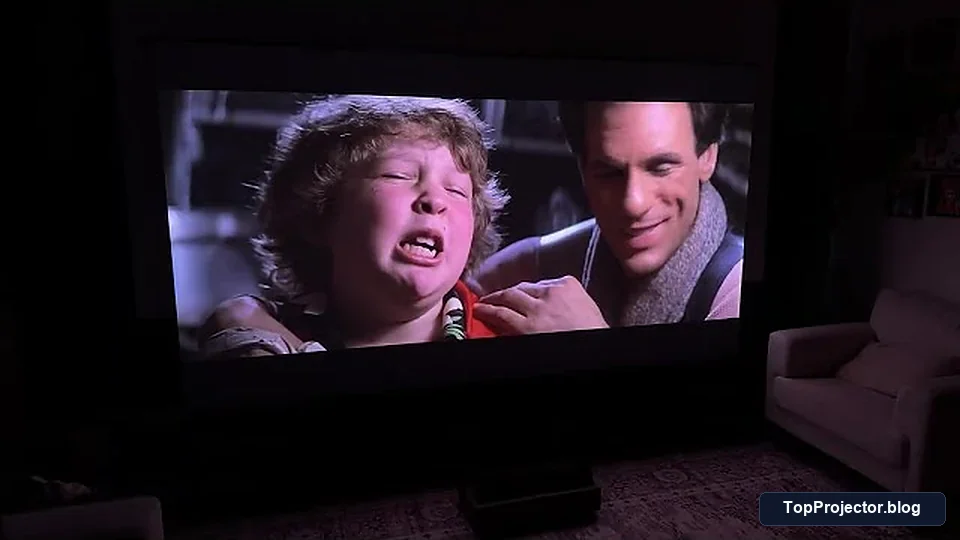
Traditional lamp-based units struggle with ambient light bleed inside untreated rooms. High-end three-chip designs use advanced dynamic irises to lower black floors and elevate perceived shadow depth.
Flat panels avoid projection wash entirely through self-emissive pixels or dense local dimming zones. Every microscopic diode turns completely off to produce absolute, ink-black shadow performance.
Native contrast ratios define how deeply dark a projector can render deep shadows. When taking your setup outside, consult our best projector for outdoor movies guide to maintain optimal black floor performance.
Dynamic iris systems physically restrict lamp output during dark scenes to artificially lower the black floor. While effective for movies, aggressive iris pumping can distract viewers during mixed-content sequences lacking stable ANSI contrast measurements.
- Native contrast ratios favor premium LCoS projection designs.
- OLED panels offer zero light bleed for infinite black floors.
- Ambient room reflections degrade projected black levels significantly.
- Always verify native contrast specifications using independent laboratory testing rather than relying heavily on inflated manufacturer marketing claims found across promotional brochures.
- Consider strategically adding dark acoustic treatment panels around your screen to minimize secondary light reflections bouncing back onto the active projection surface during dark movie scenes.
Pitch-Black Theater vs. Ambient Living Rooms
Controlling ambient light in a dedicated basement bunker transforms projector performance. Dark velvet walls absorb stray light, allowing high-end projectors to rival cinematic black floors.
Living rooms filled with white drywall bounce reflected light back onto the screen. This optical phenomenon destroys native contrast, giving flat panels an overwhelming daytime advantage.
- Velvet-treated rooms maximize projector contrast potential.
- White walls scatter light and wash out projected shadows.
The Reality of ANSI vs Native Contrast
Measuring ANSI contrast requires a checkerboard pattern testing simultaneous white and black patches. Projectors typically score lower here than televisions because bright fields scatter photons across adjacent dark cells, washing out subtle shadow details.
Ambient Light Rejection and Daytime Performance
Battling daytime illumination requires specialized engineering from both display categories. ALR screen technology helps projectors deflect overhead light while directing the main beam toward viewers.
Standard white walls scatter incoming daylight indiscriminately across the entire viewing surface. Specially formulated micro-layered projection fabrics absorb off-axis room light to preserve image saturation.
Large-screen displays utilize aggressive anti-reflective polarizers and high-nit backlights. They cut through glaring windows effortlessly without requiring specialized window treatments or dark curtains.
Ambient light acts as an optical kryptonite for traditional front projection setups. Without specialized screens, room reflections dilute saturation and crush perceived contrast. Pairing your optical engine with an ALR screen is completely mandatory.
Directional ambient light rejecting materials absorb off-axis illumination while reflecting primary beams toward viewers. Use our projector distance calculator alongside your ALR screen to ensure precise throw geometry.
- Specialized ALR screens are mandatory for daytime projection.
- Flat panels resist glare naturally using advanced matte polarizers.
- High lumen output helps projectors overcome moderate ambient light.
- Investigate specialized ambient light rejecting screen materials designed specifically to reject overhead ceiling illumination while maintaining optimal off-axis viewing angles for your living room.
- Position secondary room lighting carefully away from the primary projection axis to prevent washing out contrast during casual daytime television viewing sessions and sports broadcasts.
Daylight Viewing Strategies
Pairing an ultra-short-throw projector with a ceiling-rejecting ALR surface changes daytime usability. These optical filters block overhead living room illumination while preserving vibrant color saturation.
Display panels achieve effortless daytime viewing through sheer brute-force luminance. High peak nit counts overpower normal room lighting without needing specialized optical screens.
- UST setups require specialized ceiling-rejecting optical surfaces.
- Panel displays rely on high brightness to defeat room glare.
Choosing the Right ALR Gain Factor
Selecting a screen with a 0.8 gain rating helps suppress residual ceiling light in media rooms. Conversely, ultra-short throw models demand specialized lenticular surfaces to reject downward vectors and maintain crisp perceived brightness.
Peak Brightness, HDR Mapping, and Specular Highlights
High dynamic range content demands intense brightness to render specular highlights accurately. ANSI lumens measure total light output across a standardized white field for projection systems.
High-end home theater projectors typically output between 2,000 and 3,000 lumens. When spread across a massive 120-inch screen, this light density is significantly lower than a compact panel.
Modern flat panels easily sustain 1,500 to 3,000 nits across smaller surface areas. This localized intensity creates searing explosions and sun glints that projection systems struggle to match.
Modern HDR formatting demands immense specular highlight punch that legacy lamp projectors struggle to deliver. Televisions easily maintain high nits output across small window sizes, whereas projection systems must spread illumination across massive screen surfaces.
Dynamic tone mapping analyzes incoming metadata frame by frame to optimize brightness curves. Read our BenQ TK710 review to see how modern laser engines handle HDR content.
- Projectors measure light output in standardized ANSI lumens.
- Flat panels utilize high nit counts for impactful HDR highlights.
- Large screen sizes dilute the perceived brightness of projectors.
- Evaluate modern laser phosphor light engines carefully for consistent long-term brightness stability compared to traditional mercury lamps that degrade rapidly over extended usage periods.
- Utilize advanced dynamic tone mapping settings properly to extract maximum highlight detail from demanding high-dynamic-range movie transfers without accidentally crushing subtle shadow gradations.
Tone Mapping Challenges in Projection
Projectors must remap HDR metadata carefully to avoid clipping bright white clouds. Dynamic tone mapping algorithms analyze every frame to optimize limited light output for large screens.
Display panels process HDR signals with direct pixel-level luminance control. They render dazzling specular highlights instantly without complex external tone-mapping processors or compromises.
- Dynamic tone mapping helps projectors handle complex HDR feeds.
- Panel displays render HDR highlights instantly without processing lag.
Laser Phosphor vs Traditional Lamp HDR
Solid-state laser phosphor engines deliver consistent spectral output over thousands of hours. They sustain higher perceived brightness than fading UHP lamps, ensuring your HDR metadata calibration remains accurate throughout the projector lifespan.
Screen Size Scaling and Cinematic Immersion Geometry
Field of view determines true cinematic immersion during movie nights and sporting events. Throw ratios dictate how far back a projector must sit to fill a massive canvas.
Stepping up to a 120-inch or 150-inch screen completely transforms visual engagement. Projectors achieve this massive cinematic scale effortlessly at a fraction of the cost per square inch.
Large consumer displays max out around 98 inches for standard transport logistics. Transporting and installing anything larger requires specialized commercial freight and multiple assembly technicians.
Screen size is where projection completely obliterates flat-panel televisions on a pure cost-per-inch metric. Stepping up to a 120-inch diagonal screen creates a massive field of view that matches commercial cinema seating geometry.
Calculating your proper throw distance ensures zero geometric distortion and uniform pixel focus. Check our screen size and viewing distance tool to match your exact seating layout.
- Projectors deliver true IMAX-scale sizing beyond 120 inches.
- Flat panel sizes hit hard logistical limits past 98 inches.
- Field of view geometry heavily favors large projection screens.
- Measure your mounting distance precisely against manufacturer throw ratio calculators before purchasing permanent fixed frame projection screens for your custom home theater room.
- Calculate proper seating distances based on a comfortable forty-degree field of view to maximize overall cinematic immersion without ever causing visual eye fatigue.
Ultra-Short-Throw Flexibility
Modern ultra-short-throw projectors sit just inches away from the wall. They project massive 120-inch images upward, eliminating traditional ceiling mounting hurdles and complex cabling runs.
Despite their convenience, ultra-short-throw setups demand perfectly flat walls. Even minor drywall waviness can introduce noticeable geometric distortion across the projected image plane.
- UST models eliminate complex ceiling mounting requirements.
- Perfect wall flatness is critical for distortion-free UST images.
Field of View and Resolution Limits
Achieving true cinematic immersion requires a recommended 40-degree field of view. At this scale, 4K pixel structures become fully discernible, demanding proper seating distances to prevent noticing individual pixel boundaries during pans.
Color Gamut, Calibration, and Off-Axis Uniformity
Accurate color reproduction ensures movies match the director's original creative intent. Color volume encompasses both wide color gamuts and sustained saturation at high brightness levels.
Laser-based projection engines easily cover the DCI-P3 cinematic color space. Premium models include color filters that push coverage even further toward demanding Rec.2020 targets.
Display panels maintain flawless color uniformity regardless of viewing angle. Viewers sitting on extreme side couches experience zero color shifting, contrast loss, or brightness drop-off.
Achieving accurate director intent requires precise calibration covering wide color gamuts like DCI-P3. Projectors often rely on internal color filters that reduce total light output to expand color volume closer to studio references.
Television panels maintain identical color saturation and luminance from extreme side viewing angles. Conversely, high-gain projection screens suffer from hot-spotting and color shifting if viewers sit outside the narrow viewing cone.
- Laser engines achieve wide DCI-P3 cinematic color gamuts.
- Flat panels maintain perfect color fidelity at wide viewing angles.
- Off-axis seating can degrade projector brightness and color purity.
- Calibrate your display using professional spectrophotometer equipment to ensure accurate color tracking across standard high-definition television color spaces without introducing errors.
- Account for severe brightness penalties introduced by internal optical color filters when carefully selecting your projector lumen output requirements for large screens.
Calibration and Panel Uniformity
Achieving precise grayscale tracking requires thorough professional calibration. Projectors often exhibit slight optical corner-softening or convergence errors that require careful manual lens alignment.
Factory calibration on modern panels delivers exceptional accuracy out of the box. Pixel-level self-illumination guarantees uniform brightness and color consistency across the entire display.
- Professional calibration unlocks accurate grayscale tracking.
- Self-emissive panels guarantee uniform color and brightness.
Color Filter Insertion Trade-offs
Engaging wide color filters sacrifices up to thirty percent of maximum white brightness. Calibrators must balance accurate skin tones against overall punch, especially when lighting massive screens in light-controlled rooms.
Input Lag, Refresh Rates, and Gaming Motion
Competitive gaming demands lightning-fast response times and high refresh capabilities. Input lag measures the crucial delay between controller inputs and visual action on screen.
Modern gaming projectors have made massive strides in reducing latency. High-end units now achieve respectable 15ms to 20ms response times at 4K resolution and 60Hz refresh rates.
Flat panels remain the undisputed gold standard for high-performance gaming. They routinely deliver sub-10ms input lag alongside 144Hz variable refresh rates and instant pixel response times.
Competitive gaming requires ultra-low response times to ensure immediate visual feedback on screen. While gaming monitors and modern televisions routinely achieve single-digit input lag, projectors historically struggled with sluggish processing delays.
Modern gaming projectors now feature dedicated low-latency modes that bypass internal video processing. This drops response figures down to competitive thresholds while supporting high refresh rates up to 240Hz at 1080p.
- Modern projectors achieve competitive 15ms to 20ms input lag.
- Flat panels dominate gaming with sub-10ms response times.
- High refresh rates favor display panels for fast-paced titles.
- Enable dedicated game modes on your modern projector to bypass heavy video processing algorithms and reduce input lag significantly for fast-paced competitive play.
- Verify high refresh rate compatibility through advanced HDMI connection inputs before connecting your latest gaming consoles and high-performance personal computers.
Console Gaming vs. Cinema Immersion
Playing racing simulators on a massive 130-inch projected screen is breathtaking. The sprawling field of view compensates slightly for marginally higher input lag during casual sessions.
Fast-paced competitive shooters require ultra-responsive frame rendering. Display panels provide the instantaneous motion clarity and variable refresh support needed for twitch-based gameplay.
- Massive projection screens enhance simulation racing titles.
- Competitive shooters demand rapid panel response times.
Motion Handling and Response Times
Fast pixel response times in DLP chips prevent motion blur during rapid camera movements. However, triple-laser architectures can introduce subtle speckle artifacts during panning shots across bright solid color backgrounds.
Room Setup, Installation, and Maintenance Realities
Physical installation requirements differ drastically between these two display technologies. Throw distance calculations dictate exact placement geometry for overhead or shelf-mounted projection setups.
Installing a projector demands precise measurement, ceiling reinforcement, and cable concealment. Lamp-based units also require periodic bulb replacements every few thousand operating hours.
Display panels offer straightforward plug-and-play setup convenience. Mounting a panel onto a standard wall bracket or placing it on a media console takes minutes with zero bulb maintenance.
Installing a front projection system demands precise physical alignment, ceiling mounts, and cable routing infrastructure. Unlike a television that sits easily on a media console, projectors require meticulous lens shift adjustments for geometry.
Maintenance schedules differ drastically between display types since lamp-based projectors require periodic bulb replacements. Solid-state laser models eliminate this hassle, offering twenty thousand hours of reliable operation before significant brightness degradation occurs.
- Projectors require precise throw calculations and secure mounts.
- Traditional lamp projectors require periodic bulb replacements.
- Flat panels offer straightforward plug-and-play installation.
- Carefully factor in professional installation costs and structural ceiling mount requirements when planning your comprehensive home theater projection setup layout budget.
- Consistently monitor internal cooling fan noise levels to ensure absolute acoustic transparency during quiet movie dialogue and dramatic whisper audio sequences.
Acoustic Footprint and Fan Noise
High-output laser engines generate substantial internal heat during extended viewing sessions. Cooling fans spin up under heavy loads, producing a noticeable background hum in quiet rooms.
Display panels operate in complete silence with zero moving cooling parts. This passive thermal dissipation makes them ideal for small, quiet bedrooms and intimate listening spaces.
- Cooling fans on high-output projectors create ambient noise.
- Flat panels operate in complete silence with passive cooling.
Acoustic Noise and Thermal Management
High-output optical engines generate significant internal heat requiring active cooling fans. Selecting a projector with low operating decibel ratings prevents intrusive fan noise from disrupting quiet movie scenes during dynamic audio passages.
Frequently Asked Questions
Can a home cinema projector replace my living room TV?
A projector can replace a TV only if you control ambient daytime light and install an ALR screen. Dedicated light control is mandatory for successful daytime viewing.
How long do modern projector light sources last compared to TVs?
Modern laser and LED projection light sources routinely last between 20,000 and 30,000 hours. Solid-state laser engines match the long operational lifespan of standard flat-panel displays.
Why do TVs look brighter than projectors in brightly lit rooms?
TVs emit their own light directly toward the viewer while overcoming reflections. Self-emissive pixels maintain exceptional contrast and saturation even under harsh overhead lighting.
Are ultra-short-throw projectors better than traditional ceiling-mounted models?
Ultra-short-throw models offer effortless placement on media consoles without complex ceiling cabling. Convenient furniture placement makes UST projectors ideal for modern multi-purpose living spaces.
Which display type is better suited for next-generation console gaming?
Flat panels remain superior for gaming due to sub-10ms input lag and high refresh rates. Variable refresh rate support gives TVs a decisive edge in competitive titles.