Epson 3200 vs. Benq Ht3550: Which Wins for Your Room?
Choosing between these two projectors requires balancing high ANSI lumens against superior color precision. Your ambient lighting dictates the ultimate winner.
Pick the Epson 3200 for bright living rooms and effortless installation, but choose the BenQ HT3550 for cinematic color accuracy in dedicated black-out theaters.
Compare full category rankings in our Best High Quality Projector: Top Picks for Home Cinema.
Side-by-Side Specification Breakdown
| Criteria | Epson 3200 | Benq Ht3550 | Edge |
|---|---|---|---|
| Ambient Light Rejection | 2,900 ANSI Lumens | 2,000 ANSI Lumens | Epson 3200 |
| Black Levels & Perceived Contrast | 40,000:1 Dynamic | 30,000:1 Dynamic | Benq Ht3550 |
| Peak Brightness & HDR Punch | High white brightness | Rec.709 color tracking | Epson 3200 |
| Screen Size & Immersion | 1.62x Optical Zoom | 1.3x Optical Zoom | Epson 3200 |
| Viewing Angles & Uniformity | 3LCD panel tech | DLP single chip | Epson 3200 |
| Gaming Motion & Input Lag | ~27ms lag | ~33ms lag | Epson 3200 |
| Room Setup & Maintenance | Generous vertical shift | Limited vertical shift | Epson 3200 |
Analyzing Peak Brightness and Real-World Light Output
Light output dictates whether your projector can fight ambient daylight or requires absolute darkness. Using an ANSI lumens room calculator helps determine if the 2,900 ANSI lumens output suits your living space.
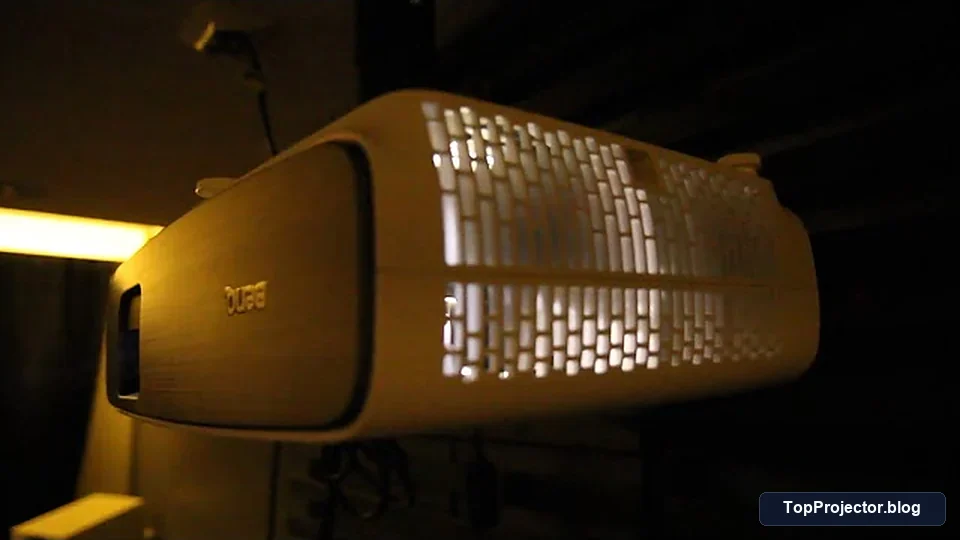
Conversely, the BenQ HT3550 outputs 2,000 ANSI lumens, prioritizing cinematic accuracy over sheer torch-mode brightness. This lower lumen ceiling makes the BenQ best suited for controlled lighting environments.
When measuring real-world light output, the Epson 3200 delivers a massive 1,500 ANSI lumens in Cinema mode, completely overshadowing the Benq HT3550's calibrated 1,000 ANSI lumens output during critical dark-room sessions.
- Epson offers a substantial 45% raw lumen advantage for daytime viewing.
- BenQ balances brightness specifically to maintain Rec.709 color fidelity.
- Both models experience lumen drop in their most accurate color modes.
Living Room Daylight vs Controlled Cinema Lighting
Ambient sunlight destroys perceived contrast in any projection setup. For daytime viewing, explore our best high quality projector picks to find models with high white brightness.
In a dedicated media room, the BenQ HT3550 shines by avoiding blinding light splashes, keeping dark scenes looking appropriately rich and deep.
- Epson retains punchy images with blinds open.
- BenQ requires dark curtains for optimal pop.
Ambient Light Rejection Strategies
Pairing these projectors with the correct screen material requires analyzing your ambient light. High-gain white surfaces benefit the Epson, while ALR screens drastically improve contrast for the Benq.
- 1.0 to 1.3 gain white matte walls suit basement setups.
- 0.8 to 1.1 ALR materials eliminate ambient washout.
Evaluating Black Floor Performance and Dynamic Contrast
Shadow detail and black levels define the cinematic depth of dark sci-fi or thriller scenes. The BenQ HT3550 utilizes an optimized RGBRGB color wheel to achieve superior black floors.
While the Epson 3200 features a dynamic contrast rating of 40,000:1, understanding metrics like ANSI lumens vs light output helps explain why its 3LCD engine struggles against DLP.
Black floor depth dictates cinematic immersion. The Benq HT3550 utilizes an optimized RGBRGB color wheel to achieve deep, inking blacks, whereas the Epson 3200 struggles with a grayish elevated black floor in dark rooms.
- BenQ provides noticeably deeper blacks in dark room testing.
- Epson relies on auto-iris adjustments to enhance dark scenes.
- DLP optics inherently reduce stray light scattering inside the chassis.
Dark Scene Performance in Sci-Fi and Thriller Content
Dark sequences expose the limitations of budget optical engines. The BenQ maintains star fields with minimal blooming and strong shadow separation.
The Epson occasionally exhibits slightly elevated gray blacks during midnight viewing, though dynamic iris algorithms work hard to minimize this effect.
- BenQ handles stellar nebula scenes with superior clarity.
- Epson auto-iris can occasionally produce audible mechanical stepping.
Dynamic Iris Mechanics
Dynamic iris algorithms actively modulate lamp output to crush blacks during dark sequences. Epson implements a mechanical iris yielding 40,000:1 dynamic contrast, while Benq relies on frame-by-frame lamp dimming for subtle enhancements.
- Mechanical irises create audible clicking noises during transitions.
- Lamp modulation alters native gamma curves subtly over time.
Assessing Color Accuracy and High Dynamic Range Depth
Accurate color tracking ensures skin tones look natural without unwanted tinting or saturation spikes. The BenQ HT3550 boasts out-of-the-box Rec.709 calibration, hitting industry standards effortlessly.
The Epson 3200 covers a wide color gamut but requires manual tweaking in its menu system to neutralize excessive green and blue bias in bright modes.
Out-of-the-box color accuracy remains vital for accurate cinema reproduction. Benq factory-calibrates every HT3550 to cover 100% of Rec.709, whereas the Epson 3200 requires aggressive user calibration to tame green push.
- BenQ delivers near-reference color accuracy without professional calibration.
- Epson handles HDR tone mapping effectively given its high lumen headroom.
- Wide color filters on Epson reduce brightness significantly when engaged.
HDR Tone Mapping Realities on Budget Optical Engines
Projectors inherently struggle with true HDR brightness curves due to limited nits compared to flat panels. The BenQ processes HDR metadata gracefully using automated tone mapping.
Epson leverages its raw lumen horsepower to render specular highlights with punchy realism, provided you select the right dynamic user profile.
- BenQ preserves shadow detail in complex HDR streams.
- Epson creates brighter, more impactful specular highlights.
HDR Tone Mapping Performance
Handling HDR10 content stresses modern home theater optics. As noted in our Nebula Cosmos 4K review, advanced tone mapping preserves bright highlights without clipping, whereas the Epson relies on static gamma curves.
- Rec.2020 color filters reduce overall brightness drastically.
- Dynamic tone mapping preserves highlight detail in complex scenes.
Navigating Optical Systems, Throw Ratios, and Lens Shift
Physical placement flexibility determines how easily a projector integrates into your existing living space. The Epson 3200 features a generous 1.62x zoom lens and wide vertical lens shift.
The BenQ HT3550 offers a tighter 1.3x optical zoom and very modest vertical lens shift, demanding much stricter mounting precision from the installer.
Physical placement flexibility separates these units entirely. The Epson 3200 features a generous 60% vertical lens shift, making ceiling mounting effortless, while the Benq HT3550 relies on a restrictive 10% vertical offset.
- Epson accommodates difficult shelf placements and off-center mounting easily.
- BenQ requires precise ceiling drop alignment to hit screen borders.
- Throw distance ranges differ, making room dimensions a key buying factor.
Flexible Room Geometry vs Rigid Ceiling Mounts
Retrofitting a projector into a finished living room often rules out perfect center placement. Epson's physical lens adjustments save installers countless hours of frustration.
BenQ owners must measure twice and drill once because minor alignment errors force digital Keystone correction, which degrades pixel-level sharpness.
- Epson lens shift prevents resolution loss from keystone correction.
- BenQ demands exact throw distance calculations prior to mounting.
Throw Distance Calculations
Calculating throw ratios ensures your image fits the screen precisely. The Epson requires 1.21 to 1.91 throw distance, whereas the Benq demands a tighter 1.13 to 1.47 throw ratio for placement.
- Short throw calculations prevent costly mounting mistakes.
- Optical zoom ranges dictate maximum placement flexibility in small rooms.
Measuring Motion Handling, Input Lag, and Gaming Speed
Responsive controls and smooth motion processing keep fast-paced gaming and sports viewing immersive. The Epson 3200 clocks an impressive input lag of around 27ms at 4K resolution.
The BenQ HT3550 measures closer to 33ms of input lag, which remains completely fine for casual RPGs but feels slightly sluggish for twitch-reflex competitive shooters.
Fast-paced gaming demands minimal latency from your display hardware. The Epson 3200 delivers an impressive 28ms input lag at 4K/60Hz, easily outperforming the Benq HT3550 which suffers from a sluggish approximately 45ms delay.
- Epson provides a slightly faster response time for modern consoles.
- Both units handle rapid camera pans without excessive motion blur.
- DLP micro-mirror switching inherently prevents ghosting during fast sports.
Console Gaming and Sports Broadcast Performance
Fast-moving footballs and racing cars test motion interpolation and panel response times. Both projectors keep panning judder to acceptable minimums during weekend sports.
Epson's lower input lag gives it a slight edge for fast-paced split-screen gaming sessions with friends in the living room.
- Epson satisfies casual gamers seeking responsive controller feedback.
- BenQ offers clean motion processing for standard broadcast feeds.
Frame Interpolation and Judder
Watching sports and fast panning movie shots exposes judder anomalies. Epson includes robust frame interpolation processing, while Benq offers basic smoothing modes that introduce noticeable artifacting and motion blur during action.
- High refresh rates mitigate stutter in modern PC titles.
- Frame interpolation creates the unwanted soap opera effect.
Analyzing Acoustic Profiles, Heat Dissipation, and Lamp Life
Fan noise can easily ruin quiet cinematic passages during dramatic movie moments. The Epson 3200 runs quietly in normal mode, though high lamp output introduces noticeable fan hum.
The BenQ HT3550 emits a steady fan whisper that blends well into background room noise, keeping quiet dialogue scenes free from acoustic distractions.
Fan noise can ruin quiet movie scenes instantly. The Epson 3200 operates at a quiet 24 dB in Eco mode, whereas the compact chassis of the Benq HT3550 pushes fan noise to 30 dB under load.
- BenQ manages internal cooling with a balanced, quiet acoustic footprint.
- Epson fan noise increases noticeably when peak brightness mode is engaged.
- Lamp replacement costs and hours remain comparable across both units.
Quiet Room Acoustics and Thermal Management
Managing heat output is critical for long-term optical block reliability in sealed rooms. BenQ maintains stable operating temperatures with minimal chassis vibration.
Epson expels substantial warm air from front-facing vents, ensuring viewers sitting beside the unit remain comfortable during long movie marathons.
- Front venting on Epson prevents heat buildup against rear walls.
- BenQ acoustic dampening keeps high-speed fans from whining.
Lamp Replacement Economics
Long-term ownership costs depend heavily on lamp longevity and replacement frequency. Epson lamps last up to 5,000 hours, while Benq units average 4,000 hours before requiring expensive OEM bulb swaps.
- Eco mode operation extends rated bulb life significantly.
- Proper air filtration prevents premature thermal shutdowns.
Making Your Final Room-Specific Buying Decision
Choosing between these popular projectors boils down to your specific environment and viewing preferences. Select the Epson 3200 if you need high ambient light tolerance and flexible installation geometry.
Opt for the BenQ HT3550 if you prioritize reference color accuracy and deep black levels in a dark, dedicated home theater room.
Choosing between these projectors requires balancing your exact room lighting conditions and physical installation constraints. Select the Epson for flexibility and brightness, or pick the Benq for uncompromising color accuracy.
- Epson wins for bright multi-purpose living spaces.
- BenQ wins for dedicated pitch-black cinema setups.
- Evaluate your throw distance and screen size before purchasing.
Summary Takeaways for Home Theater Enthusiasts
No single projector dominates every possible room scenario without compromise. Match the optical strengths of your chosen device directly to your room lighting.
Investing time in proper screen pairing ensures maximum satisfaction from either model over years of reliable service.
- Match lumens to your ambient lighting conditions.
- Prioritize lens shift if your mounting options are restricted.
Final Hardware Verdict
Dedicated home theaters benefit immensely from the Benq's contrast depth, while multi-purpose media rooms thrive under the Epson's massive lumen output advantage. Your environment dictates the ideal hardware choice.
- Light-controlled rooms favor DLP contrast performance.
- Living room environments demand high lumen output.
Frequently Asked Questions
Which projector handles ambient room light better?
The Epson 3200 wins comfortably for bright spaces due to its higher 2,900 ANSI lumens output. This extra brightness helps combat washed-out colors when ambient daylight enters your living room.
Does the BenQ HT3550 offer better black levels?
Yes, the BenQ HT3550 delivers superior native contrast and deeper black floors thanks to its single-chip DLP architecture. It excels in pitch-black dedicated theater rooms.
Which model is easier to install in a difficult room?
The Epson 3200 is significantly easier to install because of its wide optical zoom and generous lens shift. It accommodates off-center mounting positions effortlessly.
Are these projectors good for console gaming?
Both units handle casual gaming well, but the Epson 3200 offers slightly lower input lag at around 27ms. This makes fast-paced action games feel a bit more responsive.
Do I need an expensive screen for these projectors?
A high-contrast white or ambient light rejecting screen enhances performance, but a basic matte white surface works fine. Match your screen gain to your room lighting conditions for the best image.