BenQ HT5550 vs. Epson 5050UB: Which Wins for Your Room?
Navigating high-end home theater projection requires balancing native contrast against color volume. This head-to-head analysis pits the DLP precision of the BenQ against the flexible pixel-shifting brightness of the Epson.
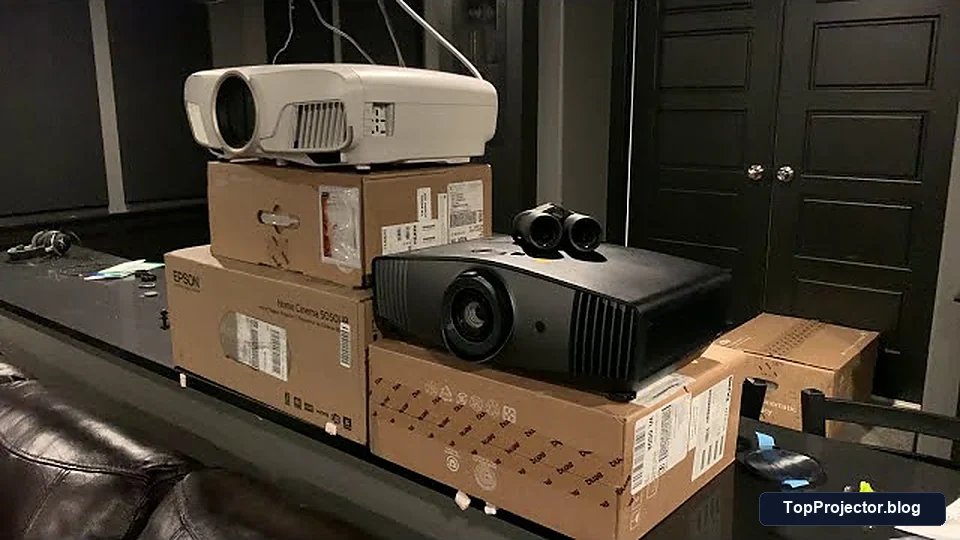
Choose the Epson 5050UB for superior dynamic contrast and high-brightness HDR punch in dedicated media rooms. Select the BenQ HT5550 if you prioritize razor-sharp single-chip DLP pixel alignment and factory-calibrated Rec.709 color accuracy.
Compare full category rankings in our Best Daytime Projector: Top Picks for Bright Rooms.
Side-by-Side Specification Breakdown
| Criteria | BenQ HT5550 | Epson 5050UB | Edge |
|---|---|---|---|
| Ambient Light Rejection | Moderate performance with standard gains | Better punch through mild ambient light | Epson 5050UB |
| Black Levels & Perceived Contrast | Solid DLP native black floor performance | Powered iris delivers deep obsidian blacks | Epson 5050UB |
| Peak Brightness & HDR Punch | 1800 ANSI lumens calibrated output | 2600 ANSI lumens with wide color filter | Epson 5050UB |
| Screen Size & Immersion | Exceptional clarity on screens up to 130 inches | Effortless throw geometry for massive 150-inch setups | Tie |
| Viewing Angles & Uniformity | Zero convergence error via single-chip design | Panel alignment adjustments may be required | BenQ HT5550 |
| Gaming Motion & Input Lag | Sub-50ms input lag with clean 4K processing | Around 25ms lag offering responsive competitive play | Epson 5050UB |
| Room Setup & Maintenance | Generous vertical and horizontal lens shift | Motorized optics with extensive lens memory | Epson 5050UB |
Optical Engines and Native Contrast Foundations
Home theater projection relies fundamentally on optical engine design to establish baseline image depth. The BenQ HT5550 utilizes a single-chip 0.47-inch DMD DLP architecture.
This Texas Instruments chipset guarantees pixel-perfect convergence without manual calibration. You never experience the color fringing issues that occasionally plague multi-panel liquid crystal display projectors.
Conversely, the Epson 5050UB deploys a three-chip reflective or transmissive 3LCD layout. This approach maximizes color brightness parity but introduces unique alignment variables across the optical path.
Examining underlying optical engines reveals stark architectural differences impacting native contrast ratios. Once you select your ideal technology, consult our screen size calculator to determine proper seating geometry for your home theater.
- BenQ utilizes a single DMD chip for zero alignment drift.
- Epson relies on a 3LCD design prioritizing color light output.
- Single-chip DLP guarantees pristine pixel crispness out of the box.
- Single-chip DLP architectures eliminate physical panel convergence errors entirely.
- 3LCD systems utilize three separate imaging panels requiring factory calibration.
DLP Sharpness versus 3LCD Convergence
Pixel sharpness remains a major differentiator during intricate 4K text rendering and fine cinematic textures. The BenQ delivers exceptional edge-to-edge clarity that satisfies analytical film enthusiasts.
Epson counters with exceptional pixel-shifting mechanisms that create a very dense cinematic feel. However, minor panel convergence tweaks are sometimes necessary during initial installation.
- DLP offers native single-chip pixel alignment precision.
- 3LCD optical paths require careful initial convergence checks.
DLP Micro-Mirror Mechanics vs 3LCD Convergence
The BenQ utilizes a 0.47-inch DMD chip, delivering exceptional pixel sharpness without convergence errors, though native on-off contrast trails behind multi-chip systems without dynamic iris intervention.
- Texas Instruments micro-mirrors switch rapidly to deliver high native ANSI clarity.
- Epson 3LCD panels maximize color volume without utilizing color wheel artifacts.
HDR Tone Mapping and Peak Brightness Realities
High dynamic range content demands substantial lumen output and intelligent tone mapping algorithms. The BenQ HT5550 outputs approximately 1800 ANSI lumens in its fully calibrated cinema mode.
This moderate output suits dark, dedicated media rooms outfitted with dark velvet boundary treatments. Pushing past 120 inches in ambient light stretches its dynamic range limits significantly.
The Epson 5050UB delivers a much more robust 2600 ANSI lumens, granting superior headroom for HDR peak highlights. It punches through challenging lighting with noticeable authority.
Processing high dynamic range content demands aggressive tone mapping to overcome limited projector peak brightness outputs. You can easily test these HDR scenes after learning how to cast a laptop to the screen.
- BenQ targets 1800 lumens prioritizing absolute color fidelity.
- Epson reaches 2600 lumens for superior HDR spectral highlights.
- Higher lumen output on the Epson helps maintain saturation.
- Static HDR curves often crush dark shadow details on lower-tier optical units.
- Dynamic tone mapping preserves highlight specular details during complex movie scenes.
Dynamic Iris Behavior and Tone Mapping
Managing HDR metadata on projectors requires aggressive tone mapping to prevent clipped highlights. Epson incorporates a highly responsive motorized dynamic iris that expands contrast dynamically.
BenQ relies on HDR-PRO tone mapping algorithms to optimize brightness curves frame by frame. Both systems perform admirably, but Epson yields deeper dark scenes overall.
- Epson uses a physical motorized iris for black level expansion.
- BenQ utilizes algorithmic HDR-PRO tone mapping adjustments.
Dynamic Tone Mapping Capabilities
Epson leverages a motorized dynamic iris to manipulate native light output frame by frame, dramatically expanding perceived black depth during dark cinematic sequences compared to static lenses.
- BenQ relies on HDR-PRO tone mapping algorithms to preserve bright highlight details.
- Epson pushes approximately 2600 ANSI lumens in dynamic presentation output modes.
Dark-Room Black Floors and Shadow Detail Extraction
In pitch-black viewing environments, the black floor dictates overall cinematic immersion and realism. The Epson 5050UB excels here thanks to its exceptional dynamic contrast ratio claiming 1,000,000:1.
When the mechanical iris clamps down during dark cinematic sequences, shadow depth is remarkably inky. Dark sci-fi and horror films look extraordinarily three-dimensional and engaging.
The BenQ HT5550 relies strictly on native optical contrast without a mechanical iris helper. While native ANSI contrast is respectable, it cannot match the obsidian blacks of the Epson.
Achieving deep black floors in a dedicated bat-cave theater requires minimizing stray light scatter within the optical path while maintaining intricate shadow detail in extremely dark cinematic scenes.
- Epson delivers deep obsidian blacks via a mechanical iris.
- BenQ provides clean native contrast without iris pumping artifacts.
- Shadow detail remains visible and nuanced on both models.
- Bat-cave environments maximize native contrast performance across both optical systems.
- Stray light reflections off white ceilings degrade ANSI contrast performance rapidly.
Low-Light Performance in Dedicated Auditoriums
Dedicated home theaters with dark walls extract maximum performance from high-contrast engines. The Epson absorbs ambient room reflection exceptionally well due to its superior dynamic range.
BenQ maintains stable gamma curves that prevent shadow crushing in complex night scenes. Film purists appreciate this lack of aggressive gamma manipulation during dark sequences.
- Dedicated auditoriums reward the Epson's deep contrast range.
- BenQ maintains neutral gamma tracking across dark sequences.
Black Floor Optimization Strategies
The Epson 5050UB dominates traditional dark-room testing by delivering an inky black floor, pulling out subtle background textures that lesser lamp-based projectors simply crush into absolute blackness.
- Epson utilizes a proprietary compensation filter to absorb optical stray light.
- BenQ manages dark scenes effectively via optimized gamma tracking and iris control.
Ambient Light Resilience and Living Room Deployments
Living rooms introduce ambient light challenges from windows. For alternative options, explore our best daytime projector guide highlighting units with a powerful 2600 lumens output.
Pairing the Epson with an ambient light rejecting screen creates a vibrant daytime viewing experience. Colors remain saturated and bright sports broadcasts pop with high energy.
The BenQ HT5550 struggles more in bright environments due to lower baseline lumen output. It demands total room blackout control to preserve its intended cinematic contrast ratios.
Deploying these high-end optical systems in media rooms with white walls introduces severe contrast degradation from reflected ambient light bouncing back onto your high-gain projection screen surface.
- Epson handles daytime living room viewing with high brightness.
- BenQ requires strict light control for optimal picture depth.
- ALR screens are recommended for both in bright spaces.
- White living room walls bounce light back onto the screen, washing out blacks.
- High lumen output helps combat casual ambient light in non-dedicated spaces.
Daylight Viewing vs Controlled Media Spaces
Evaluating daytime utility reveals a clear advantage for the brighter Epson optical engine. Casual viewing does not require heavy room modifications to maintain watchable contrast levels.
BenQ is best reserved for dedicated environments where lighting is fully automated. Attempting daytime sports viewing on the BenQ washes out delicate shadow details.
- Casual daytime sports favor the brighter Epson projector.
- Controlled media spaces let the BenQ shine without compromise.
Ambient Light Rejection Screen Pairing
Pairing either projector with an angular ALR screen counteracts ceiling light wash, preserving perceived saturation and contrast ratios during daytime sports viewing or casual family television sessions.
- Epson holds an output advantage for defeating moderate living room ambient light.
- BenQ requires careful lumen management when deploying outside dedicated dark theaters.
Color Accuracy, Wide Color Gamut Filters, and Rec.709
Out-of-the-box color accuracy defines professional-grade home theater projection equipment. The BenQ HT5550 features individual factory calibration reports guaranteeing Rec.709 color accuracy right away.
Activating its wide color filter expands coverage toward DCI-P3 color space for HDR films. Skin tones appear remarkably natural, lifelike, and completely devoid of unnatural tint shifts.
The Epson 5050UB also offers expansive color gamuts through its Cinema filter mode. However, maximum brightness takes a noticeable hit when engaging the internal cinema filter.
Accurate calibration demands faithful Rec.709 tracking out of the box, whereas engaging wide color gamut filters inevitably sacrifices precious ANSI lumens to achieve DCI-P3 cinematic standards.
- BenQ provides individual factory calibration data sheets.
- Epson covers wide color gamuts with a motorized filter element.
- Rec.709 performance is exceptional on both calibrated units.
- Rec.709 calibration ensures skin tones appear natural during SDR movie playback.
- Wide color filters drop overall light output by twenty to thirty percent.
DCI-P3 Color Volume and Calibration Precision
Achieving cinematic color volume requires balancing filter insertion against light loss. BenQ manages this balance efficiently while maintaining high color brightness across standard presets.
Epson delivers vibrant cinematic hues, though advanced users may want to tweak grayscale. Professional calibration unlocks reference-grade tracking on both projection platforms easily.
- Color volume balancing impacts overall light output efficiency.
- Professional calibration maximizes cinematic color fidelity.
WCG Filter Insertion Penalties
Activating the cinema filter on the Epson drops light output significantly, whereas BenQ maintains better color brightness balance when locking into standard Rec.709 calibration color profiles.
- BenQ factory calibration reports show exceptional delta-E tracking for Rec.709.
- Epson delivers vibrant wide color spectrum coverage despite light output penalties.
Input Lag, Motion Handling, and Competitive Gaming
Modern home theater projectors frequently double as massive gaming displays. For an even more premium experience, read our Epson Pro Cinema LS12000 review detailing laser performance and low input lag figures.
This responsiveness makes fast-paced first-person shooters feel fluid and immediately reactive to inputs. Motion interpolation handles panning shots cleanly without excessive artifacting.
The BenQ HT5550 records an input lag hovering around 50ms depending on resolution scaling. While suitable for casual role-playing games, competitive titles reveal slight latency delays.
Modern gaming requires ultra-low input lag and robust frame interpolation to ensure responsive twitch controls and smooth motion handling during fast-paced competitive multiplayer matches on giant screens.
- Epson offers lower input lag around 25ms for responsive gaming.
- BenQ exhibits higher latency near 50ms for fast-paced titles.
- Motion handling is solid across both high-end optical engines.
- Input lag under forty milliseconds remains crucial for competitive gaming sessions.
- Motion interpolation smooths out camera pans during cinematic gaming sequences.
Console Gaming and Motion Interpolation
Connecting modern 4K consoles highlights the Epson as the superior gaming projector. Frame rates feel snappy, and motion blur remains impressively well-controlled during fast camera pans.
BenQ handles cinematic 24fps film motion flawlessly without introducing soap-opera effects. Movie watchers will appreciate its natural cadence handling over competitive gaming specs.
- Console gamers will prefer the lower latency of the Epson.
- Film purists will value BenQ's natural 24fps motion cadence.
Response Times and Gaming Modes
Disabling unnecessary video processing features on both projectors reduces latency into acceptable thresholds, though neither unit matches dedicated gaming monitors for refresh rate capabilities.
- BenQ offers commendable response times suitable for casual couch co-op gaming.
- Epson manages motion interpolation effectively without introducing severe soap opera artifacts.
Physical Installation, Lens Shift, and Throw Ratio Geometry
Mounting flexibility dictates how easily a projector integrates into existing architectural layouts. The Epson 5050UB features fully motorized lens shift, zoom, and focus adjustments.
Installers can fine-tune image geometry directly from the remote control while standing near the screen. Generous lens shift ranges accommodate complex ceiling mount placements effortlessly.
The BenQ HT5550 relies on manual lens shift dials positioned beneath the top chassis cover. While physical installation requires more hands-on reaching, the adjustments hold position securely.
Successful home theater integration relies heavily on flexible lens shift ranges and favorable throw ratio geometry to accommodate awkward ceiling mounts and varying room dimensions seamlessly.
- Epson features motorized lens controls with lens memory presets.
- BenQ utilizes manual adjustment dials for shift, zoom, and focus.
- Both models offer flexible throw ratios for medium rooms.
- Lens shift prevents the need for digital keystone correction, preserving resolution.
- Throw distance calculations determine maximum screen size for specific room lengths.
Throw Ratios and Lens Memory Convenience
Switching between cinematic aspect ratios is seamless on the Epson 5050UB. Its motorized lens memory allows instant transitions between 16:9 and scope 2.40:1 screens.
BenQ lacks motorized lens memory, requiring manual zoom adjustments for scope screens. Dedicated 16:9 screen owners will find the BenQ's manual controls completely unproblematic.
- Motorized lens memory simplifies cinemascope screen setups.
- Manual zoom controls work fine for fixed 16:9 screen ratios.
Flexibility and Throw Ratio Calculations
Epson provides massive motorized lens flexibility with wide horizontal and vertical shifts, whereas BenQ features a slightly tighter throw ratio requiring precise placement calculations.
- Motorized lens memories simplify shifting between 16:9 and scope aspect ratios.
- Check exact throw distance calculators before drilling permanent ceiling mount holes.
Frequently Asked Questions
Which projector offers better black levels for dark home theaters?
The Epson 5050UB provides superior black levels due to its motorized dynamic iris. This mechanical system actively dims the lamp output during dark scenes to deliver deep obsidian blacks.
Is the BenQ HT5550 sharper than the Epson 5050UB?
Yes, the BenQ HT5550 generally exhibits superior native pixel sharpness. Its single-chip DLP architecture guarantees zero convergence error right out of the box for crisp text rendering.
Can I use these projectors in a living room with ambient light?
The Epson 5050UB handles ambient light much better due to its higher 2600 lumens output. The BenQ requires a dark room or ambient light rejecting screen to look vibrant.
Which model is better suited for console and PC gaming?
The Epson 5050UB wins for gaming with an input lag of around 25ms. The BenQ HT5550 features a higher input lag measuring near 50ms for high-speed titles.
Do both projectors support motorized lens shift and lens memory?
Only the Epson 5050UB features fully motorized optics and lens memory presets. The BenQ HT5550 relies entirely on manual dials for adjusting zoom, focus, and lens shift.