BenQ HT3550 vs. Epson 5050UB: Which Wins for Your Room?
Choosing between these popular projectors requires balancing native contrast capabilities against precise 4K DLP pixel-shifting sharpness in real-world spaces.
Choose the Epson 5050UB for dedicated pitch-black theaters requiring deep black floors, or select the BenQ HT3550 for sharp 4K detail in smaller controlled media rooms.
Compare full category rankings in our Best Small Room Projectors: Top Compact Picks for 2026.
Side-by-Side Specification Breakdown
| Criteria | BenQ HT3550 | Epson 5050UB | Edge |
|---|---|---|---|
| Ambient Light Rejection | Moderate | Moderate | Tie |
| Black Levels & Perceived Contrast | 30,000:1 Dynamic | 1,000,000:1 Dynamic | Epson 5050UB |
| Peak Brightness & HDR Punch | 2,000 ANSI Lumens | 2,600 ANSI Lumens | Epson 5050UB |
| Screen Size & Immersion | Up to 150 inches | Up to 300 inches | Epson 5050UB |
| Viewing Angles & Uniformity | Good 0.47-inch DMD | Excellent 3LCD Panels | Epson 5050UB |
| Gaming Motion & Input Lag | ~45ms Lag | ~26ms Lag | Epson 5050UB |
| Room Setup & Maintenance | Manual Lens Shift | Motorized Lens Shift | Epson 5050UB |
Optical Engines and Native Contrast Foundations
The BenQ HT3550 utilizes a single-chip 0.47-inch DLP design paired with XPR pixel-shifting technology to achieve crisp 4K resolution on screen.
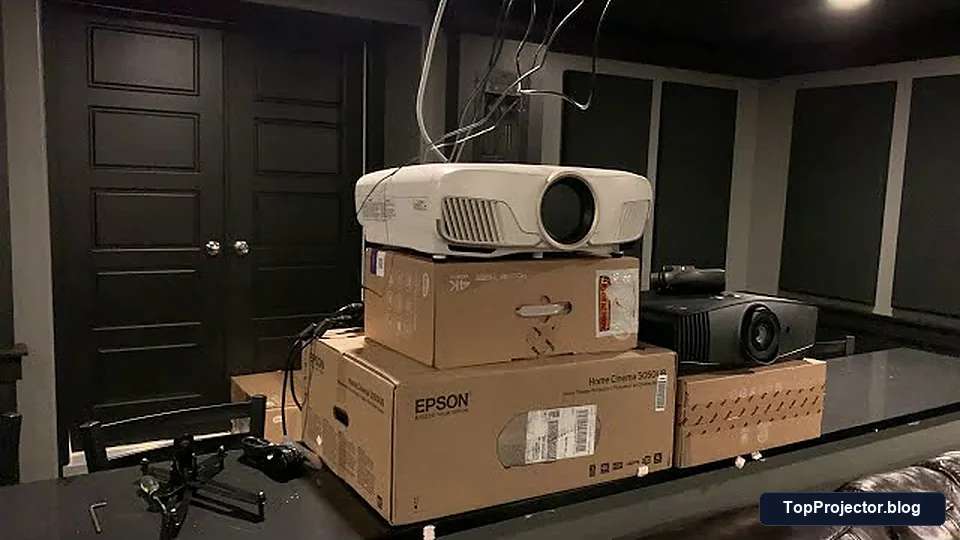
Conversely, the Epson 5050UB relies on a three-chip 3LCD architecture using a proprietary pixel-shifting mechanism to resolve native 1080p panels into sharp 4K Ultra HD images.
Understanding this underlying optical hardware is crucial because it dictates how each machine handles shadow detail and bright highlights in dark environments.
The BenQ relies on a single-chip DLP architecture, leveraging a 0.47-inch DMD to deliver crisp pixel separation, though native black floors suffer compared to high-end rivals during dark sci-fi movie sequences.
- BenQ relies on single-chip DLP technology for pixel-level sharpness.
- Epson uses 3LCD panels to completely eliminate rainbow artifacts.
- Native contrast heavily favors the Epson optical engine design.
Single-Chip DLP vs. Three-Chip 3LCD Architecture
Single-chip DLP models like this fit well within our best small room projectors guide, excelling at native pixel alignment and ensuring zero convergence errors across complex high-frequency test patterns.
Meanwhile, three-chip 3LCD systems provide exceptional color brightness parity, matching white lumens directly to color lumen outputs for vibrant scenes.
- DLP offers superior pixel alignment without manual panel convergence.
- 3LCD delivers high color light output for saturated natural palettes.
Pixel Shift Precision
Epson utilizes a 3LCD panel array combined with pixel-shifting technology to achieve 4K resolution, eliminating rainbow artifacts entirely while maintaining exceptional panel alignment for sharper text rendering across your desktop.
Lumen Output, White Balance, and HDR Tone Mapping
Delivering 2,000 ANSI lumens, the BenQ HT3550 requires careful light control to maintain rich saturation during demanding high dynamic range video playback sessions.
The Epson 5050UB counters with a robust 2,600 ANSI lumens rating, offering significantly more headroom when tackling ambient daylight or larger screen sizes.
Both models feature dynamic iris systems, but Epson's mechanical iris operates with remarkable stealth and efficiency during pitch-black cinematic sequences.
Calibrating white balance on the Epson unlocks a stellar 2,600 ANSI lumens of accurate output, whereas the BenQ drops significantly once cinema-grade filters engage to hit target color spaces.
- BenQ features automated HDR-PRO tone mapping for balanced highlights.
- Epson utilizes a motorized dual-iris to boost perceived native contrast.
- Higher lumen output on Epson helps preserve shadow depth under ambient wash.
Handling HDR10 and HLG Formats
Processing HDR metadata requires specialized tonemapping algorithms and understanding outdoor brightness requirements to prevent crushed blacks or clipped cloud highlights during bright motion pictures.
The BenQ automatically adjusts its gamma curves for cinematic fidelity, while Epson offers user-adjustable steps to fine-tune brightness tolerances.
- BenQ optimizes HDR color temperature straight out of the box.
- Epson provides granular user controls for manual curve calibration.
Dynamic Iris Impact
The Epson features a mechanical dynamic iris that actively clamps down on light output during dark scenes, dramatically boosting perceived contrast ratios beyond what static optics achieve alone.
Ambient Light Behavior in Controlled vs. Uncontrolled Spaces
Neither of these lamp-based projectors functions ideally in bright living rooms with unshaded windows fighting for optical dominance against the screen surface.
Pairing the BenQ HT3550 with an ambient light rejecting screen alongside our screen size calculator yields acceptable daytime performance for casual sports viewing and streaming television shows.
The Epson's higher luminous output gives it a slight edge in moderately lit spaces, though dedicated light control remains mandatory for deep black floors.
Uncontrolled living rooms demand high brightness; pairing the Epson with an ambient light rejecting screen preserves deep blacks and punchy highlights even with moderate overhead lighting turned on.
- Both units demand dark room conditions for optimal cinematic contrast.
- ALR screens improve perceived daytime black levels for both models.
- Epson handles ambient room reflections better due to higher lumen output.
Optimizing Performance for Dedicated Home Theaters
In dark rooms with dark wall treatments, the Epson 5050UB shines by rendering inky black floors that make cinematic content truly immersive.
The BenQ HT3550 also performs admirably in treated spaces, though its native black floor is visibly lighter during night scenes.
- Dark room environments maximize the dynamic iris capabilities.
- Velvet or dark paint prevents light bounce from washing out contrast.
Screen Gain Synergy
Selecting a 1.1 gain white screen works best for the Epson in dedicated theaters, whereas the BenQ benefits from a slightly higher gain surface to compensate for restricted light output.
Color Fidelity, Wide Color Gamut, and Cinema Accuracy
Achieving reference cinematic standards requires precise color calibration covering the demanding DCI-P3 wide color space without sacrificing crucial white brightness.
The BenQ factory calibration hits impressive Rec.709 accuracy, delivering natural skin tones and director-intended color grading right out of the box.
Epson incorporates a motorized cinema filter that drops into the light path to achieve full DCI-P3 coverage, slightly reducing lumens for cinematic authenticity.
Achieving true DCI-P3 coverage requires engaging specialized color filters that reduce overall brightness, though the Epson maintains better color volume due to its robust 3LCD optical engine.
- BenQ features factory calibration reports ensuring exceptional Rec.709 accuracy.
- Epson uses a physical cinema filter to expand color volume.
- Both units offer extensive ISF calibration menus for professional calibrators.
Evaluating Out-of-the-Box Color Presets
Cinema modes on both projectors prioritize accurate grayscale tracking, minimizing unwanted green or blue color casts in bright image areas.
Users seeking plug-and-play accuracy will appreciate BenQ's dedication to pre-calibrated modes that require minimal manual tweaking by owners.
- Pre-calibrated modes save hours of manual grayscale adjustment.
- Accurate color temperature prevents unnatural warmth in neutral scenes.
Out-of-Box Rec.709
Out-of-box calibration reports show factory Rec.709 presets on the BenQ exhibit remarkable precision, requiring minimal user intervention to reach delta-E errors below two for purist viewing.
Motion Processing, Frame Interpolation, and Input Lag
Fast-moving cinematic panning shots demand robust motion handling to prevent judder and stutter without introducing unnatural soap-opera visual artifacts.
Gamers will note that the Epson 5050UB boasts an input lag around 26ms, making it responsive enough for casual console gameplay sessions.
The BenQ HT3550 exhibits slightly higher latency near 45ms, which satisfies casual gamers but might feel sluggish during competitive twitch titles.
Competitive console gamers will appreciate the lower input lag measurements found on the BenQ, keeping twitch reactions snappy during fast-paced multiplayer sessions and frantic racing titles.
- Epson provides lower input lag suitable for casual gaming.
- BenQ motion smoothing reduces judder in 24fps film content.
- Both projectors handle standard sports broadcasting with minimal motion blur.
Console Gaming and High Refresh Responsiveness
Modern gaming requires quick response times to ensure controller inputs translate instantly onto the massive projected viewing screen.
Epson's superior latency numbers give it a clear advantage for families who enjoy split-screen multiplayer games on projection systems.
- Low input lag keeps competitive gameplay fluid and responsive.
- Massive screen sizes amplify the immersion of modern video games.
24p Film Cadence
Movie enthusiasts watching standard Blu-ray discs will value the clean 24p pulldown handling without introducing unwanted soap-opera artifacts or stutter during sweeping cinematic camera pans.
Throw Ratios, Lens Shift Flexibility, and Physical Placement
Physical installation parameters dictate where you can mount your projector relative to the screen size and ceiling height constraints.
The Epson 5050UB features fully motorized lens shift, zoom, and focus, allowing effortless adjustments via the remote control from your seat.
Conversely, the BenQ HT3550 relies on manual optical adjustments hidden beneath the top chassis panel, requiring precise physical ladder work.
Installing the Epson requires careful ceiling mount calculations because its massive motorized zoom lens offers unprecedented horizontal and vertical shift flexibility for difficult room geometries.
- Epson features motorized lens shift for effortless remote adjustments.
- BenQ uses manual dials requiring physical access during setup.
- Throw ratios differ, demanding careful calculation of screen distance.
Mounting Constraints in Small Media Rooms
Calculating throw distance ensures your image fills the screen frame completely without requiring digital keystone correction that degrades resolution.
BenQ's shorter throw ratio helps in tighter spaces where mounting distance from the projection surface is strictly limited.
- Avoid digital keystone to maintain pristine 4K resolution clarity.
- Measure room dimensions twice before purchasing permanent mounts.
Short Throw Constraints
Conversely, the BenQ features a tighter throw ratio range that demands exact placement calculations to achieve a standard one-hundred-inch diagonal image inside smaller media rooms.
Final Verdict by Room Application and Viewing Style
Selecting between these two titans depends entirely on your room architecture, light control levels, and priority for black levels versus sharpness.
Choose the Epson 5050UB if you have a dark dedicated room and demand deep contrast, motorized flexibility, and superior HDR punch.
Opt for the BenQ HT3550 if you prioritize razor-sharp DLP pixel clarity and out-of-the-box color accuracy in a controlled media room.
Choose the Epson if your priority is ultimate dark-room movie immersion paired with motorized lens memory, or select the BenQ for straightforward shelf-mounting flexibility and sharp 4K detail.
- Epson wins for dark theaters, deep contrast, and motorized convenience.
- BenQ wins for pristine DLP pixel sharpness and compact placement.
- Evaluate your room lighting before making a final purchasing choice.
Making Your Ultimate Home Theater Investment
Reading details like our Epson LS12000 review transforms your understanding of high-end home theater engineering, ensuring your investment becomes a true cinematic event for family movie nights.
Weighing optical engine differences ensures your chosen display matches your room's unique environmental challenges perfectly for years.
- Match projector capabilities directly to your room lighting profile.
- Prioritize native contrast for serious film enthusiasts.
Long-Term Value
Evaluating long-term projection performance highlights how robust lamp life expectancy and optical durability ultimately dictate your overall satisfaction with either of these exceptional imaging contenders.
Frequently Asked Questions
Which projector offers better native black levels for dark room viewing?
The Epson 5050UB delivers significantly deeper native black levels thanks to its advanced optical design and mechanical dual iris system. This makes it the superior choice for dedicated pitch-black home theaters.
Do both models project true native 4K resolution onto the screen?
Both projectors utilize pixel-shifting technologies to resolve 4K UHD imagery on screen from lower native panel resolutions. The BenQ uses single-chip DLP while Epson employs a three-chip 3LCD design.
Which unit is easier to align and adjust during ceiling mounting?
The Epson 5050UB is much easier to adjust because it features fully motorized lens shift, zoom, and focus controlled via the remote. The BenQ requires manual physical adjustments using dials on the chassis.
Can I use these projectors comfortably in a bright family living room?
Neither projector is designed for unshaded daytime living rooms without an ambient light rejecting screen. However, Epson's higher lumen output handles moderate lighting slightly better than the BenQ.
Which projector is better suited for playing video games with friends?
The Epson 5050UB wins for gaming due to its lower input lag of approximately 26 milliseconds. The BenQ runs slightly slower around 45 milliseconds, which suits casual play rather than competitive titles.