Benq Ht2050 vs. Epson 2150: Which Wins for Your Room?
Choosing between these two legendary mid-tier projectors requires balancing dark-room optical contrast against bright living room luminance.
The Benq Ht2050 dominates dedicated home theaters with superior black levels, while the Epson 2150 wins bright rooms via high lumen output.
Compare full category rankings in our Best Projector Value: Top Picks for Every Budget.
Side-by-Side Specification Breakdown
| Criteria | Benq Ht2050 | Epson 2150 | Edge |
|---|---|---|---|
| Ambient Light Rejection | Fair | Good | Epson 2150 |
| Black Levels & Perceived Contrast | Excellent (ANSI 2000:1) | Moderate (Dynamic Iris) | Benq Ht2050 |
| Peak Brightness & HDR Punch | 2200 ANSI Lumens | 2500 ANSI Lumens | Epson 2150 |
| Screen Size & Immersion | 100 inch at 8.5 feet | 100 inch at 9.5 feet | Benq Ht2050 |
| Viewing Angles & Uniformity | High DLP Uniformity | 3LCD Convergence Limits | Benq Ht2050 |
| Gaming Motion & Input Lag | 16.4ms Low Latency | 28ms Input Lag | Benq Ht2050 |
| Room Setup & Maintenance | Vertical Lens Shift | Horizontal Slider | Tie |
Optical Contrast and Black Floor Performance
Delivering true cinematic depth requires managing reflected ambient light and native micro-mirror efficiency. The Benq Ht2050 leverages a specialized RGBRGB color wheel to maximize ANSI contrast.
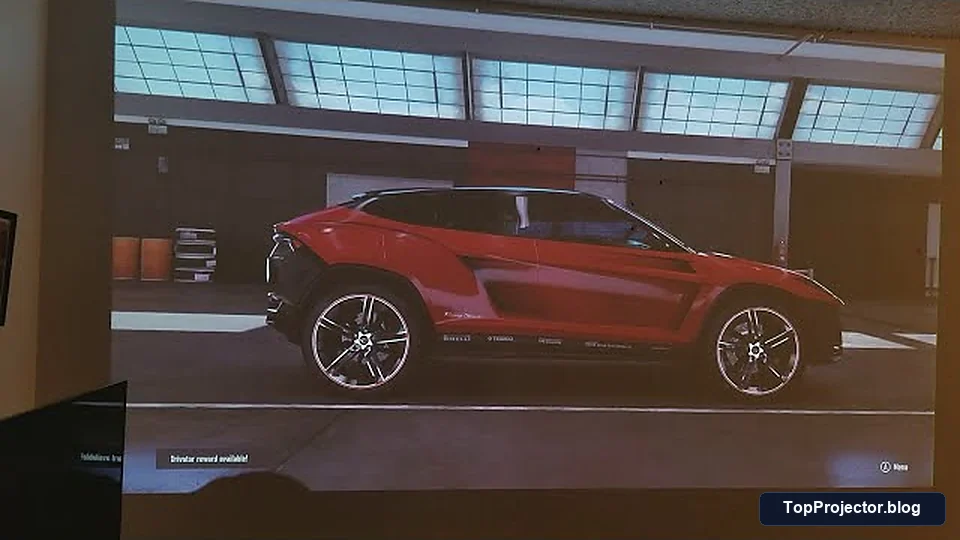
Dark-room viewers consistently notice deeper shadow detail and lower black floors during night scenes. This DLP architecture prevents the gray haze common in entry-level 3LCD light engines.
Evaluating native panel performance reveals clear engineering trade-offs between absolute black levels and highlight punch. Dedicated theater rooms benefit immensely from the Benq optical design.
- Native DLP contrast ratios exceed budget LCD limits.
- RGBRGB color wheel minimizes dark-scene light leakage.
- Shadow detail remains crisp during high-contrast movie frames.
Pitch-Black Theater Environments
In a completely dark basement or dedicated media room, the Benq Ht2050 produces breathtakingly organic contrast. Starry nights and deep space sequences look genuinely inking.
The Epson 2150 relies on a dynamic iris to artificially lower black floors during fades. This mechanical adjustment introduces audible pumping that distracts critical film enthusiasts.
- No dynamic iris mechanical noise on the Benq.
- Organic shadow gradation enhances cinematic immersion.
Control of Stray Light Reflections
White ceilings and light-colored walls bounce projector light right back onto projection screens. Both units suffer in unpainted rooms, but high native ANSI contrast mitigates wash-out.
Controlling your room's interior reflectance remains the single best upgrade for squeezing maximum performance from either optical engine.
- Room boundary reflections degrade perceived black levels.
- Dark velvet wall treatments amplify projector native contrast.
Ambient Light Behavior and Peak Brightness Dynamics
Combating daylight requires raw output, and running our ansi lumens room calculator helps ensure your chosen 2500 ANSI lumens engine easily overpowers mild ambient glare in bright living spaces.
Light output specs often deceive consumers during actual daytime viewing sessions. Color brightness matters just as much as white brightness for maintaining rich saturations.
3LCD technology guarantees equal color and white lumen ratings. This prevents skin tones from looking washed out when lamps operate at maximum wattage settings.
- Epson delivers higher overall peak white luminance.
- 3LCD color brightness matches white lumen output.
- Daytime sports viewing favors high-lumen optical engines.
Living Room Daylight Challenges
Sunlight streaming through unprotected windows will overwhelm any traditional home theater projector. Drawing curtains is mandatory for watching dark cinematic content.
The Epson 2150 holds up slightly better under controlled daytime ambient lighting conditions thanks to its extra 300 ANSI lumens of headroom.
- Ambient light rejecting screens salvage daytime usability.
- Window treatments remain essential for proper contrast.
Lamp Life and Eco-Mode Efficiency
Running lamps in eco mode reduces fan noise and extends bulb longevity significantly. Both models offer robust energy-saving presets for daily television viewing.
Budgeting for replacement bulbs is crucial, which is why finding options in our best projector value picks guide helps minimize your long-term cost of ownership while maximizing performance.
- Eco modes reduce fan acoustics dramatically.
- Extended bulb life lowers cost of ownership.
Color Accuracy, Calibration Out-of-the-Box, and Gamma
Achieving cinematic color fidelity right out of the box saves hours of tedious calibration. The Benq Ht2050 comes factory-calibrated to strict Rec. 709 standards.
Skin tones look remarkably natural without requiring expert colorimeter intervention. Director intent is preserved faithfully across complex cinematic color grading suites.
Epson units offer vibrant color modes that pop nicely in bright rooms. However, cinema presets often require manual tuning to eliminate green or blue pushes.
- Benq includes robust Rec. 709 factory calibration profiles.
- Skin tones appear organic and free of artificial tints.
- Epson requires manual adjustments for optimal cinema accuracy.
Color Wheel Speed and Rainbow Artifacts
Single-chip DLP projectors utilize spinning color wheels to generate sequential RGB imagery. Sensitive viewers might notice brief rainbow flashes across high-contrast edges.
The Benq Ht2050 runs a 4x speed color wheel that successfully minimizes rainbow artifacts for the vast majority of viewers.
- High-speed color wheels reduce visual artifacts.
- Sensitive individuals should test DLP before buying.
Gamma Tracking and Grayscale Fidelity
Smooth grayscale tracking ensures bright highlights and dark shadows blend seamlessly. Factory gamma presets on the Benq track remarkably close to standard curves.
Crushed blacks ruin shadow detail during moody cinematic sequences. Careful white balance calibration unlocks hidden nuances in dark film transfers.
- Accurate gamma prevents crushed shadow details.
- Grayscale tracking ensures smooth lighting gradients.
Screen Geometry, Throw Ratios, and Setup Versatility
Mounting a projector in tight living spaces requires precise calculations, easily managed using our projector screen aspect ratio calculator to determine the ideal 100 inch image placement.
This generous throw distance flexibility allows large screen sizes in modest apartment bedrooms or small media dens. Traditional long-throw units demand much greater room depth.
The Epson 2150 requires roughly 9.5 feet for that same 100-inch diagonal size. Measure your room layout carefully before drilling ceiling mount brackets.
- Benq offers a shorter throw ratio for compact rooms.
- Epson demands longer distances for large screen sizes.
- Accurate throw calculations prevent costly installation mistakes.
Vertical Lens Shift and Keystone Correction
Physical lens shift lets you adjust the image vertically without introducing digital keystone distortion. The Benq includes a modest vertical lens shift dial for easy alignment.
Digital keystone correction degrades pixel sharpness and introduces noticeable input artifacts. Always rely on physical optical placement whenever mounting to ceilings.
- Optical lens shift preserves full pixel sharpness.
- Avoid digital keystone adjustments to maintain resolution.
Keystone Slider Adjustments on Epson
The Epson 2150 incorporates a handy horizontal keystone slider on the chassis. This makes off-axis table placement quick for temporary outdoor movie nights.
While convenient for portable setups, side projection compromises corner focus uniformity across the entire projected screen surface.
- Horizontal sliders assist with off-axis table setup.
- Off-axis placement causes slight corner focus dropouts.
Motion Handling, Gaming Latency, and Response Times
Fast-paced console gaming and sports broadcasting demand exceptionally low input lag and smooth motion processing. The Benq Ht2050 delivers a stellar 16.4ms input lag in game mode.
Competitive multiplayer titles feel instantly responsive without frustrating controller delays. Twitch reflexes translate directly to on-screen action without stuttering frames.
The Epson 2150 measures around 28ms of input lag, which suits casual RPGs and sports games perfectly fine but trails the Benq for competitive esports.
- Benq boasts ultra-low 16.4ms gaming input lag.
- Epson 28ms lag handles casual titles quite well.
- Fast response times eliminate distracting motion blur.
Sports Broadcasting and Motion Interpolation
Watching fast-moving football or hockey pucks tests display response times severely. Both projectors handle camera panning smoothly without excessive ghosting.
Advanced motion interpolation settings on higher-end models are absent here, relying instead on native panel response speeds to maintain clarity.
- Fast camera pans remain crisp during sports broadcasts.
- Native panel speed prevents severe motion ghosting.
Frame Rate Stability and Refresh Rates
Standard 60Hz refresh rates govern both optical engines during standard video playback. PC gamers should lock frame rates to match native projector capabilities.
Screen tearing ruins immersive gaming sessions when source frame rates mismatch display refresh tolerances significantly.
- Standard 60Hz refresh rates handle console sources.
- Sync frame rates to eliminate distracting screen tearing.
Optics, Lens Shift, and Physical Installation Realities
Physical build quality and lens sharpness dictate long-term viewing satisfaction in fixed installations. The Benq Ht2050 uses all-glass optics that maintain edge-to-edge focus.
Cheap plastic elements suffer from thermal focus drift as internal chassis temperatures rise during long movie marathons. Premium glass components prevent this annoying optical degradation.
Epson utilizes quality multi-element glass lenses as well, ensuring crisp text rendering for computer desktop mirroring and web browsing applications.
- Benq all-glass optics prevent thermal focus drift.
- Edge-to-edge sharpness remains razor-sharp during movies.
- Both models render crisp computer desktop text.
Fan Acoustics and Thermal Management
Quiet fan operation prevents distracting background hums during quiet cinematic dialogue scenes. High lamp mode ramps up fan speeds noticeably on both units.
Eco mode drops fan noise down to whisper-quiet levels, blending seamlessly into normal living room ambient sound floors.
- Eco mode ensures whisper-quiet fan operation.
- High lamp mode generates moderate white noise.
Chassis Footprint and Ceiling Mounting
Ceiling mounting requires sturdy brackets capable of supporting moderate chassis weights securely. Both projectors feature standard threaded mounting holes for universal hardware.
Ensure adequate ventilation clearance around the chassis exhaust vents to prevent premature lamp burnout and thermal shutdowns.
- Standard universal mounting holes simplify installation.
- Maintain ventilation clearance for long-term reliability.
Final Scenario-Based Verdict and Room Matching
Selecting the ideal projector ultimately depends on your specific room lighting and primary entertainment sources. The Benq Ht2050 reigns supreme for dark home theaters.
Movie lovers valuing deep native contrast and low gaming latency will find the Benq an unbeatable mid-tier optical champion for dedicated basement setups.
Conversely, buyers wanting alternative optics should inspect our epson home cinema 3800 review to compare higher lumen output and flexible placement against standard lamp models.
- Benq wins dark theater contrast and gaming speed.
- Epson dominates bright living room lumen output.
- Match projector optics to your room's exact lighting.
The Dark Theater Recommendation
If your room features light-controlled windows and dark wall paint, buy the Benq immediately. Its superior optical contrast transforms movie nights.
You will enjoy richer shadow details and more faithful cinematic color grading without spending a fortune on high-end laser systems.
- Dark rooms maximize Benq native contrast benefits.
- Cinematic color accuracy rewards movie enthusiasts.
The Multi-Purpose Living Room Choice
When ambient room lighting cannot be controlled easily, choose the Epson 2150. Its bright lamp punches through daytime glare effectively.
Family movie nights and casual television viewing thrive under higher lumen outputs despite minor compromises in absolute black floor depth.
- Higher lumen output fights living room daytime glare.
- Versatile placement suits casual family entertainment.
Frequently Asked Questions
Which projector has better black levels for dark room viewing?
The Benq Ht2050 delivers superior native contrast and deeper black floors because of its specialized single-chip DLP optical design.
Can I use the Epson 2150 in a brightly lit living room?
Yes, the Epson 2150 produces higher peak brightness to easily combat moderate ambient daylight during casual viewing sessions.
Which model is better suited for fast-paced console gaming?
The Benq Ht2050 wins gaming matchups decisively with an ultra-low 16.4ms input lag measurement.
Do either of these projectors support native 4K resolution?
No, both models feature native 1080p full HD resolution chips designed for standard high-definition media sources.
Which projector is easier to install in a small bedroom?
The Benq Ht2050 offers a shorter throw ratio, casting large images from shorter mounting distances in tight spaces.