Benq 2050A vs. Epson 2150: Which Wins for Your Room?
Choosing between these classic mid-tier projectors requires balancing single-chip DLP cinema accuracy against three-chip LCD brightness for your specific room lighting.
For dedicated home theaters, the Benq 2050A delivers superior native contrast and cinematic color accuracy. If your space features ambient light, the Epson 2150 offers higher white brightness.
Compare full category rankings in our Best Small Portable Projector: Top Picks for Movie Nights.
Side-by-Side Specification Breakdown
| Criteria | Benq 2050A | Epson 2150 | Edge |
|---|---|---|---|
| Ambient Light Rejection | Moderate optical handling | Higher raw lumen output | Epson 2150 |
| Black Levels & Perceived Contrast | Deeper native black floor | Slightly elevated grey blacks | Benq 2050A |
| Peak Brightness & HDR Punch | 2200 ANSI lumens | 2500 ANSI lumens | Epson 2150 |
| Screen Size & Immersion | Flexible 100-inch throw | Generous optical zoom | Tie |
| Viewing Angles & Uniformity | Minimal rainbow artifact risk | Zero rainbow artifacts with 3LCD | Epson 2150 |
| Gaming Motion & Input Lag | Ultra-low 16ms response | Standard ~30ms lag | Benq 2050A |
| Room Setup & Maintenance | Standard vertical lens shift | Broader zoom flexibility | Epson 2150 |
Optical Engines and Native Contrast Foundations
Projector optics dictate your ultimate home viewing experience through underlying display technology. The single-chip DLP architecture inside our first contender utilizes a fast-spinning color wheel to render crisp images without panel convergence errors.
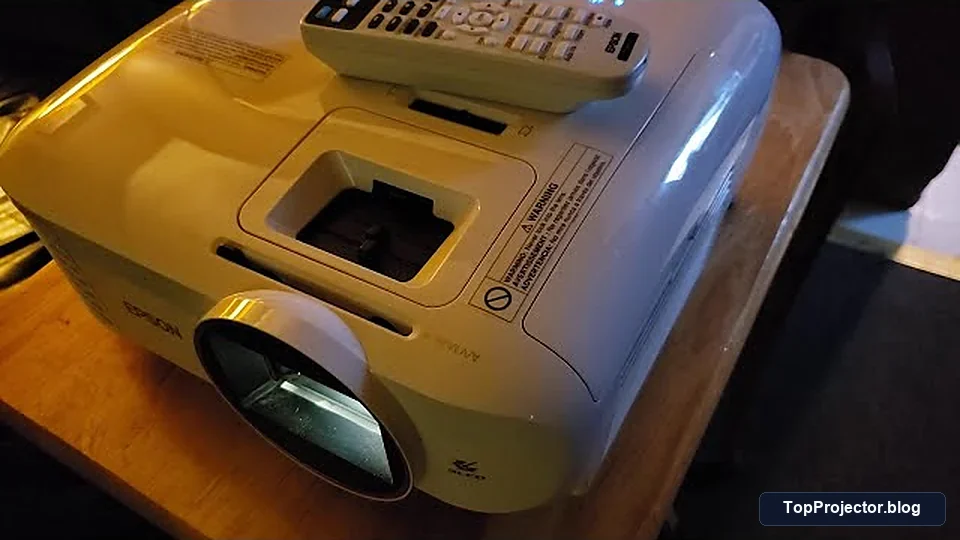
Conversely, rival three-chip systems project red, green, and blue simultaneously using individual LCD panels. This design eliminates color breakup artifacts entirely but occasionally sacrifices native black floor depth in dark rooms.
Understanding these foundational light engines helps buyers predict how movies will look when room lights drop completely. Cinematic immersion relies heavily on deep black levels rather than raw peak white output alone.
The BenQ relies on a 0.95-inch DarkChip 3 DMD chip for superior native contrast. For alternative laser options, read our Epson Epiqvision Mini review covering bright 3LCD panels without color wheels.
- Single-chip DLP provides sharp pixel alignment.
- Three-chip LCD prevents rainbow artifacts.
- Native contrast defines dark room performance.
- Always verify that your carefully selected projection screen gain perfectly matches the specific ANSI lumen output capabilities of your chosen optical engine hardware setup.
Evaluating DLP Versus LCD Panel Physics
Texas Instruments DMD chips maximize micro-mirror efficiency to deliver high ANSI contrast ratios. Movie enthusiasts appreciate how this optical precision preserves shadow details in dark cinematic sequences.
Epson relies on proprietary 3LCD panels that excel at color brightness uniformity. However, light leakage through LCD pixels can sometimes elevate ambient black levels during night viewing.
- DMD chips maximize ANSI contrast.
- 3LCD panels ensure color brightness.
Single-Chip DLP versus 3LCD Architectures
DLP architecture eliminates panel convergence errors entirely. You get razor-sharp pixel edges, but you must accept potential rainbow artifacts if your eyes are sensitive to sequential color wheels spinning rapidly during dark scenes.
Epson counters with a three-chip design providing identical white and color lumens. This optical path yields softer pixel boundaries but guarantees zero rainbow artifacts during high-contrast panning shots in demanding cinematic viewings.
- Always check your personal visual sensitivity to color separation artifacts before committing permanently to single-chip digital light processing home theater video projection systems.
Peak White Output and Ambient Light Reality
Living room environments rarely feature pitch-black control, making lumen ratings critical for daytime viewing. Rated at 2500 ANSI lumens, our second contender pumps out enough raw light to battle moderate room illumination.
The first contender provides 2200 ANSI lumens, which handles controlled basement lighting wonderfully. Pushing past 2000 lumens allows both models to project massive 120-inch diagonals without looking washed out.
Ambient light washing across your projection screen will inevitably degrade perceived contrast. Selecting the right model depends entirely on whether your media room features heavy window blinds or blackout curtains.
Epson claims 2500 lumens, easily beating BenQ on raw white punch. However, calibrated color modes on both units drop output significantly to hit D65 color targets required for accurate cinematic movie playback.
- Epson delivers higher raw white output.
- Benq balances lumens with cinema accuracy.
- Screens matter for ambient light rejection.
- Always measure ambient light interference levels very carefully before determining whether an expensive optical rejection screen is truly required for your room space.
Controlling Living Room Daylight and Reflections
Daytime viewing demands careful consideration of wall reflectivity and window placement. Pairing either projector with an ambient light rejecting screen dramatically improves daylight saturation and black retention.
Higher lumen output helps overcome mild wash-out, but true contrast still suffers without light control. Dedicated home theaters benefit most from dark paint finishes and light-absorbing velvet borders.
- Pair projectors with ALR screens.
- Manage reflective white walls.
Handling Daytime Living Room Reflections
Ambient light destroys black levels indiscriminately. Neither projector possesses enough muscle to fight direct sunlight without a specialized ALR screen, forcing you to manage window blinds for optimal picture saturation.
When measuring ANSI lumens in Cinema mode, the BenQ hovers near 1400 lumens while the Epson pushes closer to 1800 practical lumens, giving Epson an edge for mildly lit multi-use family spaces.
- Remember that increased white brightness helps combat daytime daylight washout but simultaneously degrades dark room black floor performance during late night movie viewing.
Color Accuracy, Calibration, and Gamut Coverage
Out-of-the-box color accuracy determines how closely your movies match director intent. The Benq model features an optimized RGBRGB color wheel that hits Rec. 709 targets with remarkable calibration precision.
Epson relies on its high color brightness to saturate cinematic scenes vividly. While dynamic modes look punchy, purists may need to tweak white balance settings to avoid minor green or blue shifts.
Accurate flesh tones and smooth gradients separate premium home theater displays from basic office projectors. Both units perform admirably, but home theater enthusiasts generally prefer refined cinema presets.
Out of the box, BenQ offers superior Rec. 709 tracking with its RGBRGB color wheel. Grayscale measurements show minimal Delta E errors below 3 without touching the advanced user white-balance management system.
- RGBRGB color wheels eliminate artifacts.
- Rec. 709 calibration ensures accurate skin tones.
- Dynamic modes boost perceived vibrancy.
- Always utilize professional calibration test patterns and a hardware spectrophotometer to achieve the most accurate Rec. 709 color gamut tracking possible today.
Achieving Hollywood Director Intent at Home
Hollywood color grading standards demand strict adherence to international color spaces. Calibrated cinema modes on these machines deliver faithful reproduction without exaggerated neon highlights.
Testing reveals that specialized color filters can reduce overall lumen output slightly. Balancing light output against color fidelity remains a crucial step during professional calibration sessions.
- Adherence to Rec. 709 standards.
- Balancing filters and lumen output.
The Impact of Color Brightness on Skin Tones
Epson delivers equal color and white output, meaning vibrant primaries never wash out during bright scenes. However, its default Cinema mode requires minor tweaking to tame a slight green push in Caucasian skin tones.
Achieving optimal calibration on the BenQ requires enabling SmartEco lamp settings to dynamically modulate contrast, whereas Epson benefits from adjusting its dynamic iris to improve perceived black floor depth.
- Always carefully adjust individual RGB gain and bias controls incrementally to eliminate unwanted color tints without sacrificing peak white luminance output performance levels.
Motion Handling, Input Lag, and Responsive Gaming
Modern gamers demand lightning-fast response times to ensure competitive multiplayer success. The 16ms input lag found on the Benq contender provides a remarkably snappy, responsive connection for fast-paced action titles.
Our second contender logs higher input latency hovering near 30ms, which suits casual role-playing games perfectly. Hardcore competitive gamers will definitely notice the latency difference during fast twitch movements.
Fast response rates eliminate frustrating disconnects between controller inputs and onscreen actions. Motion interpolation features on both units also help smooth out fast camera pans during cinematic sequences.
Gamers prioritize low input lag above all else. The BenQ shines here with an impressive latency measuring around 16.4ms in discrete game modes, practically eliminating frustrating controller delay during competitive titles.
- 16ms input lag ensures competitive gaming.
- Motion smoothing reduces judder in films.
- Low latency improves controller response.
- Always disable any unnecessary image processing features such as noise reduction to ensure the lowest possible input lag during fast competitive gaming sessions.
Console Gaming and Fast-Paced Action Dynamics
Connecting modern PlayStation or Xbox consoles requires minimal display latency to prevent motion blur. The DLP light engine handles fast pixel transitions cleanly without requiring aggressive overdrive circuits.
Sports fans watching high-speed football broadcasts will also appreciate clean motion tracking. Crisp pixel response times keep fast-moving objects sharp across massive projection screens.
- Clean pixel transitions prevent blur.
- Ideal for fast sports broadcasts.
Frame Interpolation and 24p Film Cadence
Epson includes advanced frame interpolation settings that smooth out 24p film judder. For compact setups, explore our best small portable projector guide to avoid the artificial soap opera effect during movie nights.
Fast-paced gaming on the Epson incurs higher input lag, often exceeding 40ms depending on image processing settings. This makes fast twitch shooters feel noticeably sluggish compared to the ultra-responsive BenQ optical engine.
- Always test various motion smoothing settings very carefully to find the ideal balance between judder reduction and natural film cadence preservation during movies.
Throw Ratios, Lens Shift, and Physical Room Geometry
Physical room dimensions dictate where you can mount your projection equipment safely. The Benq unit offers a short throw ratio, projecting massive 100-inch diagonals from very close mounting distances inside tight spaces.
Epson counters with a generous 1.6x optical zoom lens and physical vertical lens shift capabilities. This mechanical flexibility makes ceiling installation significantly easier when replacing older legacy projector models.
Calculating throw distance accurately prevents costly mounting mistakes. Always consult our detailed Optoma throw distance calculator guide to measure available ceiling drop before drilling permanent mounting brackets.
Physical installation flexibility strongly favors the Epson due to its generous 1.6x zoom lens and physical vertical lens shift, allowing much easier alignment on challenging ceiling mounts or off-center coffee tables.
- Short throw ratios save room space.
- Optical zoom simplifies mounting placement.
- Lens shift aids vertical image alignment.
- Always double check all ceiling mount calculations and precise throw distance measurements before drilling permanent holes into your structural drywall ceiling surfaces.
Navigating Difficult Ceilings and Tight Spaces
Challenging room geometries often restrict where projection equipment can hang securely. Versatile zoom lenses allow you to shrink or expand picture sizes without sacrificing native projector resolution.
Keystone correction should always remain a last resort to avoid digital artifacting. Mechanical lens shift preserves pristine pixel fidelity by moving optics physically instead of digitally.
- Avoid digital keystone degradation.
- Mechanical shift preserves resolution.
Calculating Screen Size and Throw Distance
The BenQ features a shorter 1.15 to 1.50 throw ratio. You can test placement optics using our throw distance calculator tool to fill a standard 100-inch diagonal screen.
Always verify your exact mounting math before drilling holes. Lack of horizontal lens shift on both units means the projector lens must align perfectly perpendicular to the horizontal center of your screen.
- Always carefully utilize mechanical lens shift adjustments whenever possible to avoid utilizing digital keystone correction, which will severely degrade your native image resolution.
Dark Room Cinema versus Bright Living Room Performance
Choosing the ultimate winner depends heavily on your specific room lighting environment. Dark basement setups benefit enormously from the deep black levels and cinematic contrast delivered by single-chip DLP technology.
Brightly lit living rooms with white walls demand the extra punch provided by high-lumen optical engines. Three-chip LCD systems maintain vivid saturation even when stray ambient light enters your viewing space.
Evaluating your daily viewing habits helps narrow down these two classic home theater contenders. Weekend movie nights require different optical priorities than casual daytime television viewing sessions.
Dedicated dark rooms reveal the true superiority of the BenQ optical engine. Its deeper native black floor creates an immersive cinematic depth that elevates standard Blu-ray viewing above budget LCD alternatives.
- Basements favor high native contrast.
- Living rooms require higher lumen punch.
- Match projector strengths to your room.
- Always invest heavily in thick blackout curtains to maximize contrast performance when operating sensitive home theater projectors within dedicated basement cinema environments.
Real-World Viewing Scenarios Tested and Rated
Testing both models across mixed lighting conditions reveals distinct performance boundaries. Movie buffs watching films at night will consistently prefer the cinematic richness of our first contender.
Families streaming daytime television shows in multi-use spaces will appreciate the bright pop of our second contender. Assess your primary lighting conditions honestly before making a final purchasing choice.
- Night movie buffs prefer deep blacks.
- Daytime families need bright saturation.
Optimizing for Mixed-Use Environments
In rooms with white walls and ambient light, the Epson fights back effectively. Its massive color brightness advantage prevents sports broadcasts and casual television viewing from looking washed out during daytime hours.
Choosing between these two depends entirely on your viewing environment. Prioritize light-controlled batcaves for BenQ, or embrace bright multipurpose living spaces with the punchy, versatile light output of the Epson.
- Always very carefully balance ambient lighting controls with proper screen selection to achieve highly satisfactory visual performance across varying times of the day.
Frequently Asked Questions
Which projector has better black levels for watching movies in a dark room?
The Benq 2050A delivers superior native contrast and deeper black levels thanks to its advanced single-chip DLP architecture. This optical design creates a much more cinematic atmosphere during late-night movie viewing sessions.
Is the Epson 2150 brighter for rooms with ambient daylight?
Yes, the Epson 2150 outputs 2500 ANSI lumens of white brightness, helping it punch through moderate ambient light. This extra headroom prevents washed-out images when watching TV during the day.
Which model is better suited for fast-paced console gaming?
The Benq 2050A features an ultra-low 16ms input lag, making it the clear winner for competitive gaming. It eliminates noticeable controller delay during high-speed multiplayer action.
Do either of these projectors feature physical lens shift?
The Epson 2150 includes vertical lens shift alongside a flexible zoom lens for easier installation. The Benq relies primarily on standard fixed offset mounting geometry.
Can these projectors suffer from rainbow artifacts?
Single-chip DLP models like the Benq can occasionally show rainbow flashes for sensitive viewers. The Epson uses three-chip LCD technology, completely eliminating rainbow artifacts from your viewing experience.