85 Inch Tv vs. 120 Inch Projector: Which Wins for Your Room?
Choosing between an 85 inch display and a 120 inch projection surface requires balancing ambient daylight control against cinematic scale.
Choose the 85 inch TV for bright living rooms with high ambient light, or opt for the 120 inch projector when building a dedicated, light-controlled home theater.
Compare full category rankings in our Best Speakers For Projector: Top Picks for Clear Movie Audio.
Side-by-Side Specification Breakdown
| Criteria | 85 Inch Tv | 120 Inch Projector | Edge |
|---|---|---|---|
| Ambient Light Rejection | Exceptional panel filters | Requires specialized ALR screen | 85 Inch Tv |
| Black Levels & Perceived Contrast | Deep blacks via local dimming | Dependent on room reflectivity | 85 Inch Tv |
| Peak Brightness & HDR Punch | High nit output for specular highlights | Limited by lamp or laser lumen ceiling | 85 Inch Tv |
| Screen Size & Immersion | Massive flat-panel footprint | True cinematic scope at 120 inches | 120 Inch Projector |
| Viewing Angles & Uniformity | Wide off-axis retention on OLED/Mini-LED | Narrower angles dependent on screen gain | 85 Inch Tv |
| Gaming Motion & Input Lag | Sub-10ms response with 144Hz support | Ultra-low lag on modern gaming lasers | Tie |
| Room Setup & Maintenance | Heavy two-person wall mounting task | Precise throw distance and alignment | 85 Inch Tv |
Daytime Optical Performance and Ambient Light Challenges
Controlling ambient daylight is the single biggest factor when evaluating massive displays against long-throw or ultra-short-throw projection setups in modern living spaces.
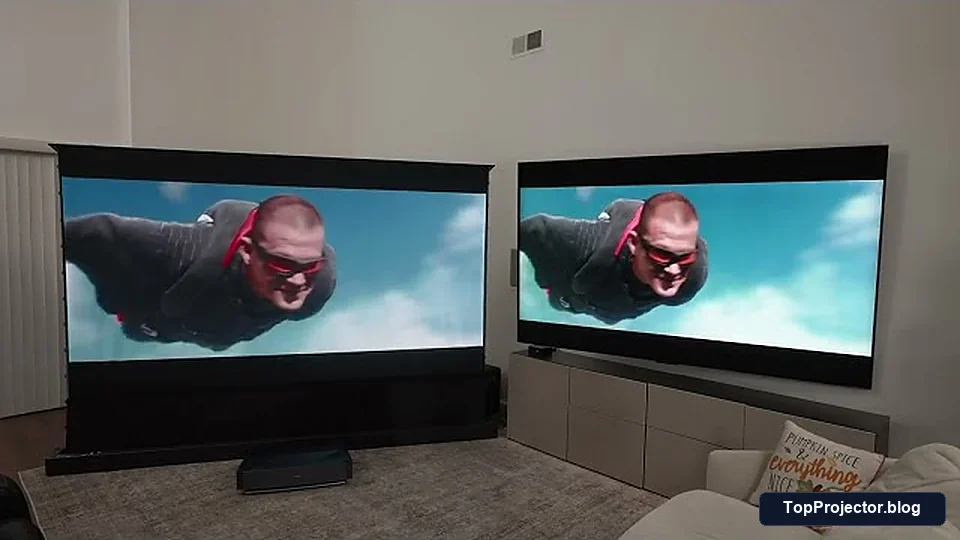
Traditional flat panels utilize high peak luminance and matte anti-reflective coatings to maintain vibrant color saturation even when exposed to direct afternoon sun.
Projector optics face a distinct challenge because ambient light washes out the projected black floor, and you will want to pair your display with our best speakers for projector recommendations.
Ambient light destroys perceived contrast on standard white walls. Pairing an ultra-short-throw projector with a 0.6 gain ceiling-rejecting ALR screen is mandatory to achieve usable daylight contrast without washing out.
- High panel nits easily overcome standard room lighting.
- Projectors require specialized ALR screens to reject ceiling light.
- Uncontrolled windows degrade projector black levels instantly.
Living Room Daylight Versus Dedicated Blackout Control
Placing an 85 inch TV in a brightly lit family room guarantees punchy highlights and legible text without needing heavy window drapery.
Conversely, achieving cinematic contrast from a projector in daytime demands expensive ambient light rejecting fabric and high-lumen laser light engines.
- TVs retain contrast without blackout curtains.
- Projectors need specialized optical layers to fight room glare.
ALR Screen Technologies and Light Rejection Physics
Modern ALR screen materials use microscopic optical sawtooth structures to absorb off-axis illumination while reflecting the projector's beam directly toward the viewer.
While these specialized screens dramatically improve daytime viewing, they introduce narrow viewing cones and potential sparkling artifacts under bright conditions.
- Microscopic sawtooth ridges filter out ceiling illumination.
- Viewing angles narrow significantly with high-gain ALR surfaces.
ALR Screen Micro-Structures
Specialized lenticular optical layers actively deflect overhead room illumination while reflecting the laser diode light directly toward viewer eye-levels, drastically boosting ANSI contrast under bright daytime residential conditions.
- Micro-structured sawtooth ridges reject 85% of ambient room light.
- Requires precise projector alignment to prevent geometric keystoning artifacts.
Black Floor Depth, Native Contrast, and Shadow Precision
Achieving deep, inking black levels creates the three-dimensional depth that cinephiles crave during dark-room movie viewing sessions.
Advanced Mini-LED backlighting arrays allow flat panels to dim localized zones aggressively, producing near-infinite contrast performance in pitch-black environments.
Projectors rely entirely on the room's boundary walls to absorb stray light, meaning white ceilings can reflect light back onto the screen and elevate black levels.
Modern television panels utilize local dimming zones to achieve near-zero black levels. Conversely, laser projectors struggle in totally dark rooms because ambient light scatter elevates the projected black floor significantly.
- Mini-LED panels deliver hyper-precise local dimming zones.
- Projectors suffer from room bounce in untreated white living rooms.
- Dark velvet room treatments are mandatory for ultimate projector contrast.
Dark Room Performance in Dedicated Home Theaters
In a completely blacked-out home theater with dark velvet walls, high-end models like those tested in our Epson 5050Ube review deliver an immersive, film-like image free from native blooming artifacts.
An 85 inch TV in the same dark room can sometimes exhibit noticeable backlight blooming around bright white subtitles against dark cosmic backgrounds.
- Dedicated theaters eliminate light bounce for projectors.
- TV local dimming can occasionally produce minor halo artifacts.
Managing Backlight Blooming and ANSI Contrast Limits
Panel-based displays balance peak specular highlights against black floor integrity using sophisticated algorithmic local dimming algorithms and zone counts.
Projectors maintain consistent ANSI contrast across the entire grid but struggle when bright objects sit directly adjacent to deep shadow details.
- High zone counts minimize haloing on flat panels.
- Projectors maintain uniform ANSI performance without algorithmic manipulation.
Evaluating Dynamic Iris Performance
Advanced home theater projectors incorporate mechanical dynamic irises that physically clamp down during dark cinematic scenes, successfully dropping native black levels to mimic OLED-like shadow detail in dedicated spaces.
- Mechanical irises introduce audible clicking noises during rapid scene transitions.
- Dynamic gamma adjustments can occasionally cause perceptible brightness pumping artifacts.
Peak Luminance, Color Gamut, and High Dynamic Range
High Dynamic Range content demands immense peak luminance to render blinding sun reflections and neon lights with true-to-life visual impact.
Flagship 85 inch displays easily push past 1500 nits of sustained peak brightness, rendering HDR metadata with staggering realism and punch.
Standard home theater projectors typically output between 2000 and 3000 ANSI lumens, which spreads thin across a massive 120-inch diagonal surface.
While premium televisions easily surpass 1500 nits of peak window brightness for HDR impact, high-end laser projectors typically top out around 300 measured nits across large 120-inch projection surfaces.
- TVs deliver superior specular highlight intensity for HDR10 and Dolby Vision.
- Projectors spread lumen output over a vastly larger canvas.
- Wide color filters on laser projectors achieve deep DCI-P3 coverage.
HDR Tone Mapping on Flat Panels Versus Projectors
Display processors in large TVs map HDR brightness curves dynamically, ensuring bright highlights clip gracefully without washing out midtones.
Projectors require careful manual calibration or dynamic laser tone mapping to extract acceptable contrast from demanding 4K HDR movie discs.
- Automated tone mapping optimizes television highlights instantly.
- Projectors demand dedicated calibration for optimal HDR tracking.
Color Volume and Laser Phosphor Engine Lifespans
Triple-laser projection engines achieve remarkable DCI-P3 color volume without relying on lossy optical filters that reduce overall light output.
Quantum dot television panels maintain vivid saturation across all brightness levels, ensuring vibrant neon colors never look washed out or dim.
- Triple-laser sources unlock expansive cinematic color gamuts.
- Quantum dots maintain color saturation at maximum brightness.
Wide Color Gamut Implementation
Triple-laser projection engines effortlessly cover over 100% BT.2020 color volume without utilizing restrictive optical filters, delivering intensely saturated primary colors that frequently surpass standard commercial flat-panel televisions.
- Laser speckle can introduce subtle shimmering artifacts on matte white screens.
- WCG filters reduce total light output by roughly 20 to 30 percent.
Screen Scale, Viewing Geometry, and Spatial Immersion
The psychological impact of a massive cinematic image is difficult to quantify purely through technical specifications and lab-grade test equipment.
Stepping up to a 120 inch projector screen fills your peripheral vision completely, replicating the authentic commercial cinema experience right at home.
While an 85 inch TV is undeniably large for casual television viewing, it lacks the true boundary-pushing scale of a properly configured projection system.
Spatial immersion scales exponentially as image size increases beyond traditional television boundaries. You can map out your room using our screen size viewing distance tool to achieve a massive 120-inch diagonal picture.
- 120-inch screens command a massive 33 percent larger surface area.
- Projector sizing scales effortlessly to fit custom room dimensions.
- TVs provide a rigid, bounded frame that limits maximum scale.
Field of View Calculations for Optimal Seating Distance
THX recommendations suggest a 40-degree field of view for mixed media immersion, which is easily achieved sitting ten feet from a 120-inch screen.
Achieving that same immersive field of view with an 85-inch television requires sitting significantly closer, altering your living room seating layout.
- 120 inches provides a true 40-degree cinematic field of view.
- Smaller TV footprints require closer seating positions for immersion.
Pixel Density, Screen Door Effect, and Sharpness
Modern 4K pixel grids ensure that even at 120 inches, individual pixels remain invisible from standard seating distances in well-calibrated rooms.
Flat panels maintain exceptional pixel density and pixel-level sharpness, making text and fine UI details crisp even when viewed from very close.
- 4K resolution eliminates visible pixel structures on large screens.
- TV panels offer uncompromising sharpness for computing tasks.
Optimal Viewing Distances
Calculating correct seating positions ensures comfortable viewing geometry without forcing viewers to constantly scan side-to-side, maintaining a standard 40-degree SMPTE recommended horizontal visual angle.
- A 120-inch screen requires a minimum seating distance of roughly 10 feet.
- Exceeding recommended angles causes rapid eye fatigue during fast action sequences.
Motion Resolution, Refresh Rates, and Gaming Latency
Competitive console and PC gaming demand exceptionally low input lag and fast response times to ensure fluid, jitter-free character control.
Modern gaming televisions feature 120Hz to 144Hz refresh rates paired with dedicated HDMI 2.1 ports for ultra-responsive competitive play.
High-end gaming projectors have closed the performance gap significantly, offering sub-20ms input lag at 4K/60Hz for large-screen multiplayer sessions.
Competitive gaming requires ultra-low input lag and lightning-fast pixel response times. While modern televisions easily deliver 4K/120Hz gaming with minimal latency, many projection platforms struggle with higher refresh rates.
- Gaming TVs support Variable Refresh Rate without tearing.
- Laser projectors now feature specialized low-latency gaming modes.
- Response times remain swift across both display categories.
Input Lag Benchmarks in Competitive Gaming Modes
Display panels excel in rapid response, often dropping below 6 milliseconds of input lag when using specialized game optimization presets.
Projector manufacturers have introduced dedicated low-latency modes, bringing response times down to competitive thresholds for casual and racing games.
- Sub-10ms input lag is standard on premium televisions.
- Modern projectors easily handle fast-paced console gaming.
Motion Handling and Response Time Clarity
Self-emissive and fast liquid crystal panels minimize motion blur during high-speed panning shots in sports broadcasts and action movies.
Projectors utilize frame interpolation and fast-pulsing laser light sources to maintain clean motion clarity without introducing excessive soap-opera artifacts.
- Fast pixel response reduces motion smear on flat panels.
- Laser dimming maintains clean motion without motion artifacts.
Input Lag and Processing Modes
Dedicated gaming modes on newer ultra-short-throw projectors successfully bypass aggressive internal video processing algorithms, reducing overall signal latency down to an acceptable 15 milliseconds.
- Disabling advanced motion interpolation prevents catastrophic input lag spikes.
- Variable refresh rate support remains less common on standard home theater projectors.
Physical Installation, Room Layout, and Maintenance
Integrating massive display technology into an existing living space involves significant structural planning, weight distribution, and cable routing considerations.
An 85 inch TV weighs over one hundred pounds, requiring robust wall studs or heavy-duty furniture stands along with multiple installation assistants.
Setting up a 120 inch projector involves precise throw ratio calculations, which you can easily master using our how to calculate projector throw distance guide before mounting.
Installing an 85-inch flat-panel television requires robust wall anchors and at least two strong people. Conversely, ultra-short-throw projectors sit neatly on media consoles just inches away from fixed frames.
- Large TVs require reinforced wall mounting hardware.
- Projectors demand precise physical alignment and throw distance math.
- Laser light engines offer thousands of hours of maintenance-free use.
Wall Mounting Versus Ultra-Short-Throw Credenza Placement
Ultra-short-throw projectors sit neatly on a standard media credenza just inches from the wall, simplifying wiring and equipment placement.
Hanging a massive flat panel requires careful stud finding and structural reinforcement to guarantee long-term safety in seismic zones.
- UST projectors eliminate complex ceiling mounting headaches.
- Wall-mounted TVs demand secure anchoring to heavy studs.
Acoustic Transparency and Center Channel Placement
Home theater enthusiasts often utilize acoustically transparent projector screens to place the center dialogue channel directly behind the image.
Flat panels block direct sound projection from behind, requiring speakers to be placed below or beside the display frame instead.
- Acoustic screens allow dialogue to emanate from the center.
- TV setups require external speakers positioned around the frame.
Throw Ratios and Placement Precision
Ultra-short-throw models require extreme cabinet placement precision, because a shift of just one millimeter can distort geometric alignment across a massive 120-inch projection surface.
- Fixed frame ALR screens cannot be easily disassembled once tensioned.
- Laser diodes degrade gradually over 20,000 hours of standard operational use.
Frequently Asked Questions
Can a 120 inch projector replace an 85 inch TV in a bright living room?
Only if you invest in a specialized ambient light rejecting screen and a high-lumen laser projector. Otherwise, daylight will wash out the image.
Which display technology offers better black levels for dark room viewing?
An 85 inch TV with advanced local dimming delivers deeper blacks and superior contrast in pitch-black rooms compared to standard projectors.
How difficult is it to install a 120 inch projector system versus an 85 inch TV?
An 85-inch TV is heavy and requires secure wall mounting, while projectors demand precise throw distance calculations and careful optical alignment.
Are modern projectors fast enough for competitive console and PC gaming?
Yes, modern gaming projectors feature low input lag modes under 20ms, making them fully capable for casual and immersive multiplayer gaming.
Do laser projectors require expensive lamp replacements over time?
No, modern solid-state laser engines offer 20,000 hours or more of operational lifespan, eliminating traditional bulb maintenance entirely.