4K Projector vs. 4K Tv: Which Wins for Your Room?
Choosing between massive optical scale and self-emissive panel brilliance requires understanding your room lighting, throw distance, and critical viewing habits.
Dedicated theaters belong to 4K projectors for cinematic scale, while bright living rooms heavily favor 4K TVs for absolute contrast and daytime punch.
Compare full category rankings in our Best Household Projectors: Top Picks for Home Theaters (2026).
Side-by-Side Specification Breakdown
| Criteria | 4K Projector | 4K Tv | Edge |
|---|---|---|---|
| Ambient Light Rejection | Struggles without dedicated ALR screen material | Exceptional internal panel brightness defeats room light | 4K Tv |
| Black Levels & Perceived Contrast | Dependent on room light reflection and native laser dimming | Self-emissive pixels or local dimming yield infinite blacks | 4K Tv |
| Peak Brightness & HDR Punch | Typically 1500 to 3000 ANSI lumens max output | Frequently exceeds 1000 to 2000 nits specular highlights | 4K Tv |
| Screen Size & Immersion | Easily scales from 100 inches to 150 inches diagonal | Capped around 85 to 98 inches for standard models | 4K Projector |
| Viewing Angles & Uniformity | Requires precise optical alignment and screen gain tuning | Wide off-axis viewing with uniform panel illumination | 4K Tv |
| Gaming Motion & Input Lag | Modern gaming projectors hit 15ms to 20ms lag at 4K/60Hz | OLED and QLED sets achieve sub-5ms latency with 120Hz support | 4K Tv |
| Room Setup & Maintenance | Demands careful throw calculations and ceiling mounting | Simple tabletop or VESA wall bracket installation | 4K Tv |
Evaluating Native Optical Contrast and Black Floor Dynamics
Achieving true cinematic depth relies heavily on how well your display handles dark scenes. Native optical contrast dictates shadow detail without crushing delicate grayscale gradients during low-light sequences.
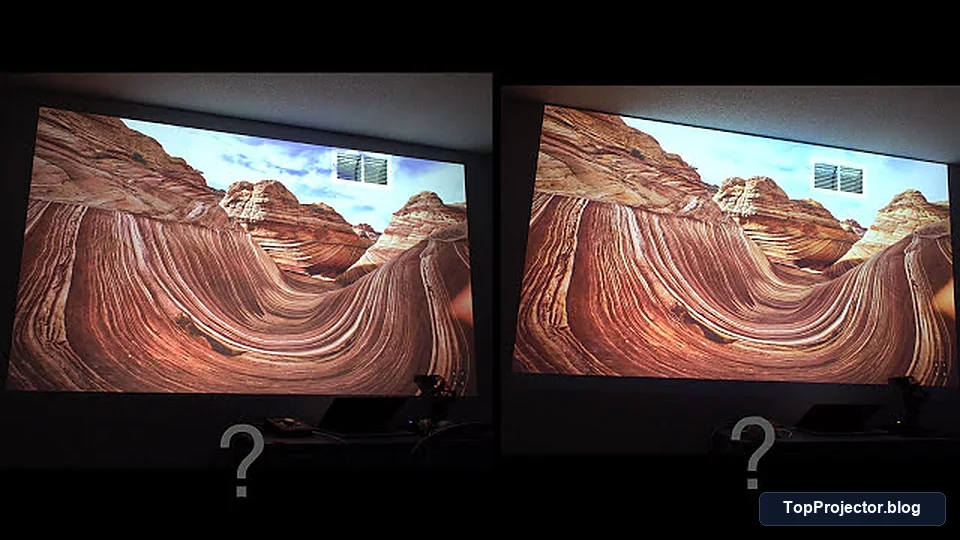
Projectors face a unique optical hurdle in untreated rooms. When exploring options inside our best household projectors guide, you will notice that ambient light washes out dark scenes entirely.
Modern laser engines incorporate dynamic iris controls to clamp down on white output during dark frames. However, ambient room reflections remain the primary enemy of projector black levels.
When measuring dynamic iris performance, high-end projectors can lower black floors significantly during dark scenes. However, OLED televisions still achieve true zero-nit blacks by disabling individual self-emissive pixels completely.
- Laser dimming algorithms improve dark-scene performance on high-end models.
- White wall reflections degrade native optical contrast in standard media rooms.
- Velvet-treated rooms restore deep shadow fidelity for high-end optical setups.
- ANSI contrast ratios evaluate mixed checkerboard patterns, revealing how optical light scatter affects dark adjacent zones in dedicated bat-cave projection setups compared to self-emissive television panels.
Pitch-Black Theater vs. Living Room Daylight
In a completely blacked-out dedicated theater, high-end 3-chip DLPs and LCoS projectors deliver breathtakingly natural contrast. Their organic light absorption rivals traditional bulb-lit panels.
Introduce ambient sunlight into that same space, and the projection screen immediately turns gray. Self-emissive displays maintain deep blacks regardless of how much external illumination enters the room.
- Dedicated dark rooms let projectors shine with organic contrast.
- Daylight completely destroys black floor performance on white projection screens.
Laser Dimming Algorithms and Dynamic Range
Modern solid-state laser engines use aggressive dynamic dimming algorithms to modulate light output frame by frame, boosting perceived contrast ratios during dark movie sequences without crushing crucial shadow details.
- Laser modulation speeds directly dictate how fast modern solid-state light engines react to sudden fade-to-black transitions during exceptionally demanding cinematic source material video playback sequences today.
Ambient Light Performance and Daylight Viewing Realities
Conquering ambient light is the single greatest challenge in projection optics. While standard televisions pump out thousands of nits directly toward your eyes, projectors must reflect light.
Specialized ambient light rejecting screens use microscopic optical sawtooth structures. These specialized filters reject overhead ceiling illumination while reflecting ultra-short throw laser light forward.
Despite modern ALR technology, watching daytime sports on a projector still looks washed out compared to a high-nit mini-LED panel placed in the exact same environment.
Deploying a high-gain ALR screen is mandatory for combatting ambient daylight washout in living room spaces. Standard matte white surfaces reflect overhead room light indiscriminately, destroying native contrast ratios.
- ALR screens successfully reject up to 85 percent of off-axis room light.
- Standard matte white screens are strictly unusable in sunlit living spaces.
- High-lumen laser units help combat moderate daytime glare effectively.
- Angular reflection rejection properties ensure that overhead ambient illumination is filtered away from the viewer, preserving acceptable black levels in rooms featuring unshaded windows.
Maximizing Lumen Output and Screen Gain
Choosing the right ANSI lumen rating depends on your screen size and room lighting. Units exceeding 2500 ANSI lumens are mandatory for lights-on casual viewing.
Positive gain screens boost center-cone brightness but introduce narrow viewing angles. Finding the ideal balance requires careful measurement of your primary seating positions.
- Lumen output must scale proportionally with desired image diagonal size.
- High-gain surfaces can cause annoying hot-spotting across wide seating rows.
Surface Micro-Structures in Ambient Light Rejection
Advanced optical screen materials utilize microscopic sawtooth lens structures to physically absorb ceiling light. Reference our projector throw ratio calculator to determine proper seating and screen placement distances.
- Micro-layered optical filters actively block off-axis ambient room illumination from multiple vectors, effectively preventing contrast washout during extended daytime sports viewing and television broadcast sessions.
Brightness, HDR Tone Mapping, and Specular Highlight Impact
High dynamic range content demands intense peak brightness to render realistic explosions, sunlight, and metallic reflections. Televisions handle HDR metadata natively through aggressive local dimming zones.
Projectors must distribute their total lumen output across a massive screen area. This fundamental physics constraint means projector HDR tone mapping requires careful calibration to avoid clipping.
Advanced laser engines utilize real-time frame analysis to remap HDR luminance curves. This ensures bright highlights pop without plunging mid-tones into muddy darkness.
Achieving accurate HDR tone mapping on projectors remains challenging because maximum light output rarely exceeds two thousand ANSI lumens. Televisions easily surpass one thousand nits of localized peak brightness.
- Mini-LED TVs easily reach 2000 nits of localized specular brightness.
- Projectors spread limited lumens across a massive 120-inch canvas.
- Dynamic tone mapping is essential for balanced HDR projection imagery.
- Dynamic metadata processing helps modern projectors remap high-nit mastering content down to their constrained native luminance capabilities without clipping bright specular highlights in demanding scenes.
Understanding Color Volume at High Brightness Levels
As laser light engines push maximum brightness, color saturation often drops significantly. Maintaining wide color gamut coverage at high output levels separates premium projectors from budget models.
Quantum dot panels on modern TVs maintain rich, saturated colors even at peak white luminance. This gives flat-panel displays a distinct advantage for vibrant HDR gaming.
- High brightness frequently dilutes color saturation in single-chip DLP units.
- Quantum dot televisions preserve rich color volume at maximum nit outputs.
EOTF Tracking and Dynamic Iris Calibration
Calibrating the Electro-Optical Transfer Function ensures that projectors follow the PQ curve accurately, maintaining proper mid-tone luminance across challenging 4K HDR movie discs.
- Static gamma curves frequently require manual user adjustments to compensate for limited projector brightness when viewing high dynamic range streaming content in dark rooms.
Screen Size, Throw Ratios, and Cinematic Immersion
Nothing replicates the genuine commercial cinema experience quite like a massive projected image. Stepping up to a 120-inch or 150-inch diagonal completely transforms your room immersion.
Televisions scale economically up to 85 inches, but pricing skyrockets exponentially beyond that threshold. Pushing past 98 inches with a flat panel introduces severe delivery and installation hurdles.
Ultra-short throw projectors sit inches from the wall, projecting massive images without complex ceiling mounts. They bridge the gap between traditional television placement and giant projection scales.
Calculating proper throw ratios is essential when mapping out a dedicated home theater layout. Using our throw distance calculator ensures your chosen lens fits your specific room dimensions.
- Projectors offer unmatched cost-per-inch value past 100 inches diagonal.
- Ultra-short throw units eliminate shadow interference and complex ceiling wiring.
- Large televisions remain structurally heavy and difficult to maneuver through hallways.
- Viewing angle geometry dictates that a one-hundred-fifty-inch projection screen fills the human field of view far more effectively than any consumer television panel available today.
Calculating Throw Distance and Room Geometry
Standard throw projectors require deep rooms to achieve large image sizes. Calculating your exact throw ratio ensures the lens fits your specific seating and mounting geometry.
Zoom lenses provide installation flexibility, but optical shift limits must be respected. Exceeding optical boundaries introduces geometric distortion and digital keystone artifacts.
- Throw ratios determine exact placement distance from screen to lens.
- Optical lens shift preserves native resolution without software degradation.
Lens Shift Versatility and Geometry Correction
Utilizing optical horizontal lens shift allows professional installers to offset projectors without introducing digital keystone distortion, preserving pixel integrity and native resolution sharpness flawlessly.
- Keystone correction algorithms should generally be avoided during setup because resampling digital pixels degrades overall image clarity and introduces noticeable digital compression artifacts.
Viewing Angles, Uniformity, and Off-Axis Picture Quality
Flat-panel displays deliver flawless off-axis viewing with zero color shifting or brightness drop-off. Viewers sitting on extreme left or right sofas enjoy the exact same image quality.
Projector screens rely on directional reflection properties to combat ambient light. Sitting outside the optimal viewing cone results in noticeable brightness drop-off and color washout.
Panel uniformity on televisions is generally consistent, though large panels can exhibit minor dirty screen effect. Projectors must be carefully focused to ensure edge-to-edge sharpness across the frame.
Unlike direct-view flat panels that suffer from color shifting at wide angles, projection screens maintain uniform off-axis picture quality for everyone seated across wide theater rows.
- Televisions maintain perfect color accuracy from extreme side angles.
- Directional ALR screens restrict vertical and horizontal viewing cones.
- Manual focus rings require precise calibration for corner-to-corner sharpness.
- Panel uniformity issues like grid lines or dirty screen effect are completely absent in projection, though optical brightness dropoff toward screen corners can occur.
Panel Uniformity and Convergence Challenges
Multi-chip projectors require meticulous panel convergence to prevent color fringing on fine text. Even minor misalignments reduce perceived 4K resolution clarity at close viewing distances.
Solid-state televisions feature fixed pixel structures with zero convergence error. As noted in the Epson 2350 review, projection systems rely heavily on proper optical alignment for sharp text.
- Pixel convergence is critical for sharp 4K text rendering on projectors.
- Televisions offer absolute pixel-level alignment straight from the factory.
Hot-Spotting and Gain Uniformity Management
High-gain screens frequently suffer from hot-spotting, a phenomenon where a bright center hotspot contrasts heavily with darker corners when viewed from extreme off-axis seating positions.
- Unity gain matte white surfaces completely eliminate hot-spotting entirely, ensuring perfectly balanced luminance distribution across the entire custom projection screen surface area during movie playback.
Gaming Performance, Motion Handling, and Input Latency
Competitive gamers demand lightning-fast responsiveness and high refresh rates. Modern gaming televisions routinely achieve sub-10ms input lag at 4K/120Hz with variable refresh rate support.
Projectors have historically suffered from sluggish input latency, but gaming-focused laser models now achieve 15ms to 20ms response times in dedicated low-latency modes.
Motion handling during fast-paced panning shots requires robust interpolation and response times. OLED panels transition pixels instantaneously, eliminating motion blur entirely during rapid camera movements.
Competitive gamers prioritize low input latency to ensure instant controller response times. Modern gaming projectors now achieve competitive sub-twenty millisecond lag figures using dedicated high-refresh modes.
- Modern gaming TVs feature multiple HDMI 2.1 ports for 4K/120Hz gaming.
- Projectors now offer dedicated fast modes suitable for casual console gaming.
- Instantaneous pixel response times give OLED TVs unmatched motion clarity.
- Frame interpolation settings smooth out low-framerate console titles, though competitive players disable these heavy processing modes to avoid introducing distracting visual motion artifacts during fast action.
Console Gaming on a Massive 150-Inch Canvas
Playing open-world role-playing games on a 150-inch projection screen is intensely immersive. The sheer scale draws you directly into virtual landscapes in ways televisions cannot replicate.
Fast competitive shooters still favor high-refresh desktop monitors or responsive TVs. Input latency and motion resolution remain the deciding factors for twitch-reflex multiplayer titles.
- Massive screens amplify immersion for cinematic story-driven video games.
- Competitive multiplayer titles benefit from ultra-low television input lag.
High Refresh Rate Support and VRR Implementation
Implementing variable refresh rate technology allows projectors to synchronize frame delivery with modern graphics cards, effectively eliminating screen tearing during intense PC gaming sessions.
- HDMI 2.1 bandwidth limits can restrict uncompressed 4K gaming at one hundred twenty hertz, requiring advanced display stream compression in certain high-end projector models.
Room Setup, Installation Complexity, and Long-Term Maintenance
Installing a television is remarkably straightforward, usually requiring a simple tabletop stand or VESA wall mount. Maintenance involves nothing more than occasional dusting of the glass panel.
Projectors demand careful planning regarding throw distance, ceiling structural integrity, and cable concealment. Alignment mistakes require physical adjustments to brackets and lens shift controls.
Light source longevity has improved dramatically with solid-state laser engines. Modern laser projectors offer 20,000 to 30,000 hours of maintenance-free operation without expensive bulb replacements.
Managing thermal management systems is critical for projector longevity because high-output lamps generate intense heat that requires noisy cooling fans running continuously during movie sessions.
- Televisions offer plug-and-play simplicity with minimal installation effort.
- Laser light sources eliminate traditional mercury bulb replacement cycles.
- Ceiling-mounted projectors require professional cable management and structural mounts.
- Lamp replacement schedules add ongoing maintenance costs compared to televisions, though solid-state laser light engines offer twenty thousand hours of maintenance-free operational lifespan.
Acoustic Considerations and Fan Noise Management
High-output laser engines generate substantial internal heat during extended viewing sessions. Cooling fans must spin rapidly, producing audible background noise during quiet movie scenes.
Televisions operate completely silently with zero moving mechanical parts or cooling fans. This makes them ideal for quiet listening environments where low noise floors matter.
- Projector fan noise can be distracting during quiet cinematic passages.
- Solid-state televisions operate in absolute silence without cooling fans.
Acoustic Noise Levels and Ceiling Mount Stability
Measuring fan noise decibels is vital when mounting projectors directly above seating positions, as high-altitude fan profiles can easily distract viewers during quiet cinematic dialogue scenes.
- Heavy-duty ceiling mounts prevent unwanted mechanical micro-vibrations from destabilizing projected image geometry over long cable runs and structural settling periods in modern residential homes.
Frequently Asked Questions
Can a 4K projector replace my living room television for daytime viewing?
A 4K projector can replace a living room TV only if you pair a high-lumen laser engine with an ambient light rejecting screen. Otherwise, daytime sunlight will wash out the image completely.
Are 4K projectors suitable for competitive fast-paced video gaming?
Modern gaming projectors feature specialized low-latency modes hitting 15ms input lag at 4K/60Hz. While great for casual play, hardcore competitive gamers still prefer lightning-fast OLED TVs.
How long do modern laser projector light sources last compared to TVs?
Solid-state laser phosphor engines typically last between 20,000 and 30,000 hours, matching the typical operational lifespan of modern LED and OLED television panels.
Why do televisions handle HDR better than most home theater projectors?
Televisions easily pump out thousands of nits of peak brightness directly to your eyes, whereas projectors must distribute their limited lumen output across a massive screen area.
What is the primary advantage of choosing an ultra-short throw projector?
Ultra-short throw models sit inches from your wall, letting you project massive 120-inch images without complicated ceiling wiring or long throw distance calculations.