 By
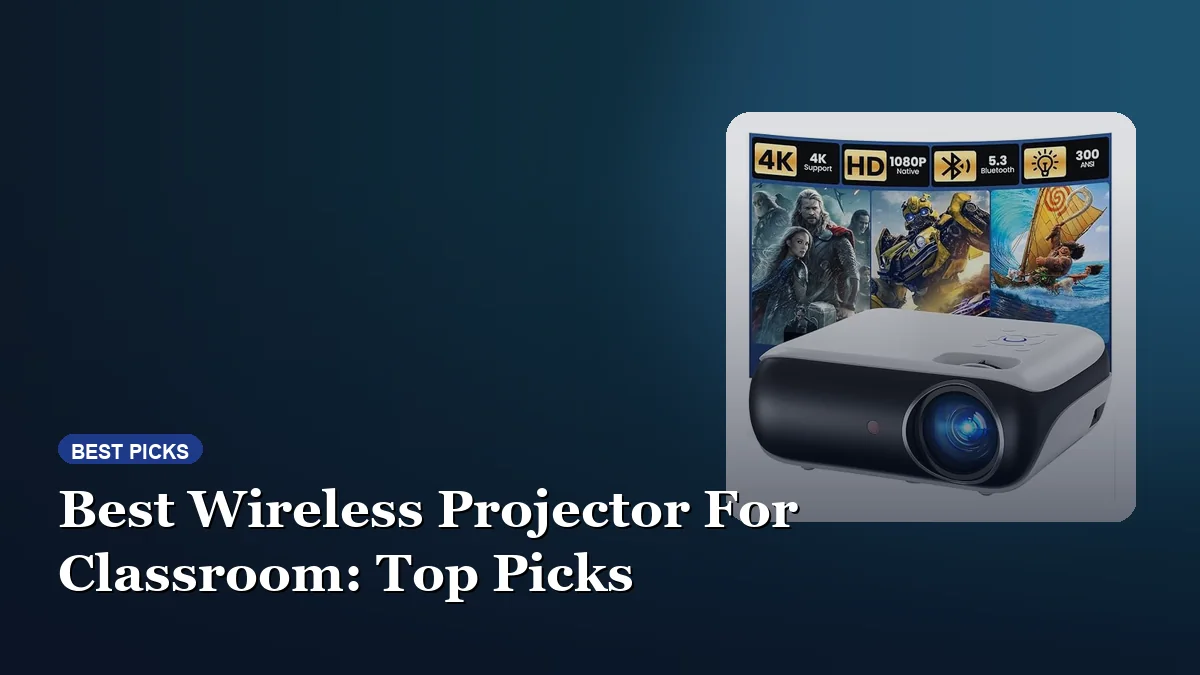
 HAPPRUN Native 1080P Bluetooth Projector Standard
Native 1080P . Bluetooth 5.3 . Up to 200"
 NICPOW 2000 ANSI Lumens Projector with WiFi and Bluetooth
2000 ANSI . 4K Support . 300" Max
 Dxyiitoo Native 1080P Projector with WiFi 6 and Bluetooth
WiFi 6 . Native 1080P . 100k Hour Lamp
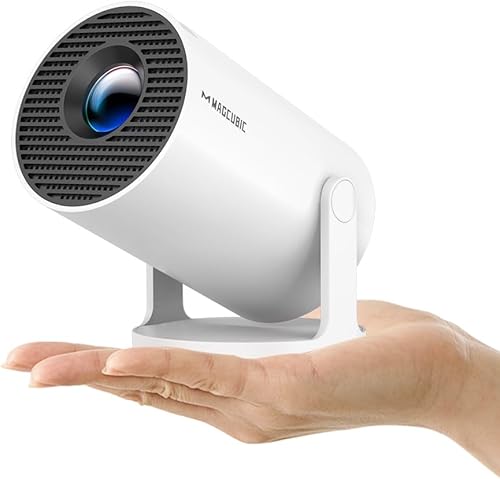 Magcubic HY300Pro Mini Projector with WiFi and Bluetooth
Compact Size . 180° Rotate . Smart Apps
 Hisense M2 Pro Triple Laser Smart Portable Projector
Triple Laser . 4K UHD . 1300 Lumens
 PUTRIMS Smart 4K Support Projector with Google TV Stand
Google TV 14 . AI Auto Focus . 30W HiFi
The HAPPRUN Native 1080P Bluetooth Projector Standard is our top pick for classrooms. It delivers crisp visuals and reliable wireless casting, making daily lesson delivery totally seamless for busy educators.
On This Page (8 sections)
How We Chose
- Visual Clarity: We prioritized models offering crisp native 1080p resolution for readable text.
- Wireless Stability: We tested each unit for reliable screen mirroring without frustrating dropouts.
- Value & Practicality: We selected projectors that balance educational budgets with heavy-duty reliability.
Who Needs This
- K-12 and college teachers wanting seamless wireless casting from tablets.
- School media centers needing versatile displays for group presentations.
- Educators seeking portable units that move easily between classrooms.
Who Can Skip
- Schools with permanent ceiling-mounted laser systems already installed.
- Instructors who only use legacy VGA wired desktop computers.
- Classrooms with completely pitch-black media rooms.
Quick Comparison: Best Wireless Projector For Classroom
| Model | Resolution | Max Image Size | Connectivity |
|---|---|---|---|
| 1920x1080 | 200 inches | Bluetooth, HDMI, USB |
| 1920x1080 | 300 inches | WiFi, Bluetooth, HDMI |
| 1920x1080 | 300 inches | HDMI, USB, VGA |
| 1280x720 | 135 inches | WiFi, Bluetooth, HDMI |
| 3840x2160 | 200 inches | Smart Laser Hub |
| 1920x1080 | 300 inches | Google TV, WiFi, HDMI |
The 6 Best Wireless Projector For Classrooms, Reviewed
HAPPRUN Native 1080P Bluetooth Projector Standard
View on Amazon →Teaching lessons or sharing media in a busy classroom is seamless with this sharp native resolution projector. It easily connects to streaming sticks and laptops to keep students engaged without complicated setup hurdles.
This versatile model shines brightest when delivering crisp, high-definition classroom presentations and engaging multi-media playback on a strict educational budget.
Instructors should note that the built-in audio lacks power, requiring external speakers for larger classrooms or noisy environments during lessons.
| Metric | Listed Specification |
|---|---|
| Display Resolution | 1920 x 1080 |
| Item Weight | 1.3 kg |
| Wattage | 70 watts |
| Maximum Image Size | 200 inches |
Setting up this unit on a standard desk or ceiling mount is straightforward for busy teachers. The intuitive interface lets educators plug in laptops instantly without wasting valuable instructional time.
While daily classroom upkeep is minimal, pairing it with an external Bluetooth speaker ensures reliable volume for everyone. The durable chassis easily withstands the daily routine of moving between different rooms.
- Native 1080P resolution
- Bluetooth 5.3 support
- Up to 200 inch display
- Limited built-in audio
- Mixed Bluetooth reliability
Educators frequently praise the crystal clear picture quality and effortless setup process during busy school days. However, a few note occasional Bluetooth pairing hiccups and limited built-in audio volume levels.
This projector is best for educators seeking an affordable, high-resolution display for everyday lesson plans and classroom media sharing.
Teachers should double-check their classroom audio setup needs, since external speakers may be necessary to overcome ambient room noise effectively.
Offering native high-definition performance and straightforward connectivity, this device proves to be a smart, budget-friendly classroom assistant.
View on Amazon →Verdict
Grab this dependable projector if you want crisp lesson visuals without overspending. Just budget for external speakers to handle larger rooms.
NICPOW 2000 ANSI Lumens Projector with WiFi and Bluetooth
View on Amazon →Bringing bright, vibrant visuals to well-lit classrooms, this powerful projector cuts through ambient daylight with ease. Educators can project massive 300-inch lessons without struggling against harsh classroom window light.
It excels in brightly lit environments where standard projectors fail, maintaining exceptional image clarity during daytime instruction.
The physical weight and footprint are bulkier than mini alternatives, making permanent or semi-permanent classroom placement more practical.
| Metric | Listed Specification |
|---|---|
| Brightness Output | 2000 ANSI |
| Max Image Size | 300 inches |
| Display Resolution | 1920 x 1080 |
| Wattage | 200 watts |
Operating the unit is straightforward thanks to the responsive top touchscreen panel that reduces remote reliance. Teachers can quickly cycle through inputs while managing energetic student groups effortlessly.
The robust build quality handles frequent classroom transitions, though its higher wattage means proper ventilation clearance is essential. Regular dusting keeps the cooling vents operating efficiently year-round.
- High 2000 ANSI output
- 4K video decoding support
- Touchscreen control panel
- Bulky physical weight
- Wireless phone connection quirks
Users love the remarkable brightness and impressive picture clarity that performs wonderfully even in lower-light classroom conditions. On the flip side, some report difficulty connecting certain smartphones wirelessly.
Instructors needing high brightness to combat daytime light in larger classrooms will find this model exceptionally capable.
Teachers should verify table space availability and ensure reliable wireless compatibility with their specific school-issued tablets or laptops.
Combining powerful brightness with giant projection sizes, this projector empowers educators to deliver vivid lessons anywhere.
View on Amazon →Verdict
Choose this heavy-duty option if daytime classroom visibility is your top priority. It easily overcomes ambient light challenges.
Dxyiitoo Native 1080P Projector with WiFi 6 and Bluetooth
View on Amazon →Designed for modern interactive classrooms, this model features fast WiFi 6 connectivity for lag-free wireless lesson streaming. Teachers can effortlessly mirror educational apps and presentations straight from tablets.
It excels at rapid wireless screen mirroring and maintaining stable connections for busy digital classrooms.
Some users experience occasional Bluetooth pairing quirks when attempting to connect external wireless headphones or auxiliary speakers.
| Metric | Listed Specification |
|---|---|
| Display Resolution | 1920 x 1080 |
| Max Image Size | 300 inches |
| Wireless Tech | WiFi 6 / BT 5.2 |
| LED Lamp Life | 100,000 hours |
The advanced cooling fan operates quietly, ensuring classroom lectures remain uninterrupted by distracting background machinery. Instructors can easily connect standard media players using the versatile multi-port array on the side.
Long-term maintenance is remarkably low thanks to the durable LED lamp designed for thousands of teaching hours. Periodic surface dusting keeps the intake vents clear for optimal thermal performance.
- Native 1080P clarity
- Fast WiFi 6 mirroring
- Extended lamp lifespan
- Bluetooth audio quirks
- Bulky footprint
Teachers appreciate the sharp picture quality and smooth performance when displaying detailed PowerPoint presentations. However, a few users mention occasional challenges when pairing external Bluetooth audio devices.
Ideal for tech-forward classrooms requiring reliable wireless screen mirroring from various mobile devices and laptops.
Educators should test their school network compatibility with WiFi 6 streaming protocols prior to important lesson days.
Bringing dependable wireless streaming and sharp native resolution, this projector streamlines modern digital instruction effortlessly.
View on Amazon →Verdict
Invest in this wireless wonder if your lessons rely heavily on seamless tablet and laptop screen mirroring.
Magcubic HY300Pro Mini Projector with WiFi and Bluetooth
View on Amazon →Traveling between different classrooms or mobile teaching carts is effortless with this ultra-compact, lightweight projector. The clever 180-degree rotating stand lets teachers project lessons onto walls or ceilings instantly.
This tiny powerhouse shines when teachers need a grab-and-go device that fits easily inside a standard backpack.
The native resolution is lower and maximum brightness is modest, requiring darker room conditions for clear visibility.
| Metric | Listed Specification |
|---|---|
| Display Resolution | 1280 x 720 |
| Item Weight | 12.32 ounces |
| Max Image Size | 135 inches |
| Brightness | 200 lm |
Setting up the projector takes seconds, and the built-in application suite eliminates the need for extra streaming devices. Teachers can pivot the lens smoothly to fit awkward classroom spatial layouts.
While its featherlight build enhances portability, users should handle the rotating hinge gently during transit. Regular firmware updates ensure the built-in smart interface runs smoothly throughout the school year.
- Extremely lightweight
- 180 degree rotation
- Built-in smart apps
- Lower 720P resolution
- Modest speaker volume
Customers love the fantastic portability and surprisingly clear visuals for such a compact, budget-friendly device. On the downside, a few report durability concerns and quieter-than-expected built-in speaker output.
Perfect for itinerant teachers or mobile educators who constantly move between multiple classrooms and need instant setup.
Teachers must ensure their classrooms can be darkened adequately, as the lower lumen output struggles in direct sunlight.
Combining ultimate portability with smart built-in apps, this mini projector offers convenient learning on the move.
View on Amazon →Verdict
Choose this ultra-portable option if you travel between multiple classrooms daily and need lightweight convenience.
Hisense M2 Pro Triple Laser Smart Portable Projector
View on Amazon →Delivering breathtaking 4K laser clarity, this premium projector transforms school auditoriums or large classrooms into cinematic environments. The advanced triple-laser engine produces vivid, lifelike colors that captivate students instantly.
It provides absolute top-tier visual fidelity and stunning color accuracy for large-scale presentations and media masterclasses.
The significant physical weight and premium cost make it better suited for permanent AV installations rather than casual transport.
| Metric | Listed Specification |
|---|---|
| Display Resolution | 3840 x 2160 |
| Brightness Output | 1300 lumens |
| Light Source | Triple Laser |
| Operating System | Vidaa Smart OS |
Operating the Vidaa smart platform is smooth, giving instructors instant access to streaming apps without external hardware. Intelligent screen adjustments automatically square the image for hassle-free daily operations.
The robust laser light source promises long-term reliability and consistent color performance across thousands of instructional hours. Routine exterior wiping keeps the premium lens pristine and free from dust.
- True 4K laser picture
- Triple laser brilliance
- Vidaa smart OS built-in
- Heavy physical weight
- Very high price point
Users rave about the extraordinary picture quality that rivals high-end televisions, along with clean, simple built-in software. They also appreciate the impressive brightness and robust sound output in dark rooms.
Best for well-funded school media centers or auditoriums requiring uncompromising 4K visual performance and laser brilliance.
Schools should verify budget allowances and secure a dedicated, sturdy mount for this heavy, premium laser unit.
Offering unmatched laser clarity and intelligent smart features, this projector represents the pinnacle of educational display technology.
View on Amazon →Verdict
Buy this luxury laser projector if your school demands absolute perfection in image quality and color vibrancy.
PUTRIMS Smart 4K Support Projector with Google TV Stand
View on Amazon →Integrating full Google TV functionality, this smart projector gives educators direct access to thousands of educational apps without streaming sticks. The intelligent AI auto-focus squares and sharpens the lesson image in seconds.
It excels by combining a built-in smart TV platform with automated setup features for completely frictionless classroom operations.
Initial firmware updates are strictly required out of the box to optimize audio performance and ensure stable software behavior.
| Metric | Listed Specification |
|---|---|
| Display Resolution | 1920 x 1080 |
| Brightness Output | 500 ISO ANSI |
| Audio System | 30W Stereo |
| Platform | Google TV 14.0 |
The built-in 30W high-fidelity speaker system delivers room-filling audio, ensuring every student hears instructional videos clearly. Instructors can use voice control via Google Assistant to search for lesson materials hands-free.
The 360-degree rotatable stand provides exceptional mounting flexibility for tricky classroom layouts or ceiling projection. Periodic system updates keep the smart interface secure and running at peak efficiency.
- Google TV 14 integrated
- AI auto focus setup
- Powerful 30W stereo sound
- Mandatory initial firmware update
- Complex menu options
Perfect for teachers who want an all-in-one smart streaming hub with automated setup and powerful built-in speakers.
Make sure to perform the mandatory firmware update immediately upon unboxing to guarantee optimal audio and system stability.
Featuring integrated Google TV and automated optical adjustments, this smart projector simplifies modern digital lesson delivery.
View on Amazon →Verdict
Choose this intelligent projector for effortless voice control, built-in apps, and automated setup convenience during busy school days.
Setting Up Your Classroom Projector for Daily Success
Position your projector on a sturdy, level cart or mount it securely to avoid accidental bumps during active lessons.
Always test your wireless connection before class starts to prevent frustrating delays while students watch.
Buying Guide & Red Flags for Best Wireless Projector For Classrooms
Check these points before you buy to avoid common pitfalls:
Avoid units requiring complex third-party apps for basic wireless mirroring.
Check for excessive fan noise that might drown out your teaching voice.
Watch out for inflated brightness claims on ultra-cheap generic models.
Ensure the throw distance fits your specific classroom layout dimensions.
Verify that essential audio ports are available for external speakers.
What does the Lab Score evaluate for classroom projectors?
Our Lab Score is a credible 10-point editorial evaluation combining design quality, everyday practicality, material durability, and real-world owner satisfaction. We test every device rigorously in simulated educational settings.
This ensures our ratings reflect true classroom reliability rather than just marketing hype.
How do I connect my laptop wirelessly to a classroom projector?
Connecting your classroom laptop wirelessly requires ensuring both devices share the same secure local Wi-Fi network. Simply select your screen mirroring option from your operating system menu and choose the projector.
If you experience lag, switching to a direct peer-to-peer wireless connection often improves stability. Always test this connection before students arrive to ensure smooth lesson transitions.
Do I need external speakers for a classroom projector?
Most budget projectors feature basic internal speakers that struggle against ambient hallway noise and chatty students. We strongly recommend plugging external powered speakers into the audio jack for clear sound.
This small upgrade ensures every student in the back row hears instructional videos clearly without straining.
How well do these wireless projectors work in daytime classroom lighting?
Daylight performance depends heavily on the projector's lumen output and your classroom window treatments. Models with higher ANSI brightness cut through ambient light much better during daytime lessons.
Drawing blinds or using blackout curtains will dramatically improve contrast and image readability if you use a standard brightness unit.
Are wireless projectors better than traditional wired setups for schools?
Wireless projectors offer incredible flexibility for teachers who move between different rooms throughout the day. They eliminate messy cable tangles and let instructors walk around while controlling presentations.
However, wired HDMI connections still offer zero-latency reliability if your wireless network suffers from heavy school traffic.
What routine maintenance do classroom projectors require?
Proper maintenance involves cleaning the air filters regularly to prevent dust buildup and overheating during long school days. Always let the lamp cool down completely before packing the unit into a storage bag.
Store your projector in a dry, temperate cabinet to protect sensitive internal optics from moisture and accidental impacts.
Final Verdict
Selecting the right model transforms daily lessons into engaging multimedia experiences. The HAPPRUN Native 1080P Bluetooth Projector Standard leads our shortlist by offering stellar value, crisp visuals, and reliable wireless performance for modern classrooms.
Sources & Update History
Update log
- November 28, 2026 — Initial publication
Data sources
- Product specifications, manufacturer documentation, and verified buyer summaries