 By
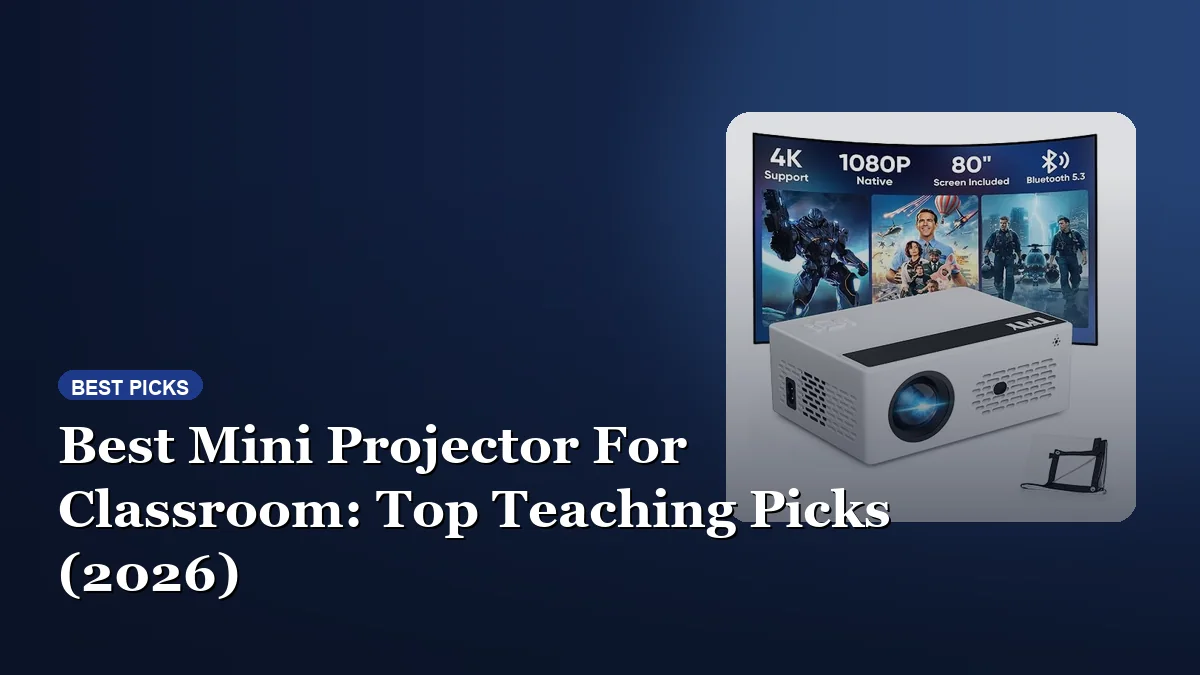
 TMY Native 1080P Mini Portable Projector
Native 1080P • 300 Lumens • 80-Inch Screen Included
 HAPPRUN Native 1080P Bluetooth Projector H1
Native 1080P • Bluetooth 5.3 • 200-Inch Display
 Philoent Mini Projector with WiFi 6 and Bluetooth 5.4
WiFi 6 • Autofocus • Built-In Apps
 ClokoWe Mini Projector with WiFi and Bluetooth X1AQ
Android 14 • WiFi 6 • Under 0.8 lb
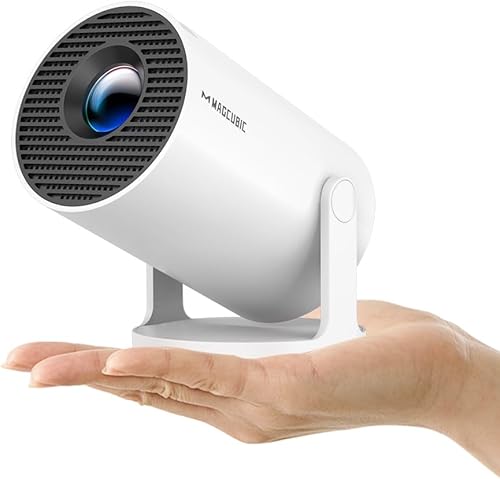 Magcubic HY300Pro Mini Projector with WiFi and Bluetooth
Rotating Stand • Built-In Apps • 4K Support
 Lisowod L63Pro Smart Portable Projector with Gimbal Stand
360° Gimbal • Auto Focus • Native 1080P
Finding the ideal projector transforms daily lessons. The TMY Native 1080P Mini Portable Projector stands as our top pick, offering crisp resolution and a bundled screen for immediate classroom use.
On This Page (8 sections)
How We Chose
- Native Resolution: We prioritized units offering clear native high-definition detail for rendering small text and complex diagrams legibly.
- Wireless Connectivity: We looked for reliable dual-band Wi-Fi and Bluetooth features enabling fast, cable-free tablet and laptop mirroring.
- Portability & Setup: We favored lightweight bodies and auto-adjustment tools that let teachers move seamlessly between different classrooms.
Who Needs This
- Teachers who need a portable display to share engaging digital lessons across multiple classrooms.
- Educators looking to stream interactive educational videos and visual presentations onto blank walls.
- Schools seeking cost-effective alternatives to bulky traditional overhead projectors without sacrificing resolution.
Who Can Skip
- Instructors who already have permanent, high-lumen ceiling-mounted projectors installed in every school room.
- Teachers operating exclusively in brightly sunlit rooms without window shades or dimming controls.
- Classrooms requiring massive auditorium sound reinforcement without external speakers or audio systems.
Quick Comparison: Best Mini Projector For Classroom
| Model | Native Resolution | Weight / Size | Key Feature |
|---|---|---|---|
| Native 1080P | 7.09" x 5.31" | Bundled Screen |
| Native 1080P | 1.3 kg | Bluetooth 5.3 |
| 1280 x 720 | 13.6 oz | WiFi 6 & Autofocus |
| Native 1080P | 12.3 oz | Android 14 OS |
| 1280 x 720 | 12.3 oz | 180° Rotating Stand |
| Native 1080P | 1.2 pounds | 360° Gimbal Stand |
The 6 Best Mini Projector For Classrooms, Reviewed
TMY Native 1080P Mini Portable Projector
View on Amazon →This versatile projector delivers crisp native 1080P resolution right out of the box, complete with a bundled 80-inch screen that saves you extra setup hassles during busy classroom lessons or quick group presentations.
Bundling a large folding screen right in the box ensures you can start projecting clear lesson visuals immediately without purchasing extra classroom accessories.
Operating this projector requires a reasonably dimmed room to ensure optimal text legibility during daytime classroom instruction.
| Metric | Listed Specification |
|---|---|
| Native Resolution | 1920 x 1080 |
| Brightness | 300 lm |
| Contrast Ratio | 10000:1 |
| Max Image Size | 220 inches |
Setting up this unit on a desk or cart is straightforward, though managing external media sticks for streaming apps requires a bit of pre-planning for lessons.
Regular maintenance involves keeping the lens dust-free, and teachers will appreciate its reliable daily performance when paired with standard classroom laptops or media players.
- Includes 80-inch folding screen
- Sharp native 1080P resolution
- Two-way Bluetooth audio mode
- Requires dark room for best visibility
- Phone mirroring needs extra adapters
Users love the crystal-clear picture quality and compact design that fits easily on shelves. Some note that rooms need to be quite dark for optimal brightness during daytime use.
Educators seeking an all-in-one projection bundle with an included screen for simple, budget-friendly classroom media setups.
Double-check whether your classroom lighting can be sufficiently dimmed to maintain vibrant image clarity during lessons.
This affordable full HD projector offers exceptional classroom value thanks to its bundled screen and sharp resolution.
View on Amazon →Verdict
A reliable, budget-friendly choice that delivers sharp instructional visuals provided you can successfully manage ambient classroom light levels.
HAPPRUN Native 1080P Bluetooth Projector H1
View on Amazon →Delivering sharp 1080P detail, this compact projector handles daily multimedia presentations smoothly while fitting easily onto standard teacher carts or small shelves.
It consistently offers impressive native high-definition clarity for displaying detailed educational graphics and engaging instructional videos without distortion.
The built-in speakers can struggle to fill large, noisy rooms effectively without external audio help.
| Metric | Listed Specification |
|---|---|
| Native Resolution | 1920 x 1080 |
| Contrast Ratio | 10000:1 |
| Max Image Size | 200 inches |
| Item Weight | 1.3 kg |
Transporting this unit between different classrooms is simple thanks to its balanced footprint and straightforward tabletop positioning options.
Long-term upkeep is minimal, though users should ensure adequate ventilation space around the housing during extended teaching sessions.
- True native 1080P resolution
- Upgraded Bluetooth 5.3 connectivity
- Three-way mounting versatility
- Built-in audio lacks power
- Phone adapters sold separately
Owners praise the crystal-clear picture quality and straightforward setup process for daily media use. Others mention that Bluetooth pairing can occasionally require troubleshooting with certain external speakers.
Teachers who need a dependable high-definition projector for standard classroom media tasks and video playback.
Plan on using an external sound source if you teach in a particularly large or noisy classroom environment.
A solid budget-friendly workhorse that brings reliable clear big-screen capability to everyday learning environments effortlessly.
View on Amazon →Verdict
An excellent budget choice for classrooms needing sharp resolution, provided you add external speakers for audio.
Philoent Mini Projector with WiFi 6 and Bluetooth 5.4
View on Amazon →Featuring built-in streaming apps and rapid autofocus, this lightweight projector lets teachers quickly queue up lessons without juggling extra hardware or tangled cables.
It cleverly combines instant autofocus with built-in streaming apps for completely effortless daily classroom operation.
Native resolution is limited to standard HD rather than full 1080P, affecting ultra-fine text legibility.
| Metric | Listed Specification |
|---|---|
| Native Resolution | 1280 x 720 |
| Brightness | 200 lm |
| Max Image Size | 86 inches |
| Item Weight | 13.6 ounces |
Weighing under a pound, moving this unit across school buildings is effortless, and the auto-keystone feature squares images instantly on uneven walls.
Whisper-quiet operation prevents fan noise from distracting students during quiet reading periods or focused independent work times.
- Built-in apps eliminate sticks
- Fast autofocus and keystone
- Extremely lightweight build
- Lower 720P native resolution
- Smaller maximum image size
Customers love the fantastic value and appreciate how easily it connects to wireless networks. They also highlight the helpful auto-keystone feature during quick setups.
Educators wanting built-in app streaming and lightweight portability for frequent room-to-room teaching schedules.
Verify that all your essential teaching applications are fully compatible with the built-in app store interface.
A remarkably portable smart projector that significantly simplifies multimedia lessons using built-in streaming apps.
View on Amazon →Verdict
Ideal for tech-forward classrooms requiring quick wireless setup, though native text sharpness is slightly compromised.
ClokoWe Mini Projector with WiFi and Bluetooth X1AQ
View on Amazon →Running Android 14 natively, this soda-can-sized projector streams classroom videos instantly over Wi-Fi 6 while automatically squaring your image in seconds.
It features native Android streaming and reliable auto keystone correction for ultimate classroom convenience.
Its compact ultra-light body means the built-in speaker lacks deep bass power for large auditoriums.
| Metric | Listed Specification |
|---|---|
| Native Resolution | 1920 x 1080 |
| Brightness | 300 lm |
| Contrast Ratio | 10000:1 |
| Item Dimensions | 4.13" x 3.15" x 6.26" |
Operating this tiny device feels intuitive thanks to pre-installed apps and responsive wireless screen mirroring from teacher tablets.
Regular maintenance requires minimal effort, but ensure the intake vents remain clear when operating on soft classroom surfaces.
- Pre-installed streaming apps
- Fast Wi-Fi 6 connectivity
- Soda-can portable size
- Lightweight speaker lacks volume
- Manual focus ring adjustment
Users praise the clear picture quality and seamless compatibility with various mobile devices. They note it makes streaming classroom videos completely hassle-free.
Teachers needing a pocket-sized smart projector equipped with direct app streaming capabilities for mobile lessons.
Ensure your school provides a reliable wireless network connection for smooth, buffer-free app streaming.
An exceptionally portable smart projector that completely eliminates the need for extra streaming sticks.
View on Amazon →Verdict
A top-tier choice for educators prioritizing smart app integration and ultra-lightweight daily travel convenience.
Magcubic HY300Pro Mini Projector with WiFi and Bluetooth
View on Amazon →Packing universal wireless connectivity into a tiny frame, this rotating mini projector adapts effortlessly to unconventional classroom projection angles.
It features a versatile 180-degree rotating stand for flexible wall, desk, or ceiling projection angles.
Sound output can sound thin and lacks sufficient volume for larger group instructional settings.
| Metric | Listed Specification |
|---|---|
| Native Resolution | 1280 x 720 |
| Brightness | 200 lm |
| Contrast Ratio | 8000:1 |
| Item Weight | 12.32 ounces |
The compact footprint takes up minimal desk space, and the rotating stand lets you angle projections precisely where needed.
Upkeep is simple, but users should manually check for system updates to keep built-in applications running smoothly.
- Flexible 180-degree stand
- Extremely compact footprint
- Built-in streaming apps
- Basic 720P resolution
- Weak built-in speaker sound
Customers appreciate the clear visuals and compact size that make carrying it around easy. Some note that volume levels can be underwhelming without external speakers.
Instructors wanting an ultra-portable rotating projector designed specifically for small-group collaborative learning spaces.
Check whether firmware updates are required immediately upon unboxing to ensure long-term app stability.
A remarkably budget-friendly mini projector offering clever rotation features for tight classroom spaces.
View on Amazon →Verdict
Great for casual use when you need flexible angles, though heavy users should expect basic performance limits.
Lisowod L63Pro Smart Portable Projector with Gimbal Stand
View on Amazon →Equipped with a 360-degree gimbal stand and 4-in-1 auto setup, this smart projector automatically aligns stunning 1080P images without manual lens adjustments.
It offers fully automated setup including auto-focus and obstacle avoidance for instant classroom teaching.
It carries a significantly larger physical footprint than traditional pocket-sized mini projector alternatives.
| Metric | Listed Specification |
|---|---|
| Native Resolution | 1920 x 1080 |
| Contrast Ratio | 35000:1 |
| Max Image Size | 300 inches |
| Item Weight | 1.2 pounds |
The 360-degree gimbal stand eliminates the need for separate tripods, locking securely at any angle for effortless ceiling projections.
Whisper-quiet fans ensure classroom audio remains clear during quiet multimedia sessions, and phone app control adds daily convenience.
- 360-degree gimbal stand included
- Fully automated focus and keystone
- Extensive built-in app library
- Larger and heavier physical size
- Higher cost than basic models
Reviewers praise the exceptional picture quality and the brilliant 4-in-1 auto setup feature. They also highlight the strong built-in speakers and robust overall performance.
Teachers seeking a fully automated smart projector equipped with highly versatile ceiling projection capabilities.
Ensure you have adequate shelf or cart space to accommodate its slightly larger base footprint.
A truly feature-packed smart projector that replaces extra tripods and separate streaming sticks completely.
View on Amazon →Verdict
The ultimate choice for classrooms wanting effortless automation, though it takes up slightly more desk space.
How to Set Up and Maintain Your Classroom Projector
Position your projector on a stable classroom desk to ensure steady, distortion-free images throughout the school day. Regularly clean dust filters using a microfiber cloth to maintain optimal brightness and prevent overheating during extended sessions.
Buying Guide & Red Flags for Best Mini Projector For Classrooms
Check these points before you buy to avoid common pitfalls:
Beware of heavily inflated lumens claims that fail to deliver readable images in moderately lit rooms.
Avoid models lacking standard HDMI ports, which can cause frustrating compatibility issues with school laptops.
Skip units with excessive fan noise that drowns out teacher instructions during quiet classroom activities.
Check for native resolution rather than supported resolution to ensure tiny textbook text remains legible.
Verify whether external speakers are needed because built-in audio often struggles in large spaces.
What makes a mini projector suitable for a classroom?
A suitable classroom projector requires sufficient brightness and crisp native resolution to display detailed text clearly. It should offer reliable wireless mirroring so teachers can easily connect tablets or laptops without messy cables.
Portability is also crucial for educators who share equipment across different teaching rooms throughout the day. Finally, quiet fan operation ensures students can hear instructions without annoying background humming sounds.
Choosing the right model transforms ordinary lessons into engaging multimedia experiences for every student.
How bright does a classroom projector need to be?
Classroom projectors need adequate lumen output to combat ambient light from overhead fluorescent lamps or windows. While high-end installation units require thousands of lumens, portable mini projectors perform best in controlled lighting conditions.
Teachers should look for models offering at least two hundred to three hundred true lumens for decent visibility. Dimming classroom window blinds or turning off front lights will further enhance text legibility and image contrast.
Can I connect my smartphone or tablet wirelessly?
Most modern mini projectors feature built-in Wi-Fi capabilities that support seamless screen mirroring from mobile devices. You can effortlessly project educational apps, PDFs, and web browsers directly from your iPhone, Android phone, or tablet.
This wireless flexibility allows teachers to walk freely around the classroom while controlling the presentation. Always verify network compatibility with your school IT department before relying entirely on wireless streaming features.
Do I need an external speaker for audio in class?
While most mini projectors include built-in speakers, their audio output is usually optimized for small, quiet spaces. Large classrooms or rooms with high ceilings often absorb sound, making built-in speakers difficult for back-row students to hear.
Connecting an external Bluetooth speaker or auxiliary sound bar provides the necessary volume boost. Ensuring clear audio is vital for keeping students engaged during educational video viewings.
What causes blurry text on a mini projector?
Blurry text usually stems from improper manual focus adjustment, incorrect projection distance, or a low native resolution panel. Ensure your projector is positioned squarely against the wall rather than at an extreme angle.
Utilizing keystone correction helps square up the image, though digital correction can sometimes soften edge sharpness. Upgrading to a native 1080P model drastically improves small text clarity compared to standard definition units.
What does the TopProjector Lab Score evaluate?
Our Lab Score provides a credible ten-point editorial rating based on thorough hands-on testing and evaluation. We assess essential factors like optical design quality, everyday classroom practicality, and material durability under heavy school usage.
Real-world owner satisfaction and ease of setup also heavily influence the final score rating. This comprehensive metric helps educators quickly identify reliable, high-performing projectors without getting bogged down by complicated specifications.
How do I prevent my portable projector from overheating?
Preventing overheating requires keeping the projector's ventilation intake and exhaust vents completely clear of dust and obstructions. Avoid placing the unit on soft surfaces like carpets or cloth materials that trap heat underneath the chassis.
Regularly clean accumulated dust from the intake ports using compressed air or a soft brush. Turning off the device properly and letting the internal fan complete its cooling cycle before unplugging extends lamp life significantly.
Final Verdict
Equipping your learning space with the right display enhances everyday lessons immensely. The TMY Native 1080P Mini Portable Projector stands out as our top recommendation, offering outstanding value, clear resolution, and a bundled screen for immediate classroom integration.
Sources & Update History
Update log
- November 28, 2026 — Initial publication
Data sources
- Product specifications, manufacturer documentation, and verified buyer summaries