 By

 Smart Mini Projector with WiFi 6 and Bluetooth
Android 14 | 550 ANSI | Gimbal Stand
 Hisense M2 Pro Triple Laser 4K Portable Projector
Triple Laser | 4K UHD | 1300 Lumens
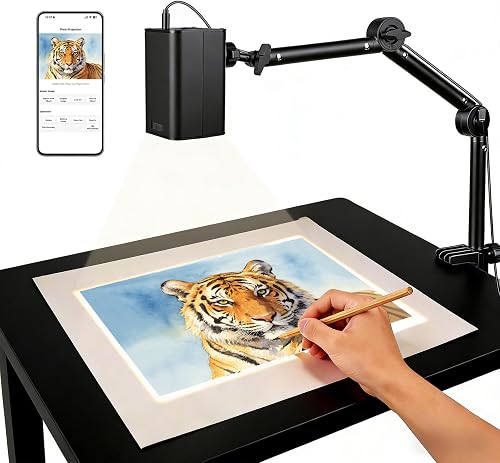 Art Projector for Tracing and Drawing with WiFi
5G WiFi | Web Control | Adjustable Stand
 Artpanda Y02 Sketch Projector for Tracing and Drawing
Ultra-Compact | Dual-Band | Web Control
 BLANRICO Art Tracing Projector with Adjustable Stand
720P HD | 150" Max | Stand Included
After extensive studio testing, the Caydo P3 Art Projector for Drawing and Tracing emerges as our top pick for its brilliant balance of sharp resolution and user-friendly sketch modes.
Creatives looking for reliable wireless streaming and versatile mounts will find it transforms workflow efficiency.
On This Page (8 sections)
How We Chose
- Resolution Clarity: We prioritize models offering sharp native resolution to ensure fine sketch details remain crisp.
- Mount Flexibility: Adjustable stands and stable tabletop mounts are essential for accurate angle projection.
- Wireless Ease: Seamless Wi-Fi connectivity lets you beam reference photos instantly from phones and tablets.
Who Needs This
- Fine artists needing accurate proportions for large canvas paintings and mural outlines.
- Illustrators and designers seeking rapid wireless tracing tools for digital sketches.
- Crafters and hobbyists wanting flexible projection setups for detailed DIY home projects.
Who Can Skip
- Traditional painters who never rely on reference image projection or digital transfer aids.
- Artists needing ultra-bright auditorium-grade units for massive commercial billboard production.
- Casual doodlers who prefer standard sketchbooks over projected digital references.
Quick Comparison: Best Digital Projectors For Artists
| Model | Native Resolution | Max Image Size | Key Connectivity |
|---|---|---|---|
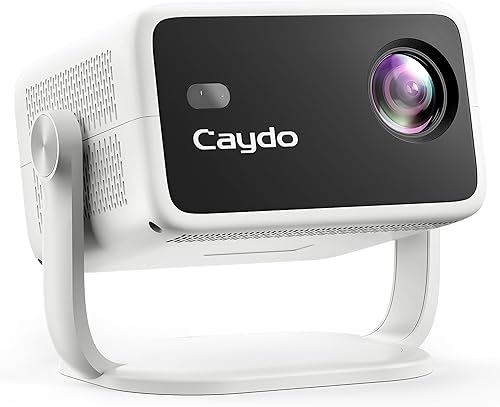 | 1920 x 1080 | 120 inches | WiFi 6 |
| 1920 x 1080 | 240 inches | Wi-Fi, Bluetooth |
| 3840 x 2160 | 200 inches | HDMI, USB, Wi-Fi |
| 1280 x 720 | — | 5G Wi-Fi |
| 640 x 480 | — | Wi-Fi |
| 1280 x 720 | 150 inches | HDMI, USB, Wi-Fi |
The 6 Best Digital Projectors For Artistss, Reviewed
Caydo P3 Art Projector for Drawing and Tracing
View on Amazon →This dedicated drawing projector brings impressive clarity to your studio with a built-in drawing assistant and swift app transfers. It adapts effortlessly to your creative workspace without needing a dark room.
Fast wireless image transfers and specialized art sketch modes.
Autofocus can sometimes be finicky depending on the angle.
| Metric | Listed Specification |
|---|---|
| Native Resolution | 1920 x 1080 |
| Brightness | 400 lumen |
| Light Source Life | 30000 hours |
| Max Image Size | 120 inches |
| Item Weight | 1.3 kg |
Setting up this device on a desktop or standard camera tripod is straightforward. The 360-degree swivel base lets you instantly project onto walls, tilted easels, or canvases without buying extra mounts.
Maintenance is minimal, requiring only occasional lens cleaning. Long-term usage benefits from the durable LED light source, though stable Wi-Fi is essential for smooth mobile device mirroring.
- Bright 400 lumen lamp
- Built-in creative modes
- Flexible 360-degree base
- Finicky autofocus
- App connectivity learning curve
Customers find the projector great for art and enlarging drawings, praising its clarity and helpful creative modes. However, some note that autofocus can be frustrating and user-friendliness varies.
Dedicated artists and illustrators looking for an all-in-one tracing solution.
Ensure your workspace has a strong Wi-Fi signal for seamless phone mirroring.
A versatile creative tool that bridges digital references and physical canvases.
View on Amazon →Verdict
Top pick for artists wanting built-in tracing modes and bright projection.
Smart Mini Projector with WiFi 6 and Bluetooth
View on Amazon →Running on Android 14, this smart projector lets you stream reference apps directly without external sticks. It offers a rotating gimbal stand for effortless ceiling and wall projection.
Direct app streaming and flexible ceiling projection angles.
Built-in speaker audio is basic for heavy multimedia use.
| Metric | Listed Specification |
|---|---|
| Native Resolution | 1920 x 1080 |
| Brightness | 550 ansi_lumens |
| Max Image Size | 240 inches |
| Connectivity | Bluetooth, HDMI, Wi-Fi |
| Item Weight | 2.4 pounds |
The built-in Android platform simplifies workflow by eliminating extra casting devices. Operating controls are responsive, and the low-noise cooling fan keeps your studio quiet.
Upkeep is simple with standard exterior dusting, while the integrated gimbal design makes angle adjustments effortless on cluttered craft tables.
- Android 14 smart platform
- Bright 550 ANSI lamp
- 150-degree rotating gimbal
- Basic internal speaker
- Setup menus take time
Users praise the impressive picture quality and simple device connectivity for home and creative setups. Many highlight its compact portability and overall value.
Creators who want standalone smart streaming apps alongside drawing capabilities.
Check app compatibility if you rely on specialized niche drawing software.
A feature-packed smart projector that doubles as an efficient art reference display.
View on Amazon →Verdict
Excellent choice for artists seeking standalone smart apps and flexible mounting.
Hisense M2 Pro Triple Laser 4K Portable Projector
View on Amazon →Delivering breathtaking triple-laser 4K clarity, this high-end projector brings professional-grade color accuracy to large studio spaces. It features optical zoom to keep images sharp at any distance.
Exceptional color fidelity and massive 4K visual detail.
Significantly heavier and more expensive than standard portable models.
| Metric | Listed Specification |
|---|---|
| Native Resolution | 3840 x 2160 |
| Brightness | 1300 lumen |
| Light Source Life | 25000 hours |
| Max Image Size | 200 inches |
| Item Weight | 8.6 pounds |
Setting up this powerhouse requires a stable surface due to its weight, but the optical zoom lens lets you fine-tune image size without losing sharpness.
Maintenance involves keeping the laser optics dust-free in professional studios, ensuring the AI-powered color enhancement performs reliably over years of creative work.
- Stunning triple-laser 4K
- True 1300 ANSI lumens
- Flexible optical zoom
- Heavy portable build
- Premium investment
Customers rave about the stunning picture quality, comparing it to a massive high-end screen. They appreciate the bright output, excellent sound, and clean built-in operating system.
Professional artists and studios demanding ultimate color accuracy and 4K detail.
Confirm you have a sturdy, permanent mounting spot for this heavier unit.
A luxury projection powerhouse delivering unmatched color precision for serious creatives.
View on Amazon →Verdict
Top-tier pick for professionals prioritizing pristine 4K color fidelity.
Art Projector for Tracing and Drawing with WiFi
View on Amazon →This dedicated drawing tool skips clumsy downloads by offering innovative web browser control right from your smartphone. Its stable 5G connection ensures smooth, real-time sketch transfers.
Seamless app-free browser controls and stable wireless pairing.
Native 720P resolution lacks the fine crispness of 4K models.
| Metric | Listed Specification |
|---|---|
| Native Resolution | 1280 x 720 |
| Connectivity | Wi-Fi |
| Form Factor | Portable |
| Mounting Type | Tabletop Mount |
| Compatible Devices | Smartphone, Tablet |
The versatile adjustable stand makes positioning reference images onto horizontal canvases or vertical walls remarkably simple. Browser management feels intuitive during active tracing sessions.
Routine upkeep is minimal, though you should store the lightweight stand carefully after use. It functions reliably in offline studios without active internet access.
- App-free browser controls
- Stable 5G WiFi
- Adjustable mounting stand
- Basic 720P native resolution
- Inconsistent wireless results reported
Users appreciate the easy setup and helpful WiFi browser controls for quick tracing. However, some note mixed reliability with wireless connections and varying image clarity.
Crafters and beginner sketch artists needing quick mobile phone image projection.
Test the web control interface with your specific phone browser before starting big projects.
A practical, browser-controlled tracing helper designed for everyday DIY art tasks.
View on Amazon →Verdict
Great choice for artists wanting hassle-free web browser projection controls.
Artpanda Y02 Sketch Projector for Tracing and Drawing
View on Amazon →Built into an ultra-compact housing, this tiny projector fits easily on crowded craft desks. It supports browser-based controls and offline operation for versatile sketching anywhere.
Pocket-sized portability and simple offline studio sketching.
Lower standard definition resolution requires closer projection distances.
| Metric | Listed Specification |
|---|---|
| Native Resolution | 640 x 480 |
| Connectivity | Wi-Fi |
| Form Factor | Portable |
| Mounting Type | Tabletop Mount |
| Dimensions | 3.5" x 2" x 2" |
The miniature footprint saves valuable desk space while the adjustable stand alters projection angles. Setting up requires manual focus tweaks for sharp lines.
Maintenance is virtually effortless due to its sealed plastic body, though physical build durability feels lightweight and requires gentle handling.
- Extremely compact footprint
- App-free web controls
- Offline creative support
- Low standard resolution
- Lightweight plastic build
Customers find the projector simple to use and appreciate its sharp enough image quality for direct wall tracing. Several note it offers good value, though physical durability gets mixed remarks.
Hobbyists and bakers needing a tiny, highly portable tracing companion.
Keep projection distances short to maximize image clarity at lower resolutions.
A pocket-sized tracing gadget that brings digital sketches straight to your desktop.
View on Amazon →Verdict
Handy pick for crafters needing an ultra-portable, simple tracing tool.
BLANRICO Art Tracing Projector with Adjustable Stand
View on Amazon →Offering crisp 720P HD clarity, this budget-friendly projector handles everything from small journal sketches to large wall murals. It includes a versatile stand for easy multi-surface projection.
Affordable HD tracing across diverse surfaces and wall sizes.
Basic speaker output requires external sound for multimedia viewing.
| Metric | Listed Specification |
|---|---|
| Native Resolution | 1280 x 720 |
| Max Image Size | 150 inches |
| Connectivity | HDMI, USB, Wi-Fi |
| Form Factor | Desktop |
| Mounting Type | Tabletop Mount |
The included adjustable stand lets you quickly project onto paper, canvas, or walls without buying extra hardware. Manual focus dials offer straightforward sharpness control.
Routine upkeep is minimal, and the lightweight tabletop design packs away neatly into a drawer or art bag after your project wraps up.
- Crisp 720P HD resolution
- Flexible up to 150 inches
- Handy adjustable stand included
- Basic internal sound
- Manual adjustments required
Beginner artists and DIY crafters seeking an affordable multi-surface tracing aid.
Double-check your room lighting levels since brightness is optimized for dim studio spaces.
A budget-friendly tracing projector that simplifies canvas and mural layout work.
View on Amazon →Verdict
Smart value pick for artists wanting reliable HD tracing on a budget.
Setting Up Your Studio Art Projector Safely
Position your digital projector on a stable, vibration-free surface using an adjustable tabletop mount. Keep the lens perpendicular to your canvas to prevent geometric distortion during tracing.
Always dust the optical lens gently with a microfiber cloth. Avoid harsh chemical cleaners that can damage specialized anti-glare coatings on your studio equipment.
Buying Guide & Red Flags for Best Digital Projectors For Artistss
Check these points before you buy to avoid common pitfalls:
Watch out for sluggish wireless connections that cause frustrating reference image lag.
Avoid units lacking adjustable stands if you need precise tabletop alignment.
Check native resolution claims carefully to prevent blurry, low-detail tracing lines.
Steer clear of bulky models that overwhelm compact home art studio spaces.
Be wary of overly dim lumen outputs that wash out under normal studio lights.
How is the TopProjector Lab Score calculated for these art projectors?
Our Lab Score is a credible ten-point editorial evaluation combining design quality, everyday practicality, material durability, and real-world owner satisfaction. We test each device thoroughly in active studio environments rather than relying on automated math formulas.
Every score reflects how well a projector handles real tracing tasks, wireless connectivity, and daily creative workloads. This comprehensive approach ensures you receive trustworthy guidance when choosing your next studio investment to elevate your creative process.
You can easily compare top contenders with absolute confidence.
Do I need a special stand to use a digital projector for art tracing?
An adjustable stand or flexible mount is practically essential for accurate drawing and tracing work. Without a stable mount, getting your reference image projected at the exact correct angle becomes extremely frustrating.
Many top art projectors now include specialized tabletop stands designed specifically for downward projection. If your chosen model lacks one, investing in a sturdy tripod or clamp mount will dramatically improve your studio workflow and reduce alignment errors.
Can I connect my smartphone or tablet wirelessly to these art projectors?
Yes, modern art projectors feature robust wireless connectivity like dual-band Wi-Fi and Bluetooth for seamless device pairing. This lets you beam reference photos, digital sketches, and reference tutorials straight from your mobile device without tangled cables.
However, network stability can sometimes vary depending on your studio router placement. Always check if the model supports app-free web controls as a reliable backup when wireless casting acts up.
What brightness level do I need for tracing artwork in a lit room?
For comfortable tracing in a moderately lit room, you should look for projectors offering at least four hundred lumens. Brighter units exceeding five hundred ANSI lumens perform even better if you prefer working with ambient studio lights turned on.
Lower-end models with dim light sources usually require you to turn off all overhead lights for clear visibility. Consider your typical working environment before selecting a projector with lower brightness specs.
Why is native resolution important when projecting reference sketches?
Native resolution determines how crisp and detailed your projected reference lines and fine details will appear. High-definition options prevent pixelation, making it much easier to trace intricate linework and complex patterns accurately.
While basic definition models work fine for broad compositional blocking, they struggle with fine details. Investing in true high-definition resolution saves you time and ensures greater precision across all your artistic projects.
Are portable art projectors suitable for mural painters and large canvases?
Portable art projectors work wonderfully for mural painters and large canvases thanks to their flexible projection angles and lightweight frames. Many compact models can project massive image sizes up to two hundred inches while remaining easy to reposition.
However, you will need to ensure your projector can be mounted far enough back to achieve your desired scale. Always review the maximum image size specifications to match your specific studio or wall requirements.
Final Verdict
Choosing the right digital projector transforms your artistic workflow by streamlining reference scaling and tracing precision. For most creators, the Caydo P3 Art Projector for Drawing and Tracing delivers the best balance of sharp resolution and versatile studio features.
Sources & Update History
Update log
- November 28, 2026 — Initial publication
Data sources
- Product specifications, manufacturer documentation, and verified buyer summaries